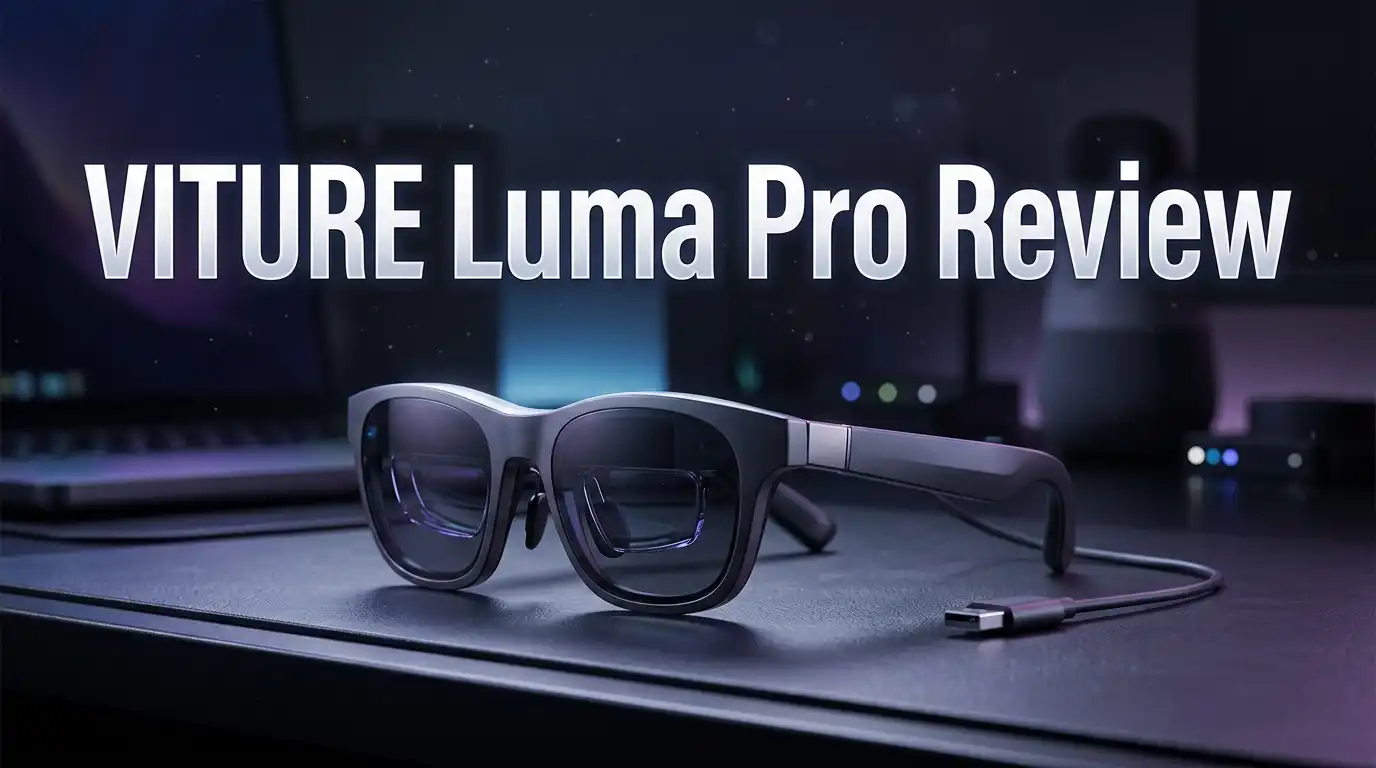
VITURE Luma Pro Review 2026: Still Worth It?
Smart glasses promised us floating screens for years. Most of them delivered blurry text and sore noses. The VITURE Luma Pro arrived with a bolder claim: a private 152 inch screen that sits on your face and weighs less than a sandwich.
I strapped these on for weeks of flights, treadmill walks, Steam Deck sessions and late night Netflix binges. Some of it blew me away. Some of it genuinely annoyed me.
This review covers both sides honestly, including the quirks that marketing pages skip. If you are deciding between the Luma Pro, the Luma Ultra or an XREAL pair, keep reading. By the end you will know exactly whether these belong on your face or on someone else’s.
In a Nutshell:
- The display is the main reason to buy. You get two micro OLED panels at 1920 x 1200 per eye, 120Hz refresh and 1000 nits of brightness. Text stays readable, blacks look deep and colours pop in a way phone screens cannot match.
- Built in myopia dials save you money. The Luma Pro corrects up to minus 4.0D with independent dials for each eye. No prescription inserts, no contacts, no extra 50 dollar purchase. Anyone past minus 4.0D needs the Luma Ultra instead, which reaches minus 6.0D.
- Comfort beats raw specs here. At roughly 80 grams with magnetic nose pads and freely moving hinges, these stay put during a jog on a treadmill. The magnetic breakaway cable also protects the frame from snag damage.
- Software is the weak link. SpaceWalker feels unfinished on Android, 6DoF tracking stutters, and head locked mode shows blur during quick movement. Samsung DeX or a plain USB C laptop connection works far better.
- Price sits around 499 dollars for the glasses alone, with frequent sales near 399. Dock and neckband accessories add more.
- Desktop PC owners should check ports first. Most gaming GPUs have no USB C DisplayPort output, so you may need adapters.
VITURE Luma Pro XR Glasses

- 【A 1200P ULTRA SHARP DISPLAY YOU’LL NEVER FORGET — EVEN SHARPER THAN VITURE PRO】Step into a jaw-dropping 152” virtual screen with revolutionary 1200P resolution that feels like 4K — powered by VITURE’s proprietary optical “secret sauce.” Text is razor-sharp, delivering a clarity that’s even sharper than the award-winning VITURE Pro, making this the sharpest XR display ever created. * Important * Please remove the protective film from the front camera (located in the center of the frame) before use. ***VITURE XR Glass is compatible with virtually any USB-C device capable of video and power output.
- 【THE BEST JUST GOT BETTER — IMMERSIVE 52° FOV & CINEMA-QUALITY COLORS】Enjoy a wider, more natural 52° field of view that completely immerses you. With industry-leading 1000 nits brightness, a silky-smooth 120Hz refresh rate, and Hollywood-grade color accuracy (DeltaE < 2), everything looks stunning — whether you’re gaming outdoors or working under bright lights.
Some of the links on this website are affiliate links, which means that at no additional cost to you, I earn a commission if you click through and make a purchase. I only recommend products and services that I believe will add value to my readers. Thank you for your support!
The Luma Pro sits in the middle of the VITURE Luma family. It launched in August 2025 and replaced the older VITURE Pro. The headline figure is a virtual 152 inch screen at 52 degrees of field of view.
That number matters more than it sounds. Wider field of view means the picture fills your vision instead of floating like a distant tablet. The panels run at 1200p per eye, which VITURE markets as 4K like clarity across both eyes combined.
Birdbath optics do the heavy lifting, bouncing light from tiny micro OLED displays into your pupils. The glasses draw power and video from one USB C cable. No battery sits inside the frame, so weight stays low and heat stays manageable.
Unboxing the Luma Pro
The box feels premium without going overboard. Lift the lid and a chunky hard shell case greets you first. That case feels tough enough to survive a backpack crush, which matters because birdbath lenses scratch easily.
Inside the top compartment you find the thick braided display cable with its magnetic pogo pin end. Below that sit three sizes of magnetic nose pads, a cleaning cloth and a thick stack of folded paper manuals in several languages.
The magnetic nose pads are a small touch that makes a big difference, since the default pair rarely suits every face. The glasses themselves feel lighter than expected the moment you lift them out. First impression: this looks like a finished consumer product, not a crowdfunded prototype.
Design and Build Quality
VITURE used high grade polycarbonate for the frame with a faint pattern running along the arms. It looks like chunky sunglasses rather than a headset, though nobody will mistake them for normal eyewear. The hinges deserve praise.
They move freely and feel reinforced, which addresses the classic failure point on older XREAL Airs. The magnetic connector on the right arm is the smartest design choice here. Yank the cable and it pops off instead of ripping the frame apart.
The trade off is a slightly bulky lump near your ear, and exposed metal pins that collect pocket lint. Ventilation improved too, so the left temple no longer cooks your skin during long sessions. Build quality feels built for daily use, not occasional novelty use.
Top 3 Alternatives for VITURE Luma Pro

- 【A 1200P ULTRA SHARP DISPLAY YOU'LL NEVER FORGET — EVEN SHARPER THAN BEFORE】Step into a jaw-dropping 152" virtual screen with revolutionary 1200p resolution that feels like 4K. Text is razor-sharp with zero blurry edges, making this the sharpest XR display for reading, working, and gaming — powered by VITURE's proprietary optical "secret sauce" and the latest Sony Micro-OLED panels with 35% lower power consumption, further reducing heat while delivering extended battery life for longer sessions.
- 【Full 6DoF Support | Hand Gesture Control via Pro Neckband】 Luma Ultra features a front RGB camera and dual depth cameras for spatial awareness, enabling more advanced XR interaction than standard display glasses. When paired with VITURE Pro Neckband, it supports full 6DoF tracking and hand gesture control, allowing you to interact with spatial interfaces in a more natural way. It is ideal for users who want to go beyond watching video and explore a more interactive XR experience. Feature availability depends on device, app, and connection method.
Some of the links on this website are affiliate links, which means that at no additional cost to you, I earn a commission if you click through and make a purchase. I only recommend products and services that I believe will add value to my readers. Thank you for your support!
VITURE Luma Ultra XR Glasses

- With a best-in-class 57° FOV, Optic Engine 4.0 recreates the feeling of watching a massive 171-inch screen from four meters away—all in lightweight, compact design.
- REAL 3D Now Available on All One Series Glasses, instantly transforming all your content—from games and movies to apps and photos—into true 3D with a single switch.
Some of the links on this website are affiliate links, which means that at no additional cost to you, I earn a commission if you click through and make a purchase. I only recommend products and services that I believe will add value to my readers. Thank you for your support!
XREAL One Pro AR Glasses

- [World’s Brightest AR Glasses – 1,200 Nits] RayNeo Air 3s Pro smart AR glasses — now with an upgraded 1,200 nits to-eye brightness, the highest in any AR glasses today. Even the faintest stars in the movie are visible instead of pure black, while others can't.
- [HueView 2.0 - Leads Even Father in Micro-OLED Display] Combined with HueView 2.0 — the 5.5th-gen tandem Micro-OLED display, you’ll experience how 200,000:1 and 98% DCI-P3 shape you the most pure and lifelike visuals ever in wearable display glasses.
Some of the links on this website are affiliate links, which means that at no additional cost to you, I earn a commission if you click through and make a purchase. I only recommend products and services that I believe will add value to my readers. Thank you for your support!
RayNeo Air 3s Pro AR Glasses
Display Quality and Image Sharpness
This is where the Luma Pro earns its money. Micro OLED panels produce true blacks, so dark movie scenes look rich instead of grey. Small text in a document stays legible, which older 1080p glasses struggled with.
The 120Hz refresh rate keeps motion smooth during fast games. Brightness peaks around 1000 nits, enough for a lit living room though not enough for direct sunlight. The centre of the image looks razor sharp while the outer edges soften slightly, a known limit of birdbath optics.
Some users also notice faint glare along the bottom of the screen in a pitch black room. Colour accuracy impressed me more than expected. Films look cinematic rather than oversaturated, and HDR content gains real punch.
Myopia Adjustment and Eye Comfort
Anyone who wears glasses knows the pain of prescription inserts. The Luma Pro removes that cost entirely. Two small dials on the underside move the display modules up and down, correcting vision from 0.00D to minus 4.0D independently for each eye.
There is also an axis adjustment to fine tune focus. This single feature saves roughly 50 dollars and a two week wait. The panels carry SGS A plus certification for eye comfort, and I noticed less eye strain than with older birdbath glasses.
The limits matter though. Astigmatism is not corrected, and heavier prescriptions past minus 4.0D need the Luma Ultra. People with strong astigmatism should still plan on contacts or custom inserts.
Harman Audio Performance
VITURE tuned the speakers with Harman AudioEFX, and the result surprised me. Open ear drivers sit near each temple and fire sound toward your ears. Bass response is fuller than the older VITURE Pro, dialogue stays clear, and volume climbs higher than most rivals.
Watching an action film without headphones feels genuinely acceptable, which is rare in this category. Leakage remains the honest downside. At high volume someone sitting beside you in a quiet room hears muffled audio.
On a plane or train that means neighbours may notice. Bluetooth pairing is not built into the glasses themselves, so private listening means plugging earbuds into your source device. For solo use at home the built in speakers handle everything well.
Gaming on the Luma Pro
Gaming is the strongest everyday use case. Plug a Steam Deck, ROG Ally, Switch dock or PS5 into the cable and you get a huge screen with no setup. The 120Hz panel keeps fast shooters fluid, and input lag feels nonexistent in head locked mode.
Playing Elden Ring on a 152 inch floating screen in bed is a genuinely great experience. The Steam Deck works best because it outputs DisplayPort over USB C directly. Nintendo Switch needs a compatible adapter or the VITURE dock.
Battery drain on handhelds increases noticeably, usually cutting play time by a fifth. 3DoF mode, where the screen stays anchored in space, adds immersion but introduces visible blur during quick head turns.
Productivity and the SpaceWalker App
SpaceWalker is VITURE’s companion software, and your experience depends entirely on your platform. On Windows and Mac it works well. You can spread three virtual monitors across your field of view, pin a document on one and notes on another, then zoom with shortcuts.
For travel work that beats squinting at a laptop panel. On iPhone it unlocks a windowed desktop and 2D to 3D conversion, which iOS otherwise lacks.
On Android it frustrates. App sandboxing blocks native YouTube and Netflix, forcing you into VITURE’s own browser where logins often fail. Samsung owners should skip it and use DeX instead, which runs every installed app natively and stays stable across long sessions.
Compatibility and Setup
Setup is refreshingly simple on the right device. Any phone, tablet or laptop with USB C DisplayPort Alt Mode works instantly. Plug in, the screen appears, done. iPhone 15 and newer support it directly. Most modern MacBooks, Dell laptops and Chromebooks do too.
Desktop PCs are the problem. Most gaming GPUs including the RTX 3080 ship with no USB C output, and many motherboards lack DisplayPort Alt Mode on their ports. That turns a plug and play product into an adapter hunt.
Check your ports before you order. Older iPhones, PS5 and Xbox need the VITURE Mobile Dock or Neckband, which add cost. Streaming apps with strict DRM occasionally refuse to play, another irritation worth knowing.
Battery Drain and Heat
The glasses carry no internal battery, so your phone or handheld feeds them. Efficiency improved over earlier generations. In my testing a Samsung Galaxy phone lost roughly 8 percent of battery during 20 minutes of YouTube, compared with 15 percent on older XREAL Airs.
That works out to about three hours of viewing from a full charge on a large phone. A small power bank or the VITURE dock removes the worry entirely. Heat stays mild. The arms warm up during long sessions but never become uncomfortable, thanks to improved airflow channels.
Laptops barely notice the extra load. Handheld consoles suffer most, so expect shorter play sessions on a Steam Deck than you normally get.
What the Luma Pro Does Not Do Well
Honest reviews need this part. First, the electrochromic dimming never goes fully black, so bright rooms wash out dark scenes. Clip on shades help but cost extra and feel flimsy. Second, 6DoF tracking is unreliable. It drifts, stutters and sometimes requires a reconnection.
Third, blur appears at the screen edges when the image is pinned in space and you move your head quickly. Fourth, the SpaceWalker app freezes the glasses on some Android handsets.
Fifth, DRM protected apps like Netflix occasionally refuse to display. Sixth, field of view at 52 degrees still feels narrow next to real VR. None of these are dealbreakers for media viewing, but they stop the Luma Pro from replacing a monitor completely.
Pros and Cons
Pros
- Sharp 1200p micro OLED panels per eye with deep blacks and accurate colour
- Built in myopia dials up to minus 4.0D remove the need for costly inserts
- Harman tuned speakers deliver surprisingly full sound without headphones
- Magnetic breakaway cable protects the frame from snag damage
- Light frame with swappable magnetic nose pads stays comfortable for hours
- Lower power draw than older XR glasses, roughly 8 percent per 20 minutes
- Genuine plug and play on Steam Deck, modern laptops and recent iPhones
Cons
- Electrochromic dimming never reaches full blackout
- SpaceWalker software feels unfinished on Android devices
- 6DoF and 3DoF tracking stutters and drifts during use
- Edge blur and faint bottom glare appear in dark rooms
- Desktop PC users usually need extra adapters
- Myopia correction stops at minus 4.0D and ignores astigmatism
- Dock and neckband accessories push the real price well past 499 dollars
Luma Pro vs Luma Ultra vs XREAL One Pro
Three glasses dominate this price bracket. The Luma Ultra costs around 599 dollars and adds a 1500 nit Sony panel, full 6DoF with depth cameras, hand gesture control and myopia support to minus 6.0D. Choose it if you want AR features or a stronger prescription.
The XREAL One Pro uses flat prism optics with a wider 57 degree field of view and an onboard X1 chip that handles screen anchoring without any app. XREAL wins on software stability and menu polish, while VITURE wins on brightness, contrast and audio.
The Luma Pro sits in the sweet spot for most buyers: better picture than the base Luma, lower price than the Ultra, simpler ownership than a full headset.
Who Should Buy the Luma Pro
Buy these if you watch a lot of video on the move, game on a Steam Deck or handheld, or need a big private screen in small spaces. Frequent flyers and hotel dwellers get the most value. People with mild myopia benefit hugely from the built in dials.
Skip them if you want a true monitor replacement for all day coding, because edge blur and app quirks will frustrate you.
Skip them too if you have strong astigmatism or need correction past minus 4.0D. Desktop only users should budget for adapters before buying. At 499 dollars list price, or closer to 399 during sales, the value looks strong against any portable display alternative.
Final Verdict
The VITURE Luma Pro is the most balanced pair of XR glasses available in 2026 for media and gaming. The display genuinely impresses, the audio punches above its class, and the myopia dials solve a problem rivals charge extra to fix.
The hardware deserves better software than it currently gets. SpaceWalker needs real work on Android, and the tracking modes need stability fixes.
Treat these as a brilliant portable cinema with occasional productivity bonuses, and you will love them. Expect a flawless floating desktop, and you will feel let down. Rating: 4.3 out of 5. For most people shopping in this category, the Luma Pro remains the smartest buy.
Frequently Asked Questions
Does the VITURE Luma Pro work with iPhone?
Yes. iPhone 15 and newer connect directly through USB C with no adapter. Older iPhones with Lightning ports need the VITURE Mobile Dock or Neckband accessory.
Can I use the Luma Pro without prescription glasses?
Yes, if your prescription falls within minus 4.0D. Independent dials for each eye adjust focus. Astigmatism is not corrected, so people with strong astigmatism still need contacts or custom inserts.
Is the Luma Pro good for working on documents?
It handles light work well, including email, reading and reference tasks across virtual screens. All day coding feels tiring because of slight edge softness and the narrow field of view.
How heavy are the VITURE Luma Pro glasses?
They weigh roughly 80 grams. Swappable magnetic nose pads spread the weight, and most users report comfortable sessions of two hours or more.
Does the Luma Pro need a battery?
No internal battery exists. Power comes from the connected phone, laptop or console, which keeps weight low but drains your source device.
Luma Pro or Luma Ultra: which should I pick?
Pick the Luma Pro for media, gaming and value. Pick the Luma Ultra for brighter output, true 6DoF AR features, gesture control and myopia support up to minus 6.0D.

Welcome to The File Fix. I’m Millie, and I review tech so you don’t have to suffer buyer’s remorse.
Navigating the endless sea of Amazon devices and gadget releases can feel like a full-time job. That’s why I do the heavy lifting. I dig past the unreliable 5-star reviews and shiny spec sheets to test how these devices actually hold up in the real world. Whether you’re looking for the best budget earbuds, a reliable power bank, or the latest smart home gear, you’ll find honest, no-nonsense breakdowns here.