Turtle Beach Stealth Ultra Controller Review 2026: Still Worth It?
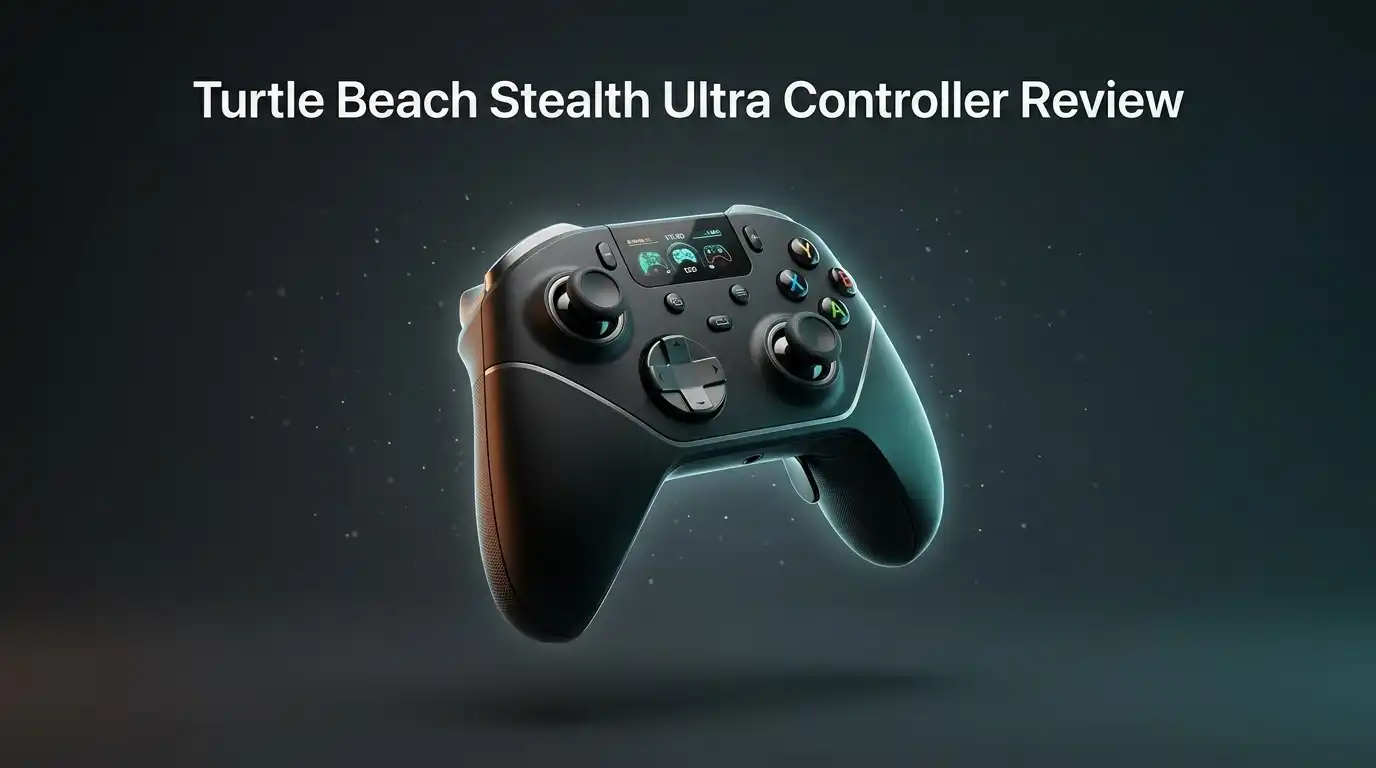
Most controllers sit in your hands and do one job. The Turtle Beach Stealth Ultra tries to do about twelve.
It has a small screen on the front, glowing RGB strips down the grips, clicky microswitch buttons, magnetic thumbsticks, and a charging dock that keeps it topped up between sessions.
But flashy hardware does not always mean better gameplay. I spent weeks with this controller across Xbox Series X, a gaming PC, and an Android phone.
In a Nutshell:
- The Command Display is the headline feature, and it actually works. You press the plus button, scroll with the D pad, and change back button mapping, vibration zones, stick response, RGB colors, and headset EQ without opening any app. Most pro controllers bury these settings behind button combos. This one shows you everything on screen.
- Button feel is excellent. The face buttons, D pad, bumpers, and rear buttons all use microswitches rated for roughly five million clicks. Every press returns a sharp, mouse like click. This is one of the best feeling button sets you can buy.
- AntiDrift thumbsticks use Hall effect magnets instead of contact parts. They resist the stick drift that kills standard controllers. They also feel slightly looser than some rivals, so expect an adjustment period.
- The box is genuinely generous. You get the controller, a magnetic rapid charge dock, a wireless dongle, a braided USB C cable, two extra sets of thumbcaps, and a hard shell case that charges the controller inside it.
- It is not perfect. There are no swappable stick modules or D pads at this price, the two inner rear buttons sit awkwardly, the companion software can feel sluggish, and the phone notification feature is closer to a party trick than a tool.
- Pricing sits around 160 to 200 dollars depending on sales. That places it directly against the Xbox Elite Series 2 and the Victrix Pro BFG.
What Is the Turtle Beach Stealth Ultra Controller?

- Keep your controller and wireless transmitter updated with the latest firmware, available in the Control Center 2 app for Xbox and PC
- Patented, On-Board Social Media Notifications

Some of the links on this website are affiliate links, which means that at no additional cost to you, I earn a commission if you click through and make a purchase. I only recommend products and services that I believe will add value to my readers. Thank you for your support!
The Stealth Ultra is Turtle Beach’s flagship wireless gamepad. It carries an official Xbox license, so it works with Xbox Series X, Series S, and Xbox One. It also connects to Windows PCs, Android phones, and many smart TVs over Bluetooth.
The headline hardware includes a color Connected Command Display mounted between the sticks, Hall effect AntiDrift thumbsticks, microswitch buttons throughout, adjustable trigger stops, and four mappable rear buttons. A magnetic Rapid Charge Dock ships in the box alongside a charge through travel case.
Turtle Beach positions this as a “do everything” pro controller rather than a modular tinkering kit. The screen replaces the usual mess of profile buttons and hidden shortcuts. That single design decision shapes the entire experience, for better and sometimes for worse.
Unboxing Experience: What Arrives in the Box
Opening the Stealth Ultra feels like opening a camera kit. The outer sleeve slides off to reveal a hard shell zip case, which already sets a premium tone before you touch anything.
Inside the case, foam cutouts hold the controller, the magnetic charge dock, a braided USB C cable, the 2.4 GHz wireless dongle, and two spare pairs of thumbcaps. Everything has a slot. Nothing rattles around.
The nicest touch is a port built into the case itself. You can run a cable into the closed case and charge the controller while it stays packed. For anyone who travels with gear, that detail matters more than it sounds.
My one gripe is that the case shell is a little softer than the ones bundled with some rivals. It protects against scuffs and light knocks, but I would not toss it loose into a packed suitcase.
Design, Build Quality, and Comfort in the Hand
Pick this thing up and the first word that comes to mind is sharp. The matte soft touch grips feel grippy without turning tacky. The RGB strips running along both handles look superb in a dim room.
Weight distribution sits in a good place. The controller feels substantial but never heavy, and long sessions did not leave my palms aching. The grip angle suits medium and large hands well.
The finish does need care. Light colored rubber grips on controllers in this category are known to pick up stains over time, and some owners report wear after heavy use. Keeping hands clean and wiping the grips occasionally goes a long way.
Overall build quality feels solid. Nothing creaks. The triggers have no side to side wobble. It reads as a product that cost real money.
The Connected Command Display: Gimmick or Genuinely Useful?
A screen on a controller sounds like a gimmick. In practice it solves one of the most irritating parts of owning a pro controller.
You press the plus button in the center, then scroll menus with the D pad and confirm with the face buttons. From there you remap rear buttons, switch between ten onboard profiles, change stick response curves, tune vibration across separate zones, adjust headset EQ, and pick RGB colors.
Nothing is buried. You see the option, you read the label, you change it. Compare that to memorizing a three button combination on a rival controller and the appeal becomes obvious.
The screen stays off during play to save battery, which is the right call. It wakes instantly when you need it. This is the feature that justifies the price for a lot of buyers.
Top 3 Alternative for Turtle Beach Stealth Ultra

- PLAY LIKE A PRO — The XBOX Elite Wireless Controller Series 2 features over 30 ways to play like a pro. Designed in collaboration with pro-level players, it puts exceptional performance, customization, and durability where it matters most.
- ADJUSTABLE-TENSION THUMBSTICKS — Fine-tune your aim with thumbsticks that let you adjust resistance for improved accuracy, consistency, and control in every match.
Some of the links on this website are affiliate links, which means that at no additional cost to you, I earn a commission if you click through and make a purchase. I only recommend products and services that I believe will add value to my readers. Thank you for your support!
Xbox Elite Wireless Controller Series 2

- Play wirelessly on console using the USB dongle, connect via Bluetooth to compatible devices, or use the included cable to plug in the controller for tournament play and even faster inputs
- Modular design for custom configuration with reversible left module, standard right module, 6-button fight pad module, 4 interchangeable sticks, 3 different D-pads, and 4 gates
Some of the links on this website are affiliate links, which means that at no additional cost to you, I earn a commission if you click through and make a purchase. I only recommend products and services that I believe will add value to my readers. Thank you for your support!
PDP Victrix Pro BFG Wireless Gaming Controller for Xbox Series X|S

- 2.4GHz Low Latency Wireless Connection to Windows PC
- Rotating Button Modules for Multi-Genre Dominance
Some of the links on this website are affiliate links, which means that at no additional cost to you, I earn a commission if you click through and make a purchase. I only recommend products and services that I believe will add value to my readers. Thank you for your support!
Turtle Beach Stealth Pivot Wireless Smart Game Controller
AntiDrift Thumbstick Performance and Accuracy
The sticks use Hall effect sensors. Magnets read position instead of physical contact parts, so the usual cause of stick drift simply is not present. After extended testing, mine still center perfectly every time.
You can also pick stick response modes from the display. Linear input suits racing games where smooth steering matters. Precision input tightens the center zone for aiming in shooters.
Here is the honest part. These sticks feel looser than the stiffer sticks on some competitors. My first hour in a shooter felt twitchy, and I missed shots I usually land.
That settled after a few sessions. Once my thumbs adjusted, flick shots and long range tracking felt great. Do not judge these sticks on day one. Give them a weekend before deciding.
Microswitch Buttons and D Pad Feel
This is where the Stealth Ultra quietly wins. The ABXY cluster, the D pad, the bumpers, and the rear buttons all sit on tactile microswitches rated around five million clicks.
Every press lands with a crisp mechanical snap, closer to a gaming mouse than a console pad. Input registers fast and the feedback is immediate, which helps in fighting games and fast shooters.
The D pad uses a circular design that some players distrust on sight. In use, directional presses registered cleanly for me, including diagonals during quarter circle inputs.
If you care about button feel above all else, this controller is near the top of the class. The only cost is noise. These buttons are loud, so a sleeping partner in the same room will hear you play.
Trigger Stops and Four Mappable Back Buttons
The triggers include physical lockout switches. Flip them and the travel distance shortens dramatically, turning each trigger into a hair trigger for shooters. Leave them long for throttle and brake control in racing games.
The lock system here feels better than several rivals. The switch is easy to reach and the short setting feels snappy rather than mushy.
The four rear buttons sit in a row across the back. The two outer buttons rest perfectly under my middle fingers and feel natural immediately.
The inner two are a problem. They sit close to the outer pair, so reaching them means shifting your grip rather than using a separate finger. I adapted after a week, but the layout is less comfortable than a spread out paddle design.
Battery Life and the Rapid Charge Dock
Turtle Beach lists up to 30 hours with adjustable power modes, and real use lands below that if you run bright RGB and wake the screen often. With lighting dimmed, I comfortably cleared multiple long sessions between charges.
The magnetic charge dock changes the math anyway. You drop the controller on the dock after playing and it is always full the next day. Battery anxiety basically disappears when a dock is part of the package.
Charging over USB C is quick, and the cable supports play while charging. The dock also stores the wireless dongle, which is a small but smart idea.
Some owners report weaker real world battery life than advertised. My experience was acceptable but not record breaking. Treat 30 hours as a best case figure with features turned down.
Connectivity Across Xbox, PC, Android, and TVs
Versatility is a real strength here. The Stealth Ultra connects over Xbox wireless, the bundled 2.4 GHz dongle, Bluetooth, or a wired USB C cable.
Switching sources happens through the display menu. You pick a connection tab, start pairing, and you are done in seconds. No awkward button holds or blinking light codes to decode.
Bluetooth support means it doubles as a phone controller for cloud gaming and a smart TV pad for streaming apps. One controller genuinely covers the whole house.
Wired mode is the pick for competitive play since it removes wireless variability entirely. Latency over the dongle felt fine for everything I played, including online shooters.
Audio Features for Headset Users
Turtle Beach builds headsets, so audio gets real attention. A 3.5mm jack on the bottom accepts any wired headset, and the display unlocks features normally locked behind console menus.
You get four EQ presets, game and chat volume balance, mic monitoring, and Superhuman Hearing, which boosts footstep frequencies in shooters.
Being able to drop the chat volume mid firefight without pausing is genuinely handy. For headset users, this alone adds practical value over rival pro controllers.
The caveat is that these features apply to wired headsets plugged into the controller. If you run a wireless headset connected directly to your console, most of this sits unused.
Control Center 2 App and Firmware Updates
The companion software runs on PC, Xbox, iOS, and Android. It handles deeper profile editing, dead zone tuning, RGB setup, notification preferences, and firmware updates.
The software is the weakest part of the package. Navigation can feel sluggish, and pushing profiles onto the controller is clunkier than it should be. Some users also hit firmware update failures caused by router or firewall settings blocking the download.
Those blocks are fixable, usually by adjusting firewall rules or updating over a phone hotspot. Still, nobody buying a premium controller wants to troubleshoot a network issue.
The good news is that the controller does so much on its own screen that the app becomes optional. Install it, update the firmware, then mostly forget it exists.
Social Notifications: The Feature You Will Probably Turn Off
The Stealth Ultra can mirror phone notifications on its screen. Messages, social alerts, and calls pop up while you play.
I wanted to like this. In practice, reading a truncated message on a tiny controller screen is worse than glancing at your phone, and alerts during a tense match are a distraction rather than a convenience.
Which notifications actually come through can also feel inconsistent depending on your phone and app settings.
Turtle Beach themselves dropped this feature from the newer model, which tells you how it landed with buyers. Switch it off, enjoy the rest of the controller, and you lose nothing.
What the Stealth Ultra Does Not Do Well
Honest reviews name the flaws, so here they are clearly.
There are no swappable modules. You get two spare pairs of thumbcaps, but no alternate stick lengths, no swappable D pad, and no removable paddles. Rivals at this price offer full modular kits.
The inner rear buttons sit in an awkward spot. Mapping restrictions have also frustrated users, including limits around assigning certain stick click inputs.
The buttons are loud. The PC software is fiddly. Advertised battery life assumes conservative settings. The grips can show wear with heavy use.
None of these are deal breakers on their own. Together they explain why some buyers still prefer the Elite Series 2 or the Victrix Pro BFG.
Pros and Cons of the Turtle Beach Stealth Ultra
Pros
- The Connected Command Display makes deep customization simple and fast, with no app required for daily changes
- Microswitch face buttons, D pad, bumpers, and rear buttons feel crisp, fast, and satisfying
- AntiDrift Hall effect thumbsticks resist drift and offer selectable response curves
- Excellent bundle value with a magnetic charge dock, dongle, braided cable, spare thumbcaps, and a charge through hard case
- Wide compatibility across Xbox, PC, Android, and smart TVs with four connection options
- Strong headset audio controls including EQ presets, chat mix, and Superhuman Hearing
- Striking design with 16.8 million color RGB lighting and a comfortable soft touch grip
Cons
- No modular thumbsticks, D pads, or paddles despite the premium price
- The two inner rear buttons sit awkwardly for most grip styles
- Control Center 2 software feels slow, and firmware updates can fail behind strict routers
- Phone notification feature adds little real value
- Advertised battery life needs dimmed lighting and conservative settings to reach
- Microswitch buttons are noticeably loud
- Hall effect sticks feel looser than some rivals and need adjustment time
Stealth Ultra vs Stealth Ultra II: Should You Wait?
Turtle Beach launched a sequel in late 2026 at 199.99 dollars. The Stealth Ultra II swaps Hall effect sticks for TMR sticks, which offer higher precision and better power efficiency.
It also adds an 8 kHz wired polling rate and 1 kHz wireless polling, a touch screen version of the Command Display, GateShift customization, and a refocused feature set that drops social notifications entirely. Battery sits at 12 hours by default and up to 34 hours in Eco mode.
Competitive players should look hard at the sequel. The polling rate jump and TMR sticks are meaningful upgrades for ranked play.
Everyone else has a real opportunity here. The original Stealth Ultra now drops into frequent sales, and the gap in everyday feel between the two is smaller than the price gap.
Price and Value in 2026
List pricing on the original sits near 199.99 dollars, with regular discounts pushing it toward 159.99 dollars and sometimes lower during sales events.
At full price it competes directly with the Xbox Elite Series 2, which offers modular parts but lacks Hall effect sticks and an onboard screen. The Victrix Pro BFG undercuts both at times and offers full modularity.
At sale pricing, the Stealth Ultra becomes easy to recommend. You are getting a dock, a case, a screen, drift resistant sticks, and premium buttons for roughly the price of a standard controller plus accessories.
Value depends entirely on what you want. Pay for customization depth and bundle contents, not for the notifications.
Final Verdict: Who Should Buy the Stealth Ultra?
Buy this controller if you want deep customization without fighting software, if you use a wired headset, and if drift resistance matters to you. The screen genuinely improves daily use, and the buttons are a joy.
Skip it if you need swappable sticks and D pads, if you play late at night near sleeping people, or if you want the absolute lowest latency for ranked competition.
It is a luxury controller that trades modularity for convenience. That trade suits a lot of players, especially those who set up a controller once and then just want to play.
Score wise, it earns a solid recommendation with clear caveats. Watch for a sale, skip the notification feature, and you will likely love it.
Frequently Asked Questions
Does the Turtle Beach Stealth Ultra work with PS5?
No. The Stealth Ultra is officially licensed for Xbox, so it works with Xbox Series X, Series S, and Xbox One, plus Windows PC and Android over Bluetooth. PlayStation 5 does not support it.
Do the thumbsticks really prevent drift?
The AntiDrift thumbsticks use Hall effect magnetic sensors instead of contact based potentiometers. That removes the main physical wear point behind classic stick drift. No stick is immortal, but these hold center far longer than standard sticks.
How long does the battery actually last?
Turtle Beach advertises up to 30 hours with adjustable power modes. Real world results land lower if you run bright RGB and wake the screen often. The bundled magnetic dock keeps it charged between sessions, which solves the issue for most players.
Can I use the Stealth Ultra wired for competitive play?
Yes. The braided USB C cable supports wired play and charges the controller at the same time. Wired mode removes wireless variability, so competitive players often prefer it.
Is the Command Display hard to learn?
No. Menus are labeled in plain language and you navigate with the D pad and face buttons. Most people figure out remapping and lighting changes within a few minutes of first use.
Does it support headsets?
Yes. A 3.5mm jack accepts any wired headset, and the display gives you EQ presets, game and chat mix, mic monitoring, and Superhuman Hearing. Wireless headsets connected directly to a console will not use these controls.
Should I buy the original or the Stealth Ultra II?
Choose the Stealth Ultra II if you want TMR sticks, an 8 kHz wired polling rate, and a touch screen for ranked play. Choose the original if you find it discounted and mainly want great buttons, drift resistance, and the bundled dock and case.

Welcome to The File Fix. I’m Millie, and I review tech so you don’t have to suffer buyer’s remorse.
Navigating the endless sea of Amazon devices and gadget releases can feel like a full-time job. That’s why I do the heavy lifting. I dig past the unreliable 5-star reviews and shiny spec sheets to test how these devices actually hold up in the real world. Whether you’re looking for the best budget earbuds, a reliable power bank, or the latest smart home gear, you’ll find honest, no-nonsense breakdowns here.