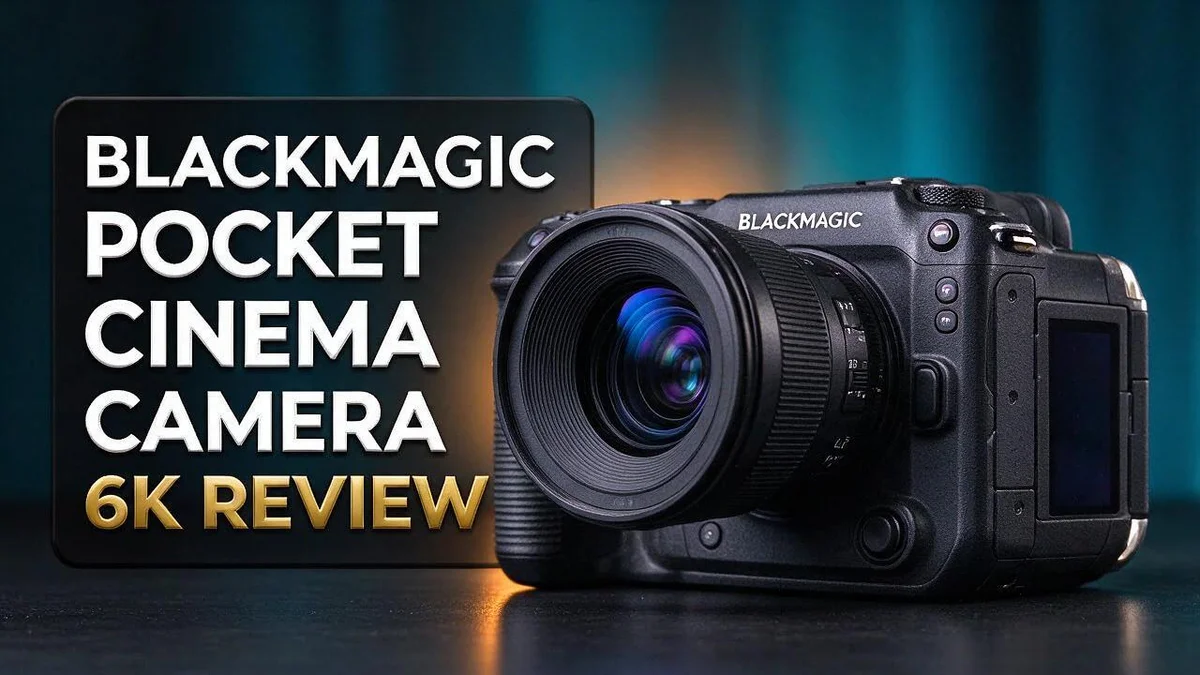
Blackmagic Pocket Cinema Camera 6K Review: Should You Buy It?
Looking for a camera that delivers stunning images? The Blackmagic Pocket Cinema Camera 6K might be the answer. It shoots sharp, detailed footage that many filmmakers love.
Its 6K resolution gives you more detail than older 4K models. It also records Raw files, which give you extra control in editing. Even at high ISO, the image stays clean.
Many creators praise the color science. The menu layout is also easy to use. Button placement and the tally light make live work simpler.
Still, this camera has some downsides. Battery life is short, and there are no internal ND filters. Keep these points in mind before you shoot.
In this review, we break down the specs, real pros and cons, and how it compares to other Blackmagic cameras. Let’s see if it fits your shooting style.
In a Nutshell
-
Clean results in dim light: The camera helps hide noise at high ISO, so your footage stays cleaner in dark rooms or at night.
-
Flexible Raw files: Raw recording gives you detailed files that hold up well during editing. You can adjust exposure and white balance without losing much quality.
-
Smart body controls: The button placement feels natural during shoots. A tally light shows when you are recording, which helps you manage talent and crews.
-
Simple menu system: Many users call the interface the best available. Changing settings feels quick, even when you work under pressure.
-
Solid build for rigs: The body feels large, especially with add-ons. Plan extra space in your bag and expect a bigger setup.
-
Points to watch: Battery life runs short, the camera has no internal ND filters, and rolling shutter can appear in fast pans. Pack spare batteries and external ND filters to stay ready.
Image Quality and Color Science

- INCREDIBLE IMAGE QUALITY: Features Super 35 image sensor with native resolution of 6144 x 3456 and an active EF/EF-S lens mount; 13 stops of dynamic range to capture even the slightest details; Dual gain ISO up to 25,600 to minimize grain and noise in all lighting conditions; Built-in 2, 4, and 6 stop ND filters.
- MULTIPLE RECORDING OPTIONS: Record your footage to SD/UHS-II and CFast 2.0 cards or alternatively to external SSD storage via USB-C port. Use built-in stereo microphone or attach external mics via either mini XLR or 3.5mm inputs.
Some of the links on this website are affiliate links, which means that at no additional cost to you, I earn a commission if you click through and make a purchase. I only recommend products and services that I believe will add value to my readers. Thank you for your support!
Image quality is where this camera truly stands out. Footage feels rich and natural before you touch a single slider.
Color science gives you a strong starting point. Skin tones usually look pleasing, which saves time during color correction in DaVinci Resolve.
Highlights and shadows hold more detail, so bright windows and dark corners keep their texture. Extra room in the image helps you recover mistakes in post.
Sharpness and cleanliness pull in different directions. The camera produces crisp edges, yet some users feel the image looks less clean than the 6K Pro model.
That tradeoff matters for your style. If you want a soft film look, you may need to dial back sharpening in post.
Fine texture can look intense on faces. Some creators add a light diffusion filter or lower the sharpness setting to soften the image.
Consistency across scenes matters most. Keep your white balance steady between setups, so clips match when you cut them together.
A simple color chart shot at the start of each day helps you match shots later. Use it as a reference during grading.
Dynamic range also plays a big role in daylight shoots. Bright skies can clip quickly, so check exposure with a histogram or waveform monitor.
Many shooters expose slightly lower to protect bright areas, then lift shadows in post.
Skin detail deserves extra care in close shots. Check focus and makeup carefully, because the sensor reveals fine texture.
Lens choice shapes the final image as much as the sensor. Sharp glass pairs well with this sensor, while softer lenses can calm the detail for a gentler look.
Overall, the image quality earns high marks. Sharp detail and pleasing color make this camera a strong pick for creators who enjoy grading their own footage. Test your settings on your own subjects before a important shoot.
Raw Recording and Workflow
Shooting in Raw changes your daily routine. Your files carry more data, so your storage, computer, and habits need to keep up.
Storage comes first. Raw clips take up a lot of space, so bring several large SSDs and extra cards on every shoot.
Card speed matters too. A slow card can drop frames or stop recording mid-take, which can ruin a key moment on set.
Offloading needs a plan. Copy every card to two separate drives as soon as the shoot ends. Check each copy before you format anything.
Backup habits protect your work. Keep one copy off site, such as a cloud service or a drive stored at another location. Fire, theft, or a damaged drive can happen to anyone.
Editing can feel heavy at first. Many editors create lighter proxy files for smooth timeline playback, then link back to full Raw files for the final export.
Your computer should match the job. A strong graphics card and plenty of memory keep playback smooth, so you can cut without constant stutter.
Plan your delivery settings early. Choose your frame rate and color space before grading begins. Late changes often add render time and extra headaches.
Naming conventions save hours. Use a simple pattern like date, camera letter, and take number. Consistent names make it easy for an assistant editor or client to follow along.
Metadata also helps later. Record lens choice, ISO, and white balance on a slate or in notes. This information speeds up matching shots during post production.
Label everything clearly. Clear clip names, scene numbers, and take notes make searching easy when a deadline gets close.
Test before a real project. Run one full day of footage from camera to final export. This quick trial shows bottlenecks early, so you can fix them calmly.
Body, Controls and Tally Light
Your hands do most of the work on set. Quick access to key controls keeps your eye on the subject. Changing settings in a hurry takes practice. Quick controls let you adjust frame rate or white balance during a tight setup.
Practice these moves at home first. Muscle memory saves time when daylight fades.
The tally light does more than look nice. It glows when the camera records. Talent knows when to begin speaking. Crew members know when to stay out of frame.
Solo creators gain the most from this signal. When you record yourself, the light confirms the camera runs. You can step into frame without checking a screen every few seconds.
Ports and buttons need planning on a rig. Some connectors sit close to the grip, so cables may press against your hand. Route cables early. Use clamps to keep wires away from your fingers.
Check the tally light outdoors, too. Bright sunlight can wash out a small glow. Shade the light with a hood or your body.
Balance matters when you mount the body. A large camera can feel front heavy with a long lens. Adjust your rig until the weight sits centered in your grip.
Balanced rigs reduce fatigue during long handheld takes. Your shoulders will thank you after a long day.
Plan your grip points before the shoot. Add handles where your hands rest most often.
Test your controls before every shoot. Walk through each button while you check focus and audio. Label the buttons you change often. Tape labels help new crew members find the right control fast.
Lock your settings once the shoot begins. Accidental bumps can change exposure mid take. Some shooters place tape over buttons they never touch. This simple habit protects your footage from surprises.
Small habits make the body and controls work for you.
Top 3 Alternatives
Sony FX3

- Full-frame 12.1MP Exmor R BSI CMOS sensor captures cinematic UHD 4K video up to 120 fps with excellent low-light performance and over 15 stops of dynamic range.
- Compact Cinema Line body features 5-axis in-body image stabilization, fast hybrid autofocus with Real-time Eye AF, and active cooling for extended recording sessions.
Some of the links on this website are affiliate links, which means that at no additional cost to you, I earn a commission if you click through and make a purchase. I only recommend products and services that I believe will add value to my readers. Thank you for your support!
The Sony FX3 is a compact cinema camera that fits easily into small rigs. It shoots clean 4K video and handles low light with ease. Creators who film run and gun scenes often praise its fast autofocus. Its light body helps you stay comfortable during long shoots, and it works well for solo filmmakers who need reliable footage on the go.
Canon EOS R5 C

- DIGIC X PROCESSOR WITH 8K VIDEO: Offers outstanding definition and realism with 16x the resolution of FHD video and an ISO range of 100-51200 (expandable to 102400) for crisp and vibrant photos and movie-theater-quality videos at up to 8K/60P .Operating Temperature : 0 – 40 °C (32 – 104 °F).
- DUAL PIXEL CMOS AF WITH ITR AF X: Advanced CMOS sensor uses every pixel to detect focus and capture actual image information to achieve high-precision focusing and image quality; Touch AF and 8-way multi-controller lets you position AF either by touching the LCD screen or manually

Some of the links on this website are affiliate links, which means that at no additional cost to you, I earn a commission if you click through and make a purchase. I only recommend products and services that I believe will add value to my readers. Thank you for your support!
The Canon EOS R5 C blends a stills camera with a true video tool. It records high resolution footage and includes a built in fan for longer recording sessions. You can switch between photo and video modes quickly. This option suits photographers who also want to create films, because one body handles both jobs well.
Panasonic Lumix GH6

- Included Items: 1 x Panasonic Lumix GH6 Mirrorless Camera, 1 x 64GB UHS-II Memory Card, 1 x Memory Card Reader, 1 x Deluxe Soft Case, 1 x 12_inch Flexible Tripod, 1 x Hand Strap, 1 x Memory Card Wallet, 1 x Lens Cap Keeper, 1 x Cleaning Kit
- A pioneer in the Micro Four Thirds class, the Lumix GH6 Mirrorless Camera from Panasonic is a petite beast that challenges full-frame rivals, a powerful hybrid addition to the video-centric GH series that offers cutting-edge tech to cinematographers and photographers alike. The improved processing power of the Venus Engine enables fast sensor readouts for internal recording of 5.7K 30p in Apple ProRes 422 HQ, FHD 300p, and handheld 100MP photos.
Some of the links on this website are affiliate links, which means that at no additional cost to you, I earn a commission if you click through and make a purchase. I only recommend products and services that I believe will add value to my readers. Thank you for your support!
The Panasonic Lumix GH6 puts video performance first. It offers strong codec options and flexible recording modes for different projects. Its Micro Four Thirds sensor keeps the camera small and easy to carry. Many filmmakers choose it for its wide range of frame rates, which gives them creative control over motion and slow motion shots.
Choose the model that fits your workflow and your shooting style. Each camera above brings clear strengths to the table.
Battery Life and Power Options
Battery life is a known weak spot on this camera. Many owners list it as a concern, so power planning deserves real attention before every shoot. Treat your batteries as part of the gear list, not an afterthought.
Start by charging every pack the night before. Fresh cells give you the longest run time. Label each battery so you can see which ones are ready and which ones need a charge.
Carry more batteries than you think you need. A spare pack covers interviews, long takes, and unexpected delays. Rotate packs between setups so one never drains completely.
Keep a charger close during long days. A charger on set lets you top up packs during breaks. Charge packs during lunch so each one returns ready for the afternoon.
For stationary work, consider external power. A mains adapter keeps the camera running during studio sessions. Check that the adapter connects securely before you start recording.
If your rig allows it, plate-mounted batteries add serious run time. Larger packs bring extra weight, so test the full setup with your lens and monitor first.
Power your monitor separately. Screens draw power too. A bright display can drain a pack faster than you expect, so lower the brightness when you do not need full detail.
Watch the battery indicator during recording. Check it between takes. Swap packs before the camera shuts down in the middle of a key scene.
Cold weather cuts run time quickly. Keep spare packs warm in an inside pocket until you need them. Batteries often recover some charge once they warm up.
Build a simple power checklist. List every battery, charger, and adapter. Review the list before you leave home.
Pick a power plan for each shoot type. A short walk and talk needs fewer packs. A full day shoot needs a steady supply of charged batteries.
Test your power setup at home first. Record a sample that matches the length of your real shoot. This shows how long your kit lasts before a paid job begins.
Low-Light Performance and Rolling Shutter
Low light tests every camera. The Blackmagic Pocket Cinema Camera 6K gives you a useful starting point in dim rooms. Its sharp detail helps hide noise when you raise the ISO.
Noise still appears in deep shadows. Grain shows up first in dark corners and on flat walls. Expose the scene well before you grade, so you need less correction later.
Raw files give you more room to recover detail. Shoot at the highest quality setting you can manage. Natural skin tones hold up better in candlelit scenes.
Rolling shutter shows up in fast motion. Every CMOS sensor reads its image line by line. That readout delay can bend straight edges during quick pans.
Vertical poles may lean when you whip the camera sideways. Spinning propellers and passing cars can look warped too. Slow your pans to reduce the effect.
Shutter angle controls the look of motion. Shutter speed changes motion blur, but it does not change the readout delay. Keep the shutter near 180 degrees for natural movement, then test your pans before the shoot.
Light flicker needs attention too. LED lights and fluorescent tubes can pulse. Combined with rolling shutter, that pulse creates bands across the frame. Set the frame rate and shutter to suit your local power frequency.
Test before every important shoot. Record a short clip with a fast pan and a flashing light. Watch the footage on a large screen. This quick check saves you from surprises later.
Lens choice affects low light too. A wide aperture lens lets in more light. That means you can keep the ISO lower and the image cleaner. Pair the camera with fast glass for dim interviews and evening walks.
Good light still beats any sensor. Place a soft lamp near your subject. Bounce light off a white wall when you can. Your eye notices the face first, so light it well.
Pros and Cons
Pros
– Color science gives skin tones a natural look straight from the camera.
– Many users praise the menu layout as one of the best available.
– Sharp detail gives you room to reframe and crop in post.
– Clean files make color grading feel smooth and fast.
Cons
– No internal ND filters means outdoor shots need extra filter gear.
– The body grows bulky once you add cages and accessories.
– It fits fewer compact rigs for quick run and gun shooting.
Who Should Buy It
If you want sharp, detailed footage in Raw, this camera deserves a close look. It suits creators who care about image quality above all else.
Solo filmmakers often make the strongest match. The button placement and tally light let you run the camera without extra crew. A single operator can also move quickly between setups, which saves time on busy days.
Documentary shooters also gain a lot from this camera. Unpredictable scenes rarely give you a second chance, so a sharp 6K frame helps you keep your options open.
Students and new filmmakers can practice with a real Raw workflow from day one. Those skills carry over well when they move on to bigger cameras.
Talking head creators also find this format useful. The sharp 6K image holds up well on large screens, so your audience sees crisp faces and clean backgrounds.
Corporate teams often edit one shoot into many formats. Extra resolution gives you flexibility for social clips, web pages, and presentations.
Viewers who want the cleanest possible image may prefer the BMPCC 6K Pro. Many users say it looks cleaner, though it is less sharp.
Large crews with dedicated support may want a bigger system. The URSA Mini Pro 4.6K G2 fits that setup better.
Beginners who want a lighter first step may look at the original Pocket Cinema Camera. It offers a simpler starting point, though it lacks the 6K detail.
Shooters who prefer a full frame look should compare the Blackmagic 6K Full Frame. Compare sensor size, body size, and lens choice before you decide.
Before you buy, test the camera with your own lenses and monitor. Real trials show how the body feels during long shoots.
Ask yourself what you shoot most often. If sharp Raw footage matters most, this camera earns a spot on your shortlist. Compare it side by side with rivals before you commit.
Final Verdict
The Blackmagic Pocket Cinema Camera 6K earns a strong place in any serious video kit. It records sharp, detailed Raw footage, and its layout helps you work fast. Few cameras in this class offer that mix of image quality and control.
Battery life is the biggest weakness. Plan on carrying spare batteries for every shoot day. A simple power checklist keeps your camera running when the moment matters most.
Think of this camera as a tool for focused, deliberate work. It rewards people who plan each shot before they roll. It can feel slower when you need quick changes on the fly.
Choose this camera if you value image control above convenience. You will spend extra time on setup. In return, you gain footage with real flexibility for later edits.
Think about your full setup before you commit. Spare batteries, fast memory cards, and a sturdy support rig all shape how the camera feels in your hands. Skipping these pieces often leads to frustration on a busy set.
Compare this model with your daily needs, not with online hype. Ask yourself how often you shoot outdoors, how long each take runs, and whether you work alone. Your honest answers will point you to the right choice.
Our final take is simple. This camera suits filmmakers who care about detail, patience, and creative control. It may frustrate those who want quick, grab and go shooting.
Shooters who already own compatible lenses and accessories will adapt quickly. Newcomers should spend a few afternoons testing settings before a paid job. That practice builds confidence and saves time later.
Good workflows matter as much as good hardware. Label your cards, back up footage each night, and keep a clean edit folder. These habits protect your work from small mistakes.
In short, the camera earns its reputation for detail and creative freedom. It asks for planning, yet it pays back that effort with footage you can shape for any project.
Frequently Asked Questions
Does rolling shutter cause problems with this camera?
Rolling shutter can appear during fast pans or quick moves. You can reduce it with slow, steady camera motion. Test your movements before an important shoot so you know what to expect.
How does the camera handle low light?
The sharper 6K image helps hide noise at high ISO settings. Still, good lighting always gives cleaner results. Use lights when you can, and save high ISO for moments when you have no other option.
Is this camera easy for beginners to learn?
A beginner can learn the basics with some practice. Raw recording adds a learning curve, so expect a few trial shoots. Start with simple scenes and build your skills over time.
Where should I store my footage?
Raw files take up a lot of space. Use fast memory cards and at least two external drives. Back up your footage every day after a shoot so you never lose important clips.

Welcome to The File Fix. I’m Millie, and I review tech so you don’t have to suffer buyer’s remorse.
Navigating the endless sea of Amazon devices and gadget releases can feel like a full-time job. That’s why I do the heavy lifting. I dig past the unreliable 5-star reviews and shiny spec sheets to test how these devices actually hold up in the real world. Whether you’re looking for the best budget earbuds, a reliable power bank, or the latest smart home gear, you’ll find honest, no-nonsense breakdowns here.