GoPro HERO 13 Black Review: Overpriced or Justified?
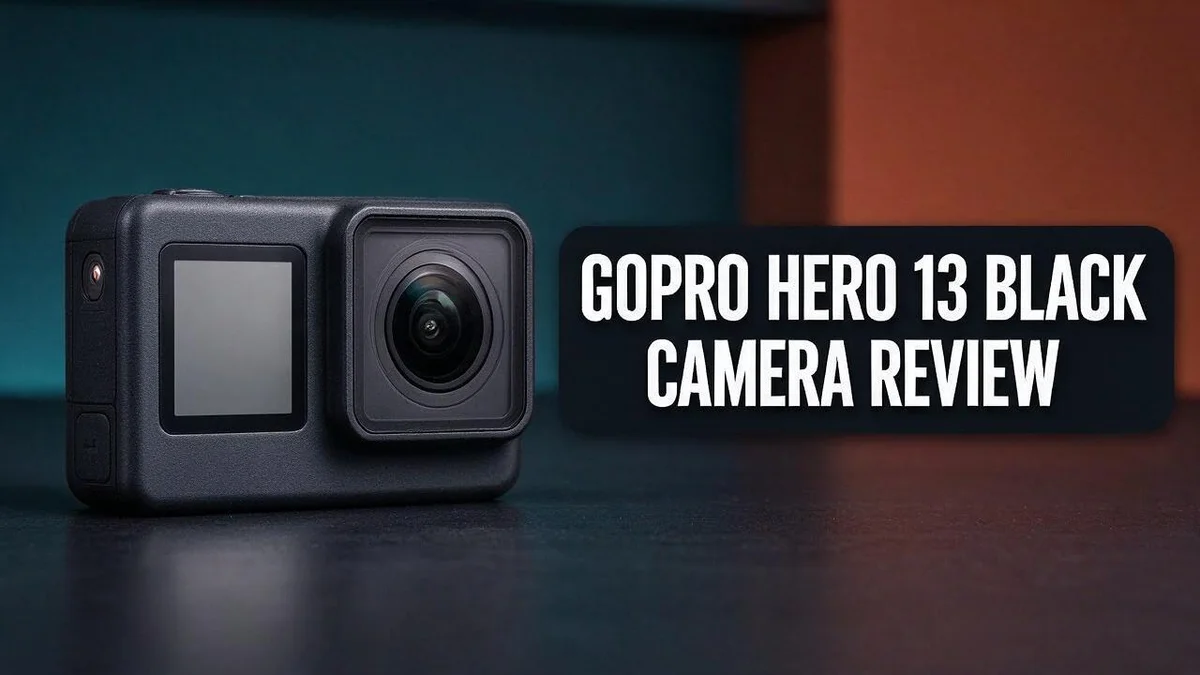
Are you looking for a camera that keeps up with your adventures? The GoPro HERO 13 Black might be the answer. It is built for riders, hikers, and anyone who loves capturing fast action.
Shooting smooth footage on rough ground is hard. This camera uses HyperSmooth 6.0 stabilization to help. Its high resolution video looks sharp and clear.
Here is what sets it apart. The camera supports smart lenses, a magnetic mount, and a larger touchscreen. It also records up to 400fps slow motion.
Still, no camera is perfect. Low light shots are not its strongest side. Battery life also has room to grow.
In this review, we break down the specs, pros, cons, and top rivals. Keep reading to see if this camera fits your next adventure.
In a Nutshell
-
Fast slow motion: Capture up to 400fps for dramatic close-ups of splashes, jumps, and quick moves. Slow footage adds a cinematic feel to nearly any clip you record.
-
Quick mounting: Magnetic mounts snap on in seconds. You spend less time setting up and more time filming the action around you.
-
Smart lens switching: Lenses auto detect when you swap them. The camera adjusts its settings, so you avoid fiddling with menus in the middle of an adventure.
-
Front screen for selfies: You can check your framing while you record yourself. This feature helps vloggers, solo creators, and anyone who films their own reactions.
-
Bright light works best: Low light performance scores lower than other areas. Plan your shoots for daylight or well lit spots to get the cleanest results.
-
Accessories shape the experience: Sources stress that extra gear unlocks much of the camera’s potential. Choose mounts and cases that match the activities you enjoy most.
Image and Video Quality

- HB-Series Lenses With Auto Detection: HERO13 Black is compatible with the HB-Series Lenses that let you instantly set up your camera for a variety of specialty shots. The Ultra Wide Lens Mod is the ultimate POV lens for action-packed scenes and epic landscapes. The Macro Lens Mod captures close-up shots in stunning detail. Neutral Density Filters add motion blur to your footage and let you adjust the lighting in your shots with professional results. Try the Anamorphic Lens Mod for pro-level cinematic shots. HERO13 Black even detects when a lens or filter is attached and automatically adjusts its settings accordingly.
- Best-in-Class 5.3K Video: 5.3K video delivers breathtaking image quality with 91% more resolution than 4K and an incredible 665% more than 1080p. HERO13 Black captures the action with crisp detail and exacting image quality so any shot with any lens will look amazing. 5.3K video also lets you grab stunning photos up to 24.7MP from your footage using the GoPro Quik app.
Some of the links on this website are affiliate links, which means that at no additional cost to you, I earn a commission if you click through and make a purchase. I only recommend products and services that I believe will add value to my readers. Thank you for your support!
The image quality of the GoPro HERO 13 Black matters most to content creators. Clear footage makes your adventures feel real.
Under the hood, a 1/1.9 inch sensor captures detail in every frame. Sensor size shapes how much light and detail the camera records.
Stills reach 27 megapixels in raw format. Raw files give you more control later. You can fix exposure and white balance during editing.
Video resolution gives you room to work. You can shoot 5.3K at 60 frames per second for sharp, detailed clips.
High resolution also helps when you edit. You can crop a shot or reframe it without losing much sharpness.
Some sources list 5.7K60 as the top video mode instead. Check the settings menu on your unit to see what it supports.
Stability matters just as much as resolution. HyperSmooth 6.0 evens out bumps, steps, and quick turns.
Reviewers highlight its strong stabilization on rough terrain. You can film while you hike, run, or ride without footage looking shaky.
Choosing settings depends on your goal. Lower resolutions save storage space and let you record longer.
Higher frame rates give smoother motion for fast action. Standard rates suit calm scenes like views, portraits, and slow walks.
The responsive touchscreen helps you review clips fast. Scroll through your shots and pick the best takes.
Good image quality also makes sharing easier. Clear videos stand out on social feeds and video platforms.
Sharp footage also helps brands and tutorials. Viewers trust clear visuals more than blurry clips.
Test your camera before a big trip. Record a short clip in each mode and watch it on a large screen.
This practice shows how each setting looks in your own environment. You can then pick the right balance of detail and file size.
Keep your lens clean for the best results. A smudge can soften even the sharpest image.
Stabilization and Slow Motion
HyperSmooth 6.0 keeps your footage steady while you record. It works inside the camera, so you do not need extra gear. Many riders and hikers rely on this feature every day.
Digital stabilization works by cropping the frame slightly. The camera uses the extra edge area to correct shaky movement. This means you get steadier shots without a gimbal.
Think of it as a buffer around your image. The sensor captures more than the final frame. The software then smooths out bumps, jolts, and quick turns.
Stabilization works best when you move with purpose. Walk at a steady pace. Pan slowly from one point to another. Sudden jerks can still show up, even with strong correction.
Stabilization also helps when you shoot handheld. Hold the camera with both hands. Keep your elbows close to your body for extra control.
Slow motion adds drama to action. The camera offers several frame rates for this effect. Each one gives a different balance between detail and smoothness.
The 2.7K mode at 240fps suits most slow motion clips. It keeps the file size manageable. Your footage still looks sharp on a phone or laptop screen.
Plan your slow motion shots before you hit record. Choose a clear subject and a clean background. Then frame the scene so motion stays easy to follow.
Tip: Test your settings before a big outing. Check your stabilization mode in the settings menu. Then run a short test clip. Watch it on a bigger screen at home to confirm the result.
Editing gives you more control over the final look. Trim the slow sections so they fall on the beat of your music. Smooth motion pairs well with calm soundtracks.
Mounting matters too. A firm mount reduces vibration before the software steps in. Tighten all clamps and check them often during long rides.
Stability and slow motion work together. Steady footage makes slow clips look polished, not wobbly. Combine both features to tell a clear story.
Mounting System and Accessories
Your mount decides where the camera sits and how it moves. A solid setup keeps your shots steady and your gear safe.
Start with the mounts you use most. Helmet, chest, and handlebar mounts cover most adventure shoots. Pick the ones that match your sport.
Think about the surface before you attach anything. A loose mount can shake the frame or drop the camera on rough ground. Check every clip before you ride or hike.
Motorcycle riders need extra care. Sources do not confirm how well the camera handles long rides on a bike. Run a short test ride first to see how the mount holds.
Check the mount before every shot. Tighten each screw and clip. Give the camera a gentle tug to confirm it holds firm.
Protection matters as much as the mount itself. A rugged case or lens cover guards the glass from scratches and dust. Keep the lens clean with a soft cloth.
Batteries are part of your kit. Battery life received a 4 out of 5 rating in reviews. Pack spare batteries for long days, and charge them the night before.
Cold conditions can drain batteries faster. Keep spare batteries in an inside pocket to warm them up. Swap them out when the charge drops.
Storage cards keep your footage safe. Use a fast card with a high write speed for 5.3K video. Format it in the camera before each trip.
Extension poles and chest straps open new angles. Low shots, wide views, and POV footage all become easier. Try a few angles at home first.
Mounts also change how your audience sees the action. A low chest view feels personal, while a high angle shows the full scene.
Label your gear. Mark cases and batteries with tape so you spot them fast in a busy bag.
Build a simple kit for each outing. Bring mounts, batteries, cards, and a cloth in one bag. A ready kit saves time and reduces missed shots.
Choose only the pieces you will use. A smaller kit is easier to carry and check.
Top 3 Alternatives
DJI Osmo Action 4

- Capture Stunning Footage - Osmo Pocket 3 vlogging camera features a 1-inch CMOS sensor and records in 4K resolution at an impressive 120fps. Capture breathtaking night views and sunsets with enhanced clarity.
- Effortlessly Frame Your Shots - Get the ideal composition with Osmo Pocket 3's expansive 2-inch touch screen that rotates for both horizontal and vertical shooting.
Some of the links on this website are affiliate links, which means that at no additional cost to you, I earn a commission if you click through and make a purchase. I only recommend products and services that I believe will add value to my readers. Thank you for your support!
The DJI Osmo Action 4 is a rugged camera for active adventures. Its large sensor handles low light well. You get clear footage at dusk or indoors. The front screen makes selfies and vlog shots easy to frame.
It is a strong pick for beginners. Its menus stay simple to learn. Battery life also lasts through long days outside, so you can keep filming.
Insta360 X4

- Lightweight & Portable (165g): A sleek 165g* camera bursting with potential. Ultralight, easy to use, full 360 creativity—you won't even notice it's there. *Actual weight may vary slightly depending on configuration and production.
- 8K 360 Video: Dual lenses capture every second of the family fun, all angles of your favorite spot, and every highlight in stunning 8K30fps. Finally, no one is stuck behind the camera.
Some of the links on this website are affiliate links, which means that at no additional cost to you, I earn a commission if you click through and make a purchase. I only recommend products and services that I believe will add value to my readers. Thank you for your support!
The Insta360 X4 shoots full 360-degree video. You can reframe every shot after you record. Choose any angle later in the editing app. This feature saves time on fast-moving trips.
It works well for creative storytellers. The camera records 8K video for sharp detail. You can also remove the selfie stick from footage, so your viewers see a clean shot.
Insta360 Ace Pro 2

- NEW 1/1.3" 8K SENSOR & LEICA SUMMARIT LENS: Unparalleled imaging with 13.5 stops of dynamic range and 2.4μm equivalent pixel size. Legendary Leica optics meet Insta360 innovation to set a new benchmark for image quality in an action camera, now supporting 4K60fps Active HDR and 8K30fps video.
- DUAL AI CHIP: The first action camera with a dedicated Pro Imaging Chip for noise reduction and image processing, plus a 5nm AI Chip for further processing and powerful performance. Delivering 100% more computing power than Insta360 Ace Pro, it's a revolutionary setup with incredible results.
Some of the links on this website are affiliate links, which means that at no additional cost to you, I earn a commission if you click through and make a purchase. I only recommend products and services that I believe will add value to my readers. Thank you for your support!
The Insta360 Ace Pro 2 is built for action and low light. Its large sensor captures bright, detailed images at night. It also has a waterproof design for swims and rainy rides. A flip screen helps you check your framing fast.
It suits people who film fast movement. Stabilization keeps motion smooth on bike rides and hikes. Your clips look steady without extra gear, so you can focus on the moment.
Durability and Battery Life
Water often tests a camera first. The HERO 13 Black is waterproof to 10 meters, so you can film in heavy rain without a separate housing.
Still, water resistance depends on care. After each ride, rinse off mud, sand, and salt. Grit trapped near the seals can cause leaks over time.
Dust deserves attention too. Desert and beach trips push grit into every gap. Wipe the lens with a clean microfiber cloth before you start.
Battery gains matter on long days. The battery is about 10% larger, and runtime improves by roughly 13.5%. That extra time can stretch a long afternoon on the trail.
Every battery still has limits. Learn how long a charge lasts on your usual route. Then you can swap before the camera shuts off mid-trip.
Carry a power bank for longer outings. Charge it the night before, so you start with full power. A small pouch keeps it dry and safe.
Swap batteries with care. Close the battery door fully after each change. Check that it clicks into place before you head back out.
Heavy recording makes the camera warm. Long clips at high resolution produce heat. Let the camera rest in shade between runs. This habit protects both the device and your recording time.
Sudden temperature changes can create condensation inside the housing. Let the camera warm up slowly in a bag before you open it. This small step prevents fogged lenses.
A drop onto rock can crack a lens or loosen a button. Keep the camera in a padded case when you travel. Before each trip, press every button and test the touchscreen.
Durability and battery life work together. A tough camera with a dead battery still fails you. Plan both, and your footage stays safe and complete.
Pros and Cons
Pros
– Stabilization keeps rough trail footage steady.
– Clear, high resolution video gives you more room to edit.
– The touchscreen responds quickly to taps.
– Smart lenses switch on automatically when you attach them.
– The front screen lets you frame yourself with ease.
Cons
– Low light footage scores 3.5 out of 5, so night shots need extra light.
– Reliability on motorcycles is not confirmed in the sources.
– Accessories play a big role, so you may need extra gear.
– Rivals like the DJI Osmo Action 5 Pro sit very close in the market.
Who Should Buy It
Creators who film fast action should take a close look. Slow motion up to 400fps turns quick moments into dramatic clips.
Photographers who also shoot video gain flexibility. The 27MP raw stills keep extra detail for later edits. One camera can cover photo walks and video days.
Travel vloggers make a strong match too. Magnetic mounts speed up setup at each new stop. Quick changes help when the scenery shifts fast.
Families who record outdoor trips may enjoy the waterproof build. It handles splashes, lake days, and rain down to 10m. Outdoor fans gain a simpler setup on wet days.
Editors who crop footage will like the high resolution. The 5.3K60 video leaves room to reframe shots. One clip can serve several edits.
Beginners who want one camera for many scenes can start here. This model covers action, travel, and everyday clips. New creators often want that flexibility.
Social media creators can use slow motion for short posts. Fast edits keep viewers watching longer. Bold visuals often stop people from scrolling.
Coaches and sports teams can review technique in detail. Players see small movements that often get missed at normal speed.
Hobbyists who enjoy both photos and clips get a versatile tool. Raw files and video modes sit side by side in one body.
Shooters who mainly film in dim rooms may want more options. Compare other models before you decide.
The Insta360 X6 and DJI Osmo Action 6 also deserve a look. Test each one against your daily shooting style. Write down the activities you repeat most.
Think about your main activity first. Then match the features to that need. A clear goal makes the choice easier.
Gear fans who like extra add-ons may feel right at home. The mount options and accessories give room to grow. Start small and expand over time.
Choose this camera when action, travel, and editing matter most. Match your shooting habits first, then decide with confidence.
Your shooting plan should guide the final choice.
Final Verdict
The GoPro HERO 13 Black earns a strong spot in the action camera market. It delivers sharp footage, steady shots, and a flexible design. Still, the best pick depends on how you plan to shoot.
Compare it with rivals before you buy. The DJI Osmo Action 5 Pro sits closest in the lineup. Other options worth a look include the Osmo Action 6, the Insta360 Ace Pro 2, the Insta360 X6, and the Insta360 GO Ultra.
Each rival may suit a different shooting style. Think about which features matter most to you, such as stabilization, resolution, or touchscreen response. Those details often decide the winner.
Choose this camera if you want one device for many scenes. It fits action fans, travel bloggers, and everyday shooters who switch between subjects. Solo creators who edit on the go will also appreciate how quickly clips move from camera to phone.
Look elsewhere if night filming is your main goal. Dim scenes may need extra lights or a different model. If most of your projects happen after sunset, a rival with stronger low light results may serve you better.
Plan for accessories from day one. A complete setup usually needs mounts, spare batteries, and protective cases. Set aside time to gather these items early, so your first big outing does not get delayed.
Think about your next trip first. Picture a typical day with the camera in your hands. Long hikes and busy city walks place different demands on power and storage, so match the setup to the journey.
Shoppers should also check current availability and official specifications before ordering. Product details can change with firmware updates and new bundles, so a quick look at the latest information helps.
The HERO 13 Black is a dependable all round pick for most active creators. Its stabilization, high resolution, and magnetic mounts make everyday shooting simple. Pair it with the right accessories, and it can grow alongside your skills.
Frequently Asked Questions
How long does the battery last?
The battery is about 10 percent larger than before. Runtime improves by roughly 13.5 percent, but reviewers rate battery life 4 out of 5. Pack a spare battery for long days out.
Does the camera shoot 5.3K or 5.7K video?
Sources disagree on the top resolution. Most list 5.3K at 60 frames per second, while one source cites 5.7K at 60. Check your settings before a big shoot.
What does the 1/1.9 inch sensor mean for you?
The sensor captures sharp detail in good light. It gives you clean footage for daytime adventures. Bright scenes show off this camera best.
What does the ISO 100 minimum mean?
The lowest ISO setting is 100. This keeps bright outdoor footage clean and natural. Use the lowest setting when the sun is strong.
Welcome to The File Fix. I’m Millie, and I review tech so you don’t have to suffer buyer’s remorse.
Navigating the endless sea of Amazon devices and gadget releases can feel like a full-time job. That’s why I do the heavy lifting. I dig past the unreliable 5-star reviews and shiny spec sheets to test how these devices actually hold up in the real world. Whether you’re looking for the best budget earbuds, a reliable power bank, or the latest smart home gear, you’ll find honest, no-nonsense breakdowns here.