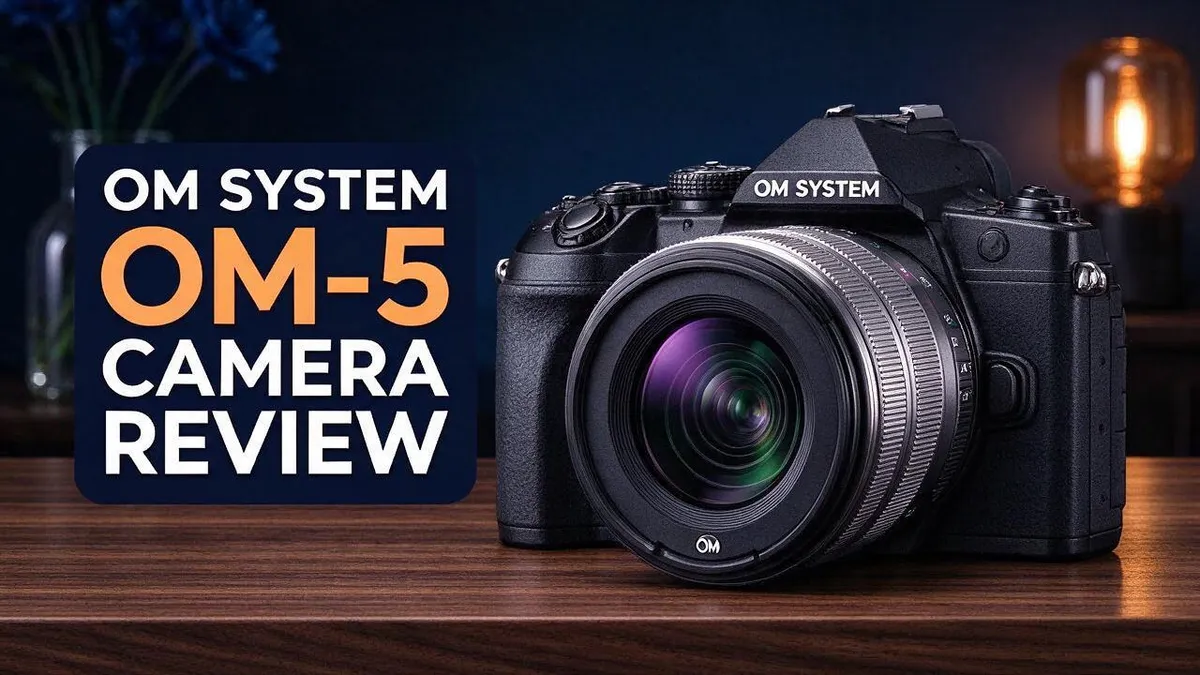
OM System OM-5 Camera Review: Specs, Performance, Video and Verdict
Looking for a small camera that does it all? The OM System OM-5 might be your match.
It packs a 20.4MP sensor and the TruePic IX processor into a compact body. Photos come out sharp and detailed.
Autofocus is fast and reliable. The 121-point phase-detection system tracks faces and eyes with ease.
Image stabilisation is a major highlight. Many users describe it as excellent, so handheld shots feel steadier.
Newcomers will also enjoy the creative tools. You get in camera focus stacking, High-Res mode, Starry Sky AF, and HDR. Video records up to 4K at 30fps.
Still, there are some drawbacks. The Micro Four Thirds sensor can struggle with noise in dim scenes. Default settings also tend to raise ISO in low light.
In this review, we break down the specs, performance, and real world results. Let’s see if this camera earns a spot in your bag.
In a Nutshell
- Focus stacking built in: The camera takes eight shots and blends them into one image. Nearby subjects look sharp from front to back.
- Handy night and sky modes: Starry Sky AF and Live Composite help you capture stars and light trails without extra gear.
- Video has limits: The top recording setting is 4K at 30 frames per second. You can also shoot at 25 and 24 frames per second.
- Grip matters on the Mark II: The newer model has a bigger grip. Your hand feels more secure during long shooting sessions.
- Noise appears in dim scenes: The smaller Micro Four Thirds sensor shows more noise in low light. Lowering the ISO yourself can help keep images clean.
- Where it fits the field: Rivals like the Canon EOS R10, Fujifilm X-S10, Nikon Z50, and Sony A6400 use larger sensors. The OM-5 suits you best if a compact body comes first.
Image Quality and Sensor

- Unmatched image quality: Sharp, stable, and vibrant shots—wherever you go.
- Compact and durable: Ready for the trail, no matter the weather.

Some of the links on this website are affiliate links, which means that at no additional cost to you, I earn a commission if you click through and make a purchase. I only recommend products and services that I believe will add value to my readers. Thank you for your support!
Good image quality starts with smart settings. The OM-5 may raise ISO on its own in dim rooms. Set a maximum ISO limit to keep your photos clean.
Stabilisation opens another option. Use a slower shutter speed and keep the ISO low. This suits still subjects like buildings, statues, or food on a table.
Moving subjects still need a faster shutter. Otherwise, they can look blurry even with steady hands. Plan your shutter speed based on what you shoot.
The smaller sensor also affects depth of field. More of the scene stays sharp at the same aperture. This helps with landscapes and group shots.
Want a softer background instead? Choose a lens with a wider aperture. You can also move further from the background behind your subject.
White balance needs attention in mixed light. Shops and homes often mix warm bulbs with cool daylight. Pick a manual white balance when colours look off.
RAW files hold more data than JPEGs. They give you more room to adjust exposure, shadows, and highlights later.
Many photographers save RAW for important shots. JPEG works well for quick sharing on phones and social feeds. Try both formats and see which one fits your workflow.
High Res mode suits still scenes with fine textures. Place the camera on a tripod so each frame lines up well. Stone walls, fabric, and tree bark show extra detail.
Sky shots need care too. Watch for bright clouds that can wash out detail.
Exposure also matters when light changes fast. Check your preview and histogram often. A quick look helps you fix brightness before the moment passes.
In short, the OM-5 gives clean results in good light. With the right settings, it also handles dim scenes with confidence.
A little practice goes a long way. Test these tips on a few outings before a big trip.
Autofocus and Subject Detection
Subject detection is where the OM-5 feels most modern. The camera looks for faces and eyes, so it helps guide focus for you.
This feature shines in people photos. Portraits look sharp because the focus lands on the eyes first.
The 121-point phase detection grid covers much of the frame. Your subject does not need to sit in the center. You can place it where the composition looks best.
Match the mode to your subject. Single AF suits still scenes like landscapes or flowers. Continuous AF suits moving subjects such as kids, pets, or cyclists.
Fast movement tests any camera. Keep the subject inside the grid and let the camera track it across the frame.
Busy scenes can confuse the system. A crowd may pull focus to the wrong face. Pick a single point and place it on your main subject.
Half-press the shutter to lock focus. Then move the frame to your final composition. This trick works well when the subject sits off center.
Dim scenes can slow the search for a subject. Give the camera a moment to lock on. Patience pays off in shadows.
The system can search for a face again when the subject moves a little. Keep the subject in view and let the camera work.
Pets make excellent practice partners. Their quick moves help you learn how the tracking reacts. Try a few short bursts at home.
Small habits lead to sharper shots. Check your focus on the screen after each frame. Adjust the point or mode when the result looks soft. For sports or wildlife, practice matters even more.
Subject detection will not fix every shot. Still, it removes much of the guesswork. In short, the OM-5 gives you a helpful focus partner for everyday life.
Image Stabilisation and Handling
The OM-5 uses built in image stabilisation to steady your shots. The sensor moves to cancel small shakes from your hands. Many people find this helpful when shooting without a tripod.
Reviewers describe the system as excellent. It helps you use slower shutter speeds without blur. A steady hand becomes far more useful in dim rooms, museums, or evening streets.
Stabilisation works best with good technique. Hold the camera firmly with both hands. Keep your elbows close to your body. Breathe out slowly before you press the shutter.
The body feels comfortable in the hand for most users. It feels light for long walks. The controls sit where your thumb and fingers can reach them without stretching.
Spend a few minutes learning the button layout. Muscle memory saves time when a moment passes quickly. You can change key settings without taking your eye away from the viewfinder.
Shooting at eye level feels steadier than arm’s length. The electronic viewfinder pulls the camera close to your face. Your elbows and head then act as extra supports.
The touchscreen adds another layer of control. You can tap to set focus points or adjust menus quickly. Many shooters use the screen for framing when the camera sits low.
Wrist straps can also help on long days. A secure strap prevents drops when you move quickly. Keep the camera close and ready for the next moment.
Practice holding still before important shoots. Try a series of shots at slow speeds. Compare the sharp frames with the blurry ones to see your progress.
Good handling builds confidence. A camera that feels natural in the hand invites you to shoot more often. That habit leads to better pictures over time.
Take a short walk with the camera before a big trip. Test each button and dial while you move. You will learn the feel of the body before it matters most.
Top 3 Alternatives
Sony Alpha a6400
No products found.
The Sony Alpha a6400 is a compact mirrorless camera that focuses quickly. Its real-time autofocus tracks people and animals well. Vloggers like it because the screen flips out and the microphone input works well.
Its 24.2MP sensor takes sharp photos in good light. It records clean 4K video with little fuss. Most users find the battery life fine for a day of shooting.
Fujifilm X-T30 II

- Bundle Items Include: 1 x FUJIFILM X-T30 II Mirrorless Camera with XC 15-45mm OIS PZ Lens (Silver) + 1 x 64GB Extreme Pro SD Card + 1 x Soft Case + 1 x Battery For FUJI + 1 x Tripod + 1 x Wireless Shutter + 1 x Hand Strap + 1 x Cleaning Kit + 1 x USB Card Reader + 1 x Memory Card Wallet + 1 x Lens Cap
- Exceptional Image Quality in a Compact Form: The 26.1MP APS-C X-Trans BSI CMOS 4 Sensor delivers stunning detail, accurate color reproduction, and smooth tonal transitions, even in low light. With 100% phase-detection AF and 425 selectable points, it ensures precision focus for stills and video. Ideal for photographers and videographers, Vloggers and Filmmaker seeking professional performance in a portable design.
Some of the links on this website are affiliate links, which means that at no additional cost to you, I earn a commission if you click through and make a purchase. I only recommend products and services that I believe will add value to my readers. Thank you for your support!
The Fujifilm X-T30 II offers a classic feel with modern tools. Its dials on top make changing settings simple. Many photographers enjoy the film simulation modes, which create lovely colors straight out of the camera.
The 26.1MP sensor handles fine detail well. It also records 4K video with natural color. The light body fits easily in a small bag for travel.
Canon EOS R10

- DIGIC X IMAGE PROCESSOR: Enhances performance for sharp photos and ultra-high definition videos
- CMOS SENSOR: Canon’s 24.2 MP APS-C CMOS sensor ensures images appear crisp
Some of the links on this website are affiliate links, which means that at no additional cost to you, I earn a commission if you click through and make a purchase. I only recommend products and services that I believe will add value to my readers. Thank you for your support!
The Canon EOS R10 is a lightweight mirrorless camera that suits beginners. It uses a 24.2MP sensor and fast processing. Its autofocus system detects eyes and faces, which helps with portraits and family photos.
The grip feels comfortable during long shoots. The touchscreen makes focusing easy. Overall, the R10 suits people who want Canon colors and simple controls.
Computational Photography Modes
The OM System OM-5 packs several computational photography modes into a small body. These modes let the camera combine multiple frames. You get results that once needed a computer and careful editing.
Focus stacking is one of the most useful tools. The camera takes eight shots at different focus points. It then blends them into one image with sharp detail from front to back.
This works well for close up subjects like insects, flowers, or small objects. Place the camera on a tripod for the best results. Keep the subject still between frames.
Live Composite works in a different way. It layers exposures over time and shows the result as you shoot. Light trails and fireworks look especially dramatic this way.
Next comes Starry Sky AF. This mode helps the camera focus on stars in dark skies. It saves time when you chase the night sky outdoors.
HDR mode blends several exposures into one balanced frame. Bright skies and dark shadows both keep their detail. Scenes with strong contrast benefit the most.
The scene modes give another helpful shortcut. The camera adjusts settings for a chosen subject. Newcomers can learn what each setting does by trying them one at a time.
Keep one tip in mind. Computational modes need time to process. Wait for the camera to finish before you move it or change the scene.
Some modes also need still subjects. Moving leaves or water can create ghosting. Test each mode first, then decide which one fits your style.
Many users find these modes fun to explore on weekends. Each one teaches a little more about light and timing. Over time, you will know which mode to reach for.
Experimenting also builds confidence for harder shots. Try one mode on the same scene. Compare the files side by side to see the difference clearly.
Video Performance
The OM System OM-5 records video at up to 4K at 30 frames per second. It also supports 25 and 24 frames per second. These options cover most everyday clips and simple home projects.
Still, many reviewers rate the video performance as fair. One forum user even called it a disappointing upgrade. That feedback suggests stills remain the main strength. Many shooters still choose it for photos first.
The Micro Four Thirds sensor plays a big role here. It is more prone to noise when light gets low. Clips shot indoors or at dusk can look grainy.
Default settings add another challenge. The camera tends to raise ISO in dim scenes. Higher ISO brings more noise into your footage. Check the ISO setting before every session, because auto ISO can surprise you at sunset.
Good habits can help. Set a lower maximum ISO before you record. Add light with a lamp or a window. Test a short clip first.
Frame rate matters too. Choose 24 frames per second for a film look. Choose 30 for smoother motion in busy scenes.
Sound matters as much as sight. The internal microphone picks up wind and room noise easily. An external microphone can improve clear speech for vlogs.
Rival cameras use larger APS-C sensors. The Canon EOS R10, Fujifilm X-S10, Nikon Z50, and Sony A6400 are in the same class. Each one has a bigger sensor than the OM-5, and their bigger sensors often handle dim rooms better.
Panasonic G9 and GH6 are larger cameras. They serve a different type of shooter. If you need heavier video work, look at those models.
Overall, the OM-5 works well for casual clips. Lighting does most of the work. Stillness is key in video, so a tripod helps. Keep your videos simple and short at first.
Pros and Cons
Pros
- The 20.4MP sensor gives you room to crop shots without losing much detail.
- The TruePic IX processor helps the camera respond quickly.
- The 121-point autofocus locks onto subjects fast.
- Face and eye detection keeps portraits sharp.
- It suits beginners who want both photo and video features in one body.
Cons
- Some buyers expect a bigger leap from earlier models.
- Dim scenes may need extra light or a steady support.
- You get less natural background blur than with larger sensors.
Who Should Buy It
The OM System OM-5 suits certain shooters better than others. Knowing your own habits helps you decide with confidence.
Travelers who want to pack light will appreciate the compact frame. It slides into a daypack without much fuss, which matters on busy trips.
Hikers and outdoor fans can carry it for hours. The lighter build keeps the load manageable on long trails and steep climbs.
Social media creators often need quick clips more than long films. This camera handles short videos well, so it fits that style of posting. Quick edits and short uploads suit it nicely.
Smartphone users ready to upgrade will notice a clear step up. A dedicated lens and real controls open new creative choices that phones cannot match.
Newcomers who want room to grow gain a helpful path. Simple automatic options work on day one, and manual settings can come later as skills improve.
Family photographers often want a camera that feels approachable. This model keeps everyday snapshots simple while still offering deeper control when you need it.
Shooters with larger hands should check the Mark II first. Its bigger grip feels more secure during long sessions.
Night photographers should look at other options. Canon EOS R10, Nikon Z50, and Sony A6400 use larger sensors, so they may handle dark scenes better.
Professional videographers need more than this body offers. Serious film projects often call for a stronger video system with more advanced tools.
Think about your shooting style before you commit. Read the list again and see which group describes you best.
In short, this camera fits casual creators, travelers, and beginners. Match it to your goals, and you will likely enjoy every outing.
Final Verdict
The OM System OM-5 earns a strong spot in the lineup. It handles everyday scenes with ease. The image stabilisation feels excellent, so handheld shots stay steady even at slower speeds.
Think about how you plan to shoot. If your days include photo walks, city trips, or casual family moments, this camera rewards you. If your goal is polished video, look at other options first.
The camera also deserves a fair test against its rivals. Each one brings its own menu style, lens range, and button layout. Handling the Canon EOS R10, Fujifilm X-S10, Nikon Z50, and Sony A6400 in person helps you decide which feels natural.
Focus stacking deserves a closer look too. Macro fans can use it to keep tiny details sharp from front to back. Few beginners expect that kind of creative help from a camera this size.
Lens choice shapes your final results. A bright prime lens can add soft background blur and sharp detail. Kit zooms work well for everyday shots. Good glass often matters as much as the body.
Your first weeks with the camera will teach you a lot. Shoot in different light, test each mode, and review your files on a large screen. Patience pays off. Small habits build skill faster than any single setting.
Keep your expectations realistic before you buy. Clips may look fine on a phone screen but less sharp on a big monitor.
Our final take is simple. The OM-5 suits photo-first shooters who want stability, speed, and a compact design. Video fans should test clips before they commit.
Pick up the camera, check the buttons, and shoot a short test roll. Trust your own eyes, and let your shooting style guide the choice.
Frequently Asked Questions
Does the OM System camera keep handheld shots steady?
Yes, the image stabilisation earns high praise. It helps you hold slower shutter speeds without blur. Handheld shooting in soft light becomes much easier.
How good is the video quality?
Reviewers rate the video as fair. Some users expected more, and one called it a disappointing upgrade. The camera handles short everyday clips well, but longer projects may need a stronger tool.
Which cameras should I compare it with?
Look at the Canon EOS R10, Fujifilm X-S10, Nikon Z50, and Sony A6400. Each one sits in a similar market. Compare autofocus, menus, and lens options before you decide.
Are the scene modes useful?
Yes, the camera offers many scene modes that help you learn. Try a few and watch how each setting changes the image. You can build your skills faster this way.

Welcome to The File Fix. I’m Millie, and I review tech so you don’t have to suffer buyer’s remorse.
Navigating the endless sea of Amazon devices and gadget releases can feel like a full-time job. That’s why I do the heavy lifting. I dig past the unreliable 5-star reviews and shiny spec sheets to test how these devices actually hold up in the real world. Whether you’re looking for the best budget earbuds, a reliable power bank, or the latest smart home gear, you’ll find honest, no-nonsense breakdowns here.