Canon EOS R50 V Review: Don’t Buy Until You See This
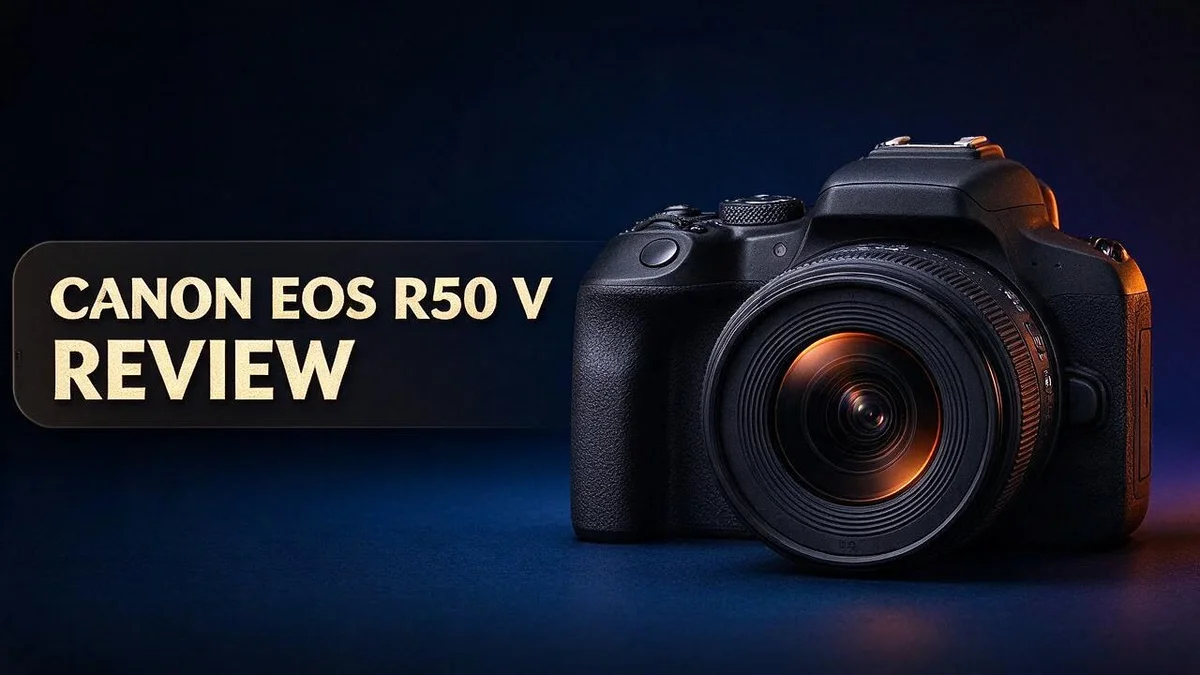
Are you looking for a camera that fits in your bag and still shoots stunning video? The Canon EOS R50 V might be the answer. It packs a 24MP sensor, 4K video at 60 frames per second, and a body that feels light in your hands.
Content creators and casual shooters both gain plenty from this model. Autofocus feels quick and responsive. You can also use over 50 lenses, so your setup can grow with you.
Clean images appear up to ISO 800, which suits many indoor shoots. Let us take a closer look at what this camera does well.
In a Nutshell
- Wide lens choice: The camera supports over 50 Canon lenses. You can pick the right glass for portraits, landscapes, or fast action.
- Fast focus tracking: The autofocus feels snappy, and the large focus point count helps you lock onto moving subjects. Your shots stay sharp when the action gets quick.
- Helpful video controls: The front and top recording buttons include a tally lamp. Smart video modes make filming simpler, so new creators can start recording with less setup.
- Flexible tripod mounting: Horizontal and vertical tripod mounts let you shoot tall or wide frames. Switching orientation takes only seconds, which saves time on busy shoots.
- Pleasing dynamic range: Users report good detail in both bright skies and deep shadows. Your footage holds up well in mixed lighting.
- Best in good light: Noise stays low only up to ISO 800. Shooters who work in dim rooms should plan extra lighting for the best results.
Key Features and Specifications

- Includes Versatile 18–45mm Lens: Covering wide to standard focal lengths, this compact zoom lens is great for daily content, portraits, and street shooting.
- Oversampled 4K with Dual Pixel AF: Enjoy sharp, smooth footage with reliable subject tracking, face/eye detection, and autofocus built for creators.
Some of the links on this website are affiliate links, which means that at no additional cost to you, I earn a commission if you click through and make a purchase. I only recommend products and services that I believe will add value to my readers. Thank you for your support!
The sensor delivers 24MP of effective resolution. Each still image measures 6000 by 4000 pixels. That count gives you plenty of room to crop without losing detail.
Video runs at 4K60p. Smooth motion helps when you film sports, pets, or quick moments. Each frame stays sharp, even when the action moves fast.
Color depth reaches 10 bit 4:2:2. This format records more color data than standard video. Editors gain flexibility when they grade footage and adjust skin tones.
The 4K output comes from 6K oversampling. The sensor captures a larger frame, then scales it down to 4K. This process helps reduce jagged edges and adds crisp detail.
The ISO range spans 100 to 32000. That wide span gives you options in many lighting conditions. Higher settings bring more noise, so balance your exposure carefully.
Smart video modes handle many settings for you. Beginners can press record and focus on framing instead of menus. Experienced creators can also use these modes as quick starting points.
Key specs show a compact camera with strong video features. The 24MP sensor, 4K60p recording, and 10 bit color give creators a useful toolkit. Together, these details make the R50 V a smart pick for hybrid shooters.
Cons appear rarely in early reviews. Most early reviews focus on positives rather than drawbacks. Readers should test the camera in their own setting before they decide.
Compatibility with existing gear matters too. If you own Canon RF lenses, you can start shooting quickly. Check your lens list before you buy extra glass.
Spec sheets can mislead without real use. Numbers show potential, but hands-on testing shows how the camera feels. Try it in your favorite light before you decide.
Image Quality and Low-Light Performance
Image quality depends on the sensor, but light still decides most results. Your photos look their best when the scene has enough light to work with.
Noise rises gradually as ISO climbs. Past ISO 800, you may see grain in shadows and smooth areas like skies. Even so, these files work well for social posts and small prints.
Try ISO 1600 and 3200 when a scene turns dim. These settings keep shutter speeds fast enough to freeze motion. Check your results on a larger screen before you rely on them.
Lens choice matters just as much as the body. A lens with a wide maximum aperture lets in more light. You can then keep ISO lower and capture cleaner files.
Shoot in RAW for extra control. RAW files hold more tonal data than JPEG files. You can recover shadow detail and reduce noise later in your editing app.
Exposure habits shape the final image too. Try to keep the histogram near the bright side without clipping highlights. This approach keeps tones smooth and lowers visible noise in darker areas.
Color rendering deserves attention as well. Skin tones look natural under warm indoor lights when you set white balance by hand. A custom setting takes only seconds and saves time later.
Sharp focus matters more than any sharpening filter. Aim your focus on the subject’s eyes for portraits. Single point focus gives you the most control over where the sharpness lands.
High resolution files also give you room to crop. You can frame a subject tighter and still print a clear image. Cropping also helps when you cannot move closer. Keep crops moderate, though, so fine detail stays crisp.
Good light and smart settings bring out the best in this camera. Test these habits in your usual shooting spot. That practice shows you the real limits and helps you shoot with confidence.
Autofocus and Subject Tracking
Good focus starts with the right focus area. Pick a small area for still subjects like flowers or products. Switch to a wider area when your subject moves around.
Subject tracking works best with a clear target. Choose one person, animal, or vehicle in the frame. The camera then follows that target as it moves.
Light also affects how fast the lock happens. Bright scenes give the sensor more signal to work with. Dim scenes can make focus hunt back and forth.
Motor speed shapes how quickly focus settles. Lenses with quiet and quick motors help the camera lock on faster. Kit lenses can work well for casual shooting, but they may feel slower.
Burst shooting helps you catch the right moment. Hold the shutter button down during action. Review the frames later and keep the sharpest one.
Distance changes how tracking behaves too. Close subjects fill the frame and can leave less room for error. Step back a little if the tracking struggles.
Practice makes tracking feel natural. Walk a short path with a friend and follow them. Try different speeds and angles. You learn how the camera responds to your habits.
Check your focus before big moments. Take a few test shots first. Zoom into the image on your screen to confirm the subject is sharp.
Focusing ahead of time helps with predictable movement. Set focus on the spot where the action will happen. Wait for the subject to arrive, then press the shutter. This method suits races, dance shows, and sports games.
Scene planning saves effort. Think about where your subject will move. Choose a spot with clear space and even light. Your camera will work with less struggle.
In short, the autofocus system suits many everyday subjects. Beginners can start with simple settings. Experienced users can build deeper habits over time. Keep practicing and enjoy the process.
Top 3 Alternatives
Sony ZV-E10 II

- The Sony ZVE-10 II with the 16-50mm lens is your ideal travel companion, delivering high-quality photos and 4K videos in a portable package.Boasting a 26MP APS-C Exmor R CMOS sensor and a powerful BIONZ XR image processor, this camera ensures exceptional image and video quality, even in low light conditions. Equipped with a flip-out LCD screen and built-in microphone, it's designed for vloggers and content creators, offering convenience and professional audio capture.
- Capture stunning photos and videos with the 26MP APS-C Exmor R CMOS sensor and a powerful BIONZ XR image processor, delivering impressive image quality even in low light conditions.Real-time Eye Autofocus and Tracking technology keeps your subjects in focus, making it effortless to capture sharp, professional shots.Share your content wirelessly with Wi-Fi and Bluetooth, and control your camera remotely, simplifying your workflow and enhancing your creative capabilities.
Some of the links on this website are affiliate links, which means that at no additional cost to you, I earn a commission if you click through and make a purchase. I only recommend products and services that I believe will add value to my readers. Thank you for your support!
The Sony ZV-E10 II is a strong choice for creators who love shooting video. It records 4K footage at up to 60 frames per second, so motion looks smooth and sharp. Its product showcase setting shifts focus from the presenter to items held up to the lens. The fully articulating screen also makes selfie framing simple for vlogging.
Fujifilm X-S20

- 26.1 megapixel X-Trans CMOS 4 sensor and X-Processor 5
- Up to 7 stops of Internal Body Image Stabilization (IBIS)

Some of the links on this website are affiliate links, which means that at no additional cost to you, I earn a commission if you click through and make a purchase. I only recommend products and services that I believe will add value to my readers. Thank you for your support!
The Fujifilm X-S20 gives you plenty of creative control. Its image stabilization keeps handheld footage steady, even when you walk and talk. Film Simulation modes add classic color looks straight from the camera, so you spend less time editing. Photographers and filmmakers both enjoy its flexible design and easy controls.
Nikon Z50 II

- Nikon USA Authorized Bundle Includes: Nikon Z50 II Mirrorless Camera with Z DX 16-50mm f/3.5-6.3 VR lens. + Camera Bag + 128GB Memory Card
- Compact Mirrorless Camera with Versatile Zoom Lens – The Nikon Z50 II combines a 20.9MP DX-format CMOS sensor with Nikon's flagship EXPEED 7 image processor to deliver exceptional image quality, fast performance, and continuous shooting up to 30 fps. Paired with the lightweight NIKKOR Z DX 16-50mm VR lens, this kit is ideal for landscapes, portraits, travel, street photography, family moments, and everyday creative shooting.
Some of the links on this website are affiliate links, which means that at no additional cost to you, I earn a commission if you click through and make a purchase. I only recommend products and services that I believe will add value to my readers. Thank you for your support!
The Nikon Z50 II suits people who want fast and accurate focus. Its autofocus tracks subjects such as people, animals, and vehicles. It records 4K video at high frame rates for detailed, clear clips. The comfortable grip feels secure during long shoots, which helps you stay focused on your creative work.
Video Capabilities and Recording Tools
Video work feels easier with the right controls. The Canon EOS R50 V includes handy buttons and lights that keep recording simple.
You can reach a front recording button near the grip. Press it to start filming while you hold the camera at chest level.
The top recording button sits where your finger rests naturally. Use it for quick clips during a family trip or a short outing.
The tally lamp shows when the camera records. A small light glows while the camera rolls. Everyone nearby can see that recording is active at a glance.
This feature helps during interviews and vlogs. You can keep eye contact with the person in front of you. Nobody needs to ask if the camera is running.
Horizontal and vertical tripod mounts add flexibility. You can mount the camera in landscape or portrait orientation. Vertical framing suits short videos that play on phones.
A solid mount keeps the frame level during long takes. Pair it with a tripod for smooth pans and calm interview shots.
Check the lamp before every recording. A quick glance confirms the camera has started. This habit prevents missed moments at weddings, recitals, or pet videos.
Long days need extra power. Carry a spare battery and charge it the night before. This keeps your recording going during events.
Keep one hand near the top button while you move. This habit keeps your footage steady and reduces sudden jerks in the frame.
Try a short walk with the camera. Press record, move slowly, then stop. Watch the clip to spot shaky moments.
Practice these controls before a big shoot. Start a test clip and check the tally lamp. Then review the file on a phone or computer.
Good habits save time later. Label each clip right after you record it. Add a short note about the scene and the time.
Build, Size and Lens Ecosystem
The Canon EOS R50 V feels light and easy to carry. Its compact body fits into a small backpack or a large coat pocket without much fuss.
Its classic SLR style shape will feel familiar to anyone who once used a DSLR. The layout makes sense right away, so you spend less time hunting for settings.
Handling feels natural for most shooters. Your hand rests comfortably on the grip, even after a long day of photos.
Size also helps when you travel. You can carry the camera on a trip with a second lens and still keep your bag manageable.
The lens ecosystem shapes what this camera can do. The R50 V uses the Canon RF mount, which supports more than 50 lenses. That range gives you room to grow as your skills improve.
Lenses built for smaller sensors suit this camera well. They keep the whole setup small and light.
Full frame RF lenses also mount on the body. They work well here, though the image crops to match the smaller sensor.
Pick a lens that matches your subject. A short zoom suits everyday walks and family moments. A longer telephoto lens helps with sports or wildlife.
Mounting a lens feels smooth and quick. Line up the marks on the lens and body, then turn until it clicks.
Many photographers carry only two lenses for travel. A single versatile zoom often covers most days.
Think about the future when you choose. Each new lens adds creative options over time. Starting with a good base lens keeps your choices open and your bag light.
Check lens compatibility before you buy so you avoid surprises. Look for firmware notes on the Canon website too.
Pros and Cons
Pros
- Fast autofocus with 4,503 AF points keeps moving subjects sharp.
- Strong 4K60p video gives smooth motion for action clips.
- 10-bit 4:2:2 color offers rich tones for editing.
- 6K oversampling produces clean, detailed 4K footage.
- Crisp 24MP photos leave room for cropping.
Cons
- Low light shots get noisy above ISO 800.
- The APS-C sensor creates less background blur than full frame.
- Dim venues often need extra light or a faster lens.
- Night photos take more care to keep noise under control.
Who Should Buy It
The Canon EOS R50 V fits a specific group of creators well. Some shooters will feel right at home, while others may want something else. Here is a closer look at who should buy it.
Phone photographers ready for more control will find a clear step up. The camera gives you real creative tools, so you can grow your skills over time.
Hybrid creators form another strong fit. If you shoot product photos in the morning and record short clips in the afternoon, one body covers both jobs. You avoid carrying separate gear for each task.
Families who love candid moments also benefit. Kids, pets, and birthday parties move fast. The camera keeps up with that energy and returns sharp, detailed images you can print or share.
Students and new vloggers can start small. Learning video and photo basics on one camera builds good habits. The camera grows with you as your skills improve.
Hobby photographers who enjoy experimenting will have fun. Each setting change shows a clear result, which speeds up learning and keeps practice sessions interesting.
On the other hand, night photographers and concert shooters should think twice. Noise appears above ISO 800, which can frustrate anyone shooting in dark rooms. Dim lighting often calls for extra gear, which adds weight and extra steps. A bigger sensor or a brighter lens may serve those jobs better.
Professional studio shooters who need the largest sensor size should look at full frame bodies instead. Commercial clients often expect that extra detail and depth.
Think about your favorite subjects and your typical lighting. Those two factors usually decide whether this camera fits your daily needs. Ask yourself what you shoot most. If the answer is everyday life, family moments, and mixed photo and video work, this camera deserves a close look.
Final Verdict
The Canon EOS R50 V earns a strong place on your shortlist. It blends a compact design with capable photo and video tools.
Overall, this camera suits people who want room to grow. Beginners get friendly controls, while experienced shooters find useful depth.
The front and top recording buttons make starting a clip quick. A tally lamp shows when the camera rolls, which helps solo creators stay in control.
Smart video modes also guide newcomers. They handle settings that often confuse first-time filmmakers.
Horizontal and vertical tripod mounts help when you shoot vertical clips for social media.
Early users report strong dynamic range. Bright skies and shadowed faces can both keep detail, which saves time during editing.
Before you commit, test the feel in person. Visit a store, hold the camera, and check how the menus work for you.
Watch sample footage shot in your own environment. Real lighting tells you more than any spec sheet.
Consider your long term goals as well. A camera should grow with your skills, not hold them back. The R50 V gives beginners a comfortable starting point.
Many creators want one body for both photos and video. This model handles both tasks without forcing you to switch gear.
Think about the total picture, not just one feature. Autofocus, video, handling, and lens access all work together. The best result depends on how well these parts fit your daily routine.
Plan your lens collection early so your kit can keep pace with your skills.
Daily shooters should practice with the controls until they feel natural. Smooth muscle memory makes a big difference during fast moments.
In short, the R50 V delivers solid performance for the right buyer. Match its strengths to your shooting habits, and it can serve you well for years.
Your final choice should feel exciting, not stressful.
Frequently Asked Questions
Is the Canon EOS R50 V a good first mirrorless camera?
Yes, it suits people who are new to mirrorless cameras. The smart video modes handle many settings for you. New shooters can learn the basics at their own pace and grow into more manual control later.
Can I use the lenses I already own?
The camera supports more than 50 Canon RF lenses. Check your lens type before you buy. This step helps you avoid surprises and makes sure your favorite glass works with the body.
How is the R50 V different from the standard Canon EOS R50?
The R50 V sits next to the standard R50 in Canon’s lineup. Compare the video buttons, smart modes, and other features side by side. Choose the version that matches how you shoot most days, whether that means photos, clips, or both.
What should I check before I buy?
Research shows few clear drawbacks, but low light remains the main limit. Test the camera in a shop if you can. Hold it, check the menu layout, and see how the grip feels in your hand. A short hands-on test often tells you more than any spec sheet.

Welcome to The File Fix. I’m Millie, and I review tech so you don’t have to suffer buyer’s remorse.
Navigating the endless sea of Amazon devices and gadget releases can feel like a full-time job. That’s why I do the heavy lifting. I dig past the unreliable 5-star reviews and shiny spec sheets to test how these devices actually hold up in the real world. Whether you’re looking for the best budget earbuds, a reliable power bank, or the latest smart home gear, you’ll find honest, no-nonsense breakdowns here.