Kodak PIXPRO FZ55 Review: Specs, Image Quality, Speed, and Who It Suits
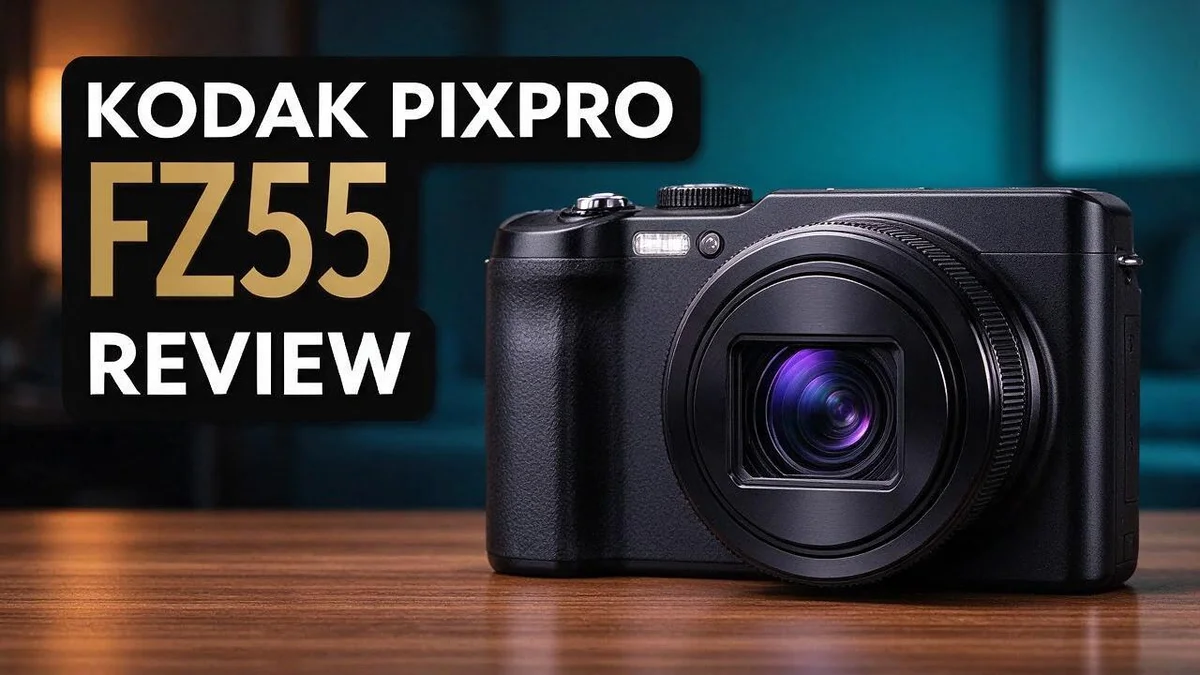
If you want a simple camera that fits in your pocket, the Kodak PIXPRO FZ55 deserves a close look. It packs a 16MP sensor, a 2.7″ LCD, and easy controls into a light body that weighs just 118.5 g with the battery.
Beginners often feel lost with complex settings. This camera keeps things simple. You can point, shoot, and start taking photos fast.
Still, it has limits. Reviewers say it struggles with quick action, so sports fans may want something else. Some also question the build quality.
Image quality looks close to mid-range phones, and that matters for many buyers. In this guide, we break down the specs, the real strengths, and the drawbacks.
In a Nutshell
- Sensor and resolution: The camera uses a 16MP 1/2.3 inch CMOS sensor. It covers ISO 100 to 3200, so it handles many lighting conditions with ease.
- Easy viewing: A 2.7 inch LCD monitor helps you frame shots and check photos right away. The screen gives you a clear view for everyday use.
- Power and storage: A rechargeable lithium ion battery keeps the camera ready for outings. It accepts SD cards up to 512GB, so you can store thousands of photos without swapping cards often.
- Print size: Your photos can print up to 19 by 14 inches at 240 DPI. This makes it a good choice for family snapshots and framed wall prints.
- Shooting speed: Many users say the camera shoots at a decent speed for general scenes. However, it struggles with fast moving subjects like sports or active pets.
- Build concerns: Some reviewers describe the build as cheap, with questionable quality control. Still, many people say the colors look nice in their final shots.
Design and Build Quality

- 16MP Sensor: Captures detailed photos with a CMOS sensor for everyday shooting
- Optical Zoom: 5x optical zoom with a 28mm wide angle lens for flexible framing indoors or outdoors

Some of the links on this website are affiliate links, which means that at no additional cost to you, I earn a commission if you click through and make a purchase. I only recommend products and services that I believe will add value to my readers. Thank you for your support!
The Kodak PIXPRO FZ55 has a compact body that fits easily into a jacket pocket. You can take it almost anywhere without thinking twice.
The body feels light in your hand. That makes it easy to carry on long walks or day trips.
Grip matters for steady shots. The grip area is small, so some owners with larger hands may feel cramped.
Most controls sit in clear places. You can find many buttons by touch without checking the screen.
The menus follow a simple structure. This helps new users learn the camera quickly.
Materials are the main concern. Reviewers describe the body as cheap. The plastic shell may feel less solid than metal models.
Build quality also affects how long the camera lasts. Careful handling protects the lens and buttons over time.
Weight also plays a role in comfort. A light camera reduces strain on your wrist during long shoots. However, light cameras can feel less steady in windy conditions, so a strap helps.
A wrist strap is a good idea. Attach one before each outing so the camera does not slip from your hand.
The lens area needs gentle care. Dust and fingerprints can soften image sharpness. Wipe the lens with a soft cloth before shooting.
Screen protection matters too. Small scratches on the LCD can make photos look hazy. A clear film is an easy way to guard it.
Use a soft case when you travel. A simple pouch can block dust and small bumps in your bag.
Loose covers can let dust reach internal parts. Close the battery door and card slot firmly after each change.
Overall, the design favors simplicity over a premium feel. Buyers who want a sturdy everyday camera should hold one in person first.
Image Quality and Color Rendition
The Kodak PIXPRO FZ55 aims for pleasant results straight out of the box. Reviewers say the colors look nice to the eye. Color is often the first thing people notice in a photo.
Bright daylight gives the best color results. Blue skies look clean, and green leaves appear fresh. Your subjects keep a natural look in open shade too.
Indoor scenes tell a different story. Warm room lights can cast a yellow tint on your photos. Move closer to a window to add softer, cooler light.
Keep the ISO setting low when light is strong. The camera offers a range from 100 to 3200. Lower settings keep colors smooth and clean.
Raising the ISO helps in dim spaces. However, the image may show more grain. Some color areas can look muddy as the noise grows.
Shadows deserve a quick check before you press the shutter. Dark areas may lose fine detail. Bright patches may lose color depth too.
Contrast also shapes how colors appear. Strong contrast makes reds and blues pop, while soft scenes look gentle. Choose scenes with clear light for the best color impact.
Backgrounds matter too. A plain wall or open sky lets your subject stand out. Busy patterns can make the image look crowded and less vivid.
Skin tones are a good test for any camera. Portraits taken outdoors usually look warm and pleasant. Place your subject facing the light for the best look.
White balance can fix many color problems. Choose the preset that matches your scene. Try a few test shots first so you know how your camera handles each setting.
Overall, colors look good for everyday snapshots. Family photos, holiday moments, and casual street shots show pleasing tones. Pay attention to light, and your pictures will look their best.
Shooting Speed and Autofocus
Speed and focus decide whether you catch the moment you want. The Kodak PIXPRO FZ55 locks on best when your subject stays still. Here is how it handles focus and timing.
Autofocus works well for posed portraits and landscapes. You aim at your subject, press the shutter halfway, and wait for the focus confirmation before you press fully.
Fast-moving subjects give this camera trouble. Reviewers advise against using it for sports, running pets, or kids in motion. Expect blurred frames when the action speeds up.
Shutter response can feel slow between presses. Some shots happen a split second after you press the button. Press early and hold steady to beat the delay.
Focus in dim rooms takes longer. The lens hunts for contrast when light fades. Turn on a bright room light or step closer to your subject.
Burst shooting helps with movement. Hold the shutter button and take several frames in a row. You can then pick the sharpest image later on your computer.
Pre focusing offers another option. Set focus on the spot where the action will happen, then wait for it. This trick works well at events like school plays.
Tracking a moving person needs practice. Pan with your subject and keep the frame centered. Small movements of your body make a big difference.
Focus lock helps with off-center subjects. Half press the shutter on your subject, then recompose the frame and press fully. This keeps the subject sharp.
Shutter lag can frustrate you at first. Give the camera a moment after turning it on. Learning its rhythm saves many missed chances.
Plan for unpredictable moments. Get the camera ready before the event starts. A comfortable grip keeps your hands steady while you wait.
In short, the FZ55 suits calm scenes and careful framing. Save fast action for a camera built for speed. Your patience will reward you with sharper family snapshots.
Top 3 Alternatives
Canon PowerShot ELPH 180

- 8x Optical Zoom with Optical Image Stabilizer helps you capture images with flexibility and ease
- 20.0 Megapixel CCD sensor combines with the DIGIC 4+ Image Processor to help deliver stunning image quality.Focal Length: 5.0 (W) - 40.0 (T) mm (35mm film equivalent: 28-224mm).
Some of the links on this website are affiliate links, which means that at no additional cost to you, I earn a commission if you click through and make a purchase. I only recommend products and services that I believe will add value to my readers. Thank you for your support!
Looking for a small and simple camera? The Canon PowerShot ELPH 180 fits easily in a pocket. It takes sharp photos in good light. Its compact body makes it great for daily trips and family outings.
The camera offers a 20 megapixel sensor and HD video recording. Beginners will find the auto mode easy to use. You can snap photos quickly without any fuss.
Canon PowerShot SX740 HS

- Powerful 40x Optical Zoom with Optical Image Stabilizer and Zoom Framing Assist
- 4K Video and 4K Time-lapse Movie
Some of the links on this website are affiliate links, which means that at no additional cost to you, I earn a commission if you click through and make a purchase. I only recommend products and services that I believe will add value to my readers. Thank you for your support!
If you want more zoom, this model is a strong pick. The 40x optical zoom lets you capture distant wildlife or sports action. It still stays small enough to carry on a day hike.
The camera also records 4K video. Its flip screen helps you take selfies and vlogs. Many users love how comfortable it feels in the hand.
Nikon COOLPIX A10

- COOLPIX P950 offers 16. 0 Megapixels of resolution
- COOLPIX P950 features an 83X optical zoom/166X Dynamic Fine Zoom
Some of the links on this website are affiliate links, which means that at no additional cost to you, I earn a commission if you click through and make a purchase. I only recommend products and services that I believe will add value to my readers. Thank you for your support!
The Nikon COOLPIX A10 keeps things very simple. It has a clean design and a lightweight body. Kids and new photographers often enjoy using it.
This camera focuses fast in most situations. Its 16 megapixel sensor produces bright, colorful shots. Pick this option if you want an easy point and shoot camera.
Ease of Use for Beginners
Starting with a new camera can feel intimidating. The Kodak PIXPRO FZ55 makes the first day much easier. Most people can take their first photo within minutes.
Setup takes very little time. First, charge the battery. Then slide an SD card into the slot and power on. Your camera is ready to shoot.
Beginners often worry about settings. This camera gives you a clear path. You can leave most options alone and still get good results.
Playback is your best teacher. After each shot, review the image on the screen. Zoom in to check focus and detail. This simple habit shows you what works.
Practice in a safe place first. Try your living room, a local park, or your backyard. Test different light levels so you learn how the camera reacts.
A short guide can help during your first week. Keep the manual nearby and read one section each day. Small lessons add up quickly.
Learning happens through regular use. Take a few photos every day. Review them each evening and note what looks good. You will spot patterns fast.
Clear controls build confidence. Each small win keeps you motivated. Celebrate a sharp photo of a pet, a friend, or a sunny street. Every success builds skill.
Some beginners worry about making mistakes. Mistakes are normal and easy to fix. Delete a blurry shot and try again.
Practice one setting at a time. Change it, take a test shot, and then reset it. Repeating this routine builds familiarity. Soon the process feels natural.
Keep a notebook of favorite settings. Write down what worked in bright sun or indoor light. This record makes future shoots faster.
Overall, this camera suits new photographers. It rewards patience and steady practice. Anyone who wants simple tools will feel at home quickly, even on the first day.
Print Output and Storage
Printing your photos turns digital files into something you can hold. The Kodak PIXPRO FZ55 prints up to 19 by 14 inches at 240 DPI. That size fits well on a wall or in a family album.
Large prints show every detail. Small flaws can stand out at this size. Review each image on a larger screen before you send it to print.
Storage starts with the memory card. The FZ55 accepts SD cards up to 512GB. A large card holds many shots, so you can avoid swapping cards during a long day out.
Choose a card with a good reputation and a fast write speed. Slow cards can delay the next shot. Format the card inside the camera before each trip. This step keeps files clean and reduces errors.
Keep a backup plan for your memories. Copy photos to a computer after each outing. Store a second copy on an external drive or a cloud folder. Two copies protect your work if one card fails.
Label your folders by date and place. Clear names make searching easy later. You can find a sunset from last summer in seconds. This habit saves time and stress.
Printing at home or at a photo lab gives you control. Many lab services accept files on a memory card or a USB stick. Ask the lab about file size and format first. A quick call can prevent wasted paper.
Think about your print size before you shoot. Plan your framing with the final print in mind. Large prints reward sharp focus and steady hands. Taking a moment to frame well saves you from disappointment later.
Pros and Cons
Pros
- Light enough to carry all day in a small bag.
- Simple controls with an easy menu layout.
- Quick enough for relaxed everyday shooting.
- Pleasant color tones for social media posts.
- Accepts SD cards up to 512GB for long trips.
Cons
- Quick action scenes are not its strength.
- The body can feel cheap in your hands.
- Some units may show uneven quality control.
- Image quality is close to mid-range phone cameras.
Who Should Buy It
The Kodak PIXPRO FZ55 fits several types of people. It works best for those who want a simple camera for everyday moments.
Parents often look for a first camera for their children. This model gives young shooters a fun way to explore their surroundings.
Teenagers who want to build their own photo projects may enjoy it. They can practice framing without the distraction of a phone screen.
Grandparents who want a thoughtful gift can also consider this camera. A dedicated camera can bring family gatherings to life in a fresh way.
Travelers who want a casual backup camera will find it handy on the road. It can slip into a jacket pocket for a quick stroll.
Hikers and picnic lovers may also like its easy handling. Sunny outdoor days often suit its straightforward approach.
People who prefer a physical camera over a phone can benefit most. Many phone users miss the focus on taking pictures alone.
Anyone who dislikes long editing sessions often prefers simple cameras like this one. Quick snapshots can reach friends with little effort.
Families with young children may enjoy passing the camera around. Everyone can take a turn without a long lesson.
Hosts of birthday parties could leave it out for guests. Guests can snap candid moments and share them later.
Pet owners who love capturing daily routines may also enjoy this model. Small shots of a dog on a slow walk can bring a smile.
Sports parents and wildlife watchers should look at faster tools. This camera keeps things simple, not fast.
Serious hobbyists who want advanced manual controls should look at other models. Those shoppers need more room to experiment.
Each buyer should think about how often they will shoot before deciding.
Finally, choose this camera if you want simple photos without the fuss. It makes a warm, fun companion for everyday family moments.
Final Verdict
Our final verdict is simple. The Kodak PIXPRO FZ55 is a friendly camera for relaxed photo days. It is not built for speed or sharp action.
Think of it as a companion for calm moments. Picture a stroll through a park, a family dinner, or a quiet beach walk. Those scenes suit it well.
Sports fans and wildlife watchers should look elsewhere. Fast subjects can blur or slip out of focus.
Think about where you will use it most. Indoor gatherings with dim lighting may challenge the sensor. Bright days outdoors bring out its best side.
Compare it with its siblings. Look at the Kodak PIXPRO FZ45 and C1 before you decide. Test how each model handles your favorite subjects. Side by side tests reveal differences that specs alone can hide.
Ask yourself one key question. Do you want a camera that stays out of your way? If yes, this model deserves a place on your shortlist.
Set realistic expectations before you buy. The camera will not replace a dedicated model with a larger sensor. It also will not turn every shot into a masterpiece.
Check the seller policy first. Reviewers report that quality can vary between units. A clear return window gives you room to test the grip, buttons, and screen.
Test the menus in a store if possible. Spend five minutes changing a setting. If the steps feel easy to follow, you will likely enjoy the camera more.
Pack a spare battery so you never miss a moment. Long days out can drain power quickly.
Remember the bigger goal. A camera is a tool for memories. The best model is the one you carry and use often.
Overall, this camera earns a friendly recommendation. It suits people who value simplicity over speed. Enjoy the process, and let your pictures tell your story.
Frequently Asked Questions
Which memory card should I buy?
The camera uses SD cards, so you can choose from common brands. Pick a card size that fits your shooting plans. Keep a spare card in your bag so you never miss a moment.
How do I keep the battery ready?
The camera uses a rechargeable lithium-ion battery. Charge it the night before a trip or a family event. A fully charged battery gives you peace of mind when the day runs long.
Can I frame my shots using the screen?
Yes. The 2.7 inch LCD monitor shows your scene before you press the shutter. You can also review photos right away and delete shots you do not like. This helps beginners learn what works.
What should I check when the camera arrives?
Start with a few test photos in good light. Look at the lens, the buttons, and the battery door for any loose parts. Check the results on a large screen so you can spot any issues early. If something seems wrong, use the seller’s return policy quickly.

Welcome to The File Fix. I’m Millie, and I review tech so you don’t have to suffer buyer’s remorse.
Navigating the endless sea of Amazon devices and gadget releases can feel like a full-time job. That’s why I do the heavy lifting. I dig past the unreliable 5-star reviews and shiny spec sheets to test how these devices actually hold up in the real world. Whether you’re looking for the best budget earbuds, a reliable power bank, or the latest smart home gear, you’ll find honest, no-nonsense breakdowns here.