Kodak PIXPRO AZ528 Review: 52x Zoom Bridge Camera Tested
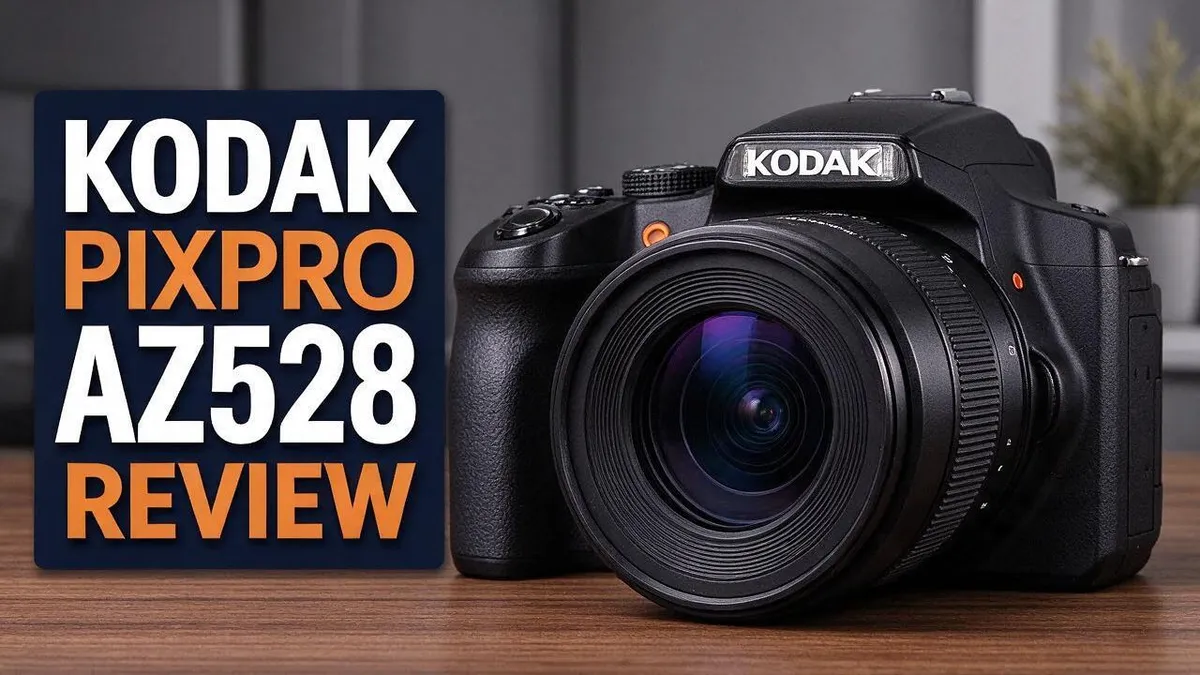
Looking for one camera that does it all? The Kodak PIXPRO AZ528 might be the answer. It packs a 52x optical zoom into a compact body, so you can capture distant wildlife without carrying a second lens.
Many people want a simple way to shoot distant subjects. This camera gives you that reach in one device. It also suits beginners who want to learn photography step by step.
The camera offers 16 MP resolution and Full HD video. It starts at a 24mm wide angle view, which suits landscapes and group shots. Stabilization keeps your shots steadier at full zoom.
In a Nutshell
- Reach distant details with ease. The 52x zoom pulls far away details into frame. You can capture wildlife, sports, or street scenes without moving closer.
- A wide start for groups and views. The 24mm starting point captures broad landscapes, big rooms, and crowded family photos. It gives you room to fit everyone in the shot.
- Steadier zoomed shots. Built-in stabilization helps keep images sharp when you zoom in fully. This matters most when you hold the camera by hand and cannot use a tripod.
- Easy to carry on trips. The medium body fits well in a day bag. It suits sightseeing, hikes, and family outings where you want one camera ready at all times.
- Strong owner ratings. One listing shows 82% of ratings at 4 stars or higher. That result suggests many owners feel happy with their purchase.
- Some critics want more. One Reddit user called it a generic bridge camera. Experienced shooters may want more creative control, so comparing models like the Canon PowerShot SX400 IS is a smart step.
Zoom Range and Lens Performance

- Bundle Items Include: Kodak PIXPRO AZ528 Digital Camera (Black), 32GB SDHC Memory Card, Camera Bag, Cleaning Cloth
- Explore distant subjects with the Kodak PIXPRO AZ528, featuring an impressive 52x optical zoom lens that spans a remarkable 24-1248mm equivalent focal length range. From wide landscapes and travel scenes to faraway wildlife or sports action, this powerful zoom allows photographers to capture subjects at virtually any distance with ease.
Some of the links on this website are affiliate links, which means that at no additional cost to you, I earn a commission if you click through and make a purchase. I only recommend products and services that I believe will add value to my readers. Thank you for your support!
The zoom range is the main draw of this camera. Many people never need a bag full of lenses.
Here is how the numbers work. The lens starts at a wide 24mm view and reaches a 52x zoom.
Multiply those numbers and you get a telephoto reach of about 1248mm. In standard camera terms, that is a very long reach for a camera this size.
Zoom range is not the same as image quality. Long reach can make small details look softer.
At the far end of the lens, tiny shakes show up fast. Light levels also matter more.
Bright daylight gives the best results at full zoom. Dim rooms and sunsets call for a more careful approach.
Try this tip: zoom in steps instead of jumping straight to the maximum.
Start at a medium zoom, frame the subject, then push in slowly. This habit keeps shots cleaner.
Edge sharpness can also vary across the frame. Center detail often looks cleaner than the corners at full zoom.
Crop your photos only when needed. Extra cropping adds more softness, so frame well from the start.
Keep the lens clean too. Dust and smudges reduce contrast, which matters most at long range.
Some situations suit this range well. Think bird watching, kids at a soccer field, or a parade.
Wildlife fans may enjoy the reach, though fast moving animals can be hard to track.
Autofocus can hunt at the far end of the zoom. Patience helps, so wait for the lens to settle.
Plan your shots before you zoom. Look at light, distance, and background first.
This simple check saves time and keeps your photos sharp.
Take a few test shots at different zoom levels. Compare them on a bigger screen to learn the limits.
Your results will grow with practice. Each outing teaches you how the lens behaves.
Image Quality and Stabilization
Zoom power only tells part of the story. Light and steadiness decide how clear your photos really look.
Low light is the main challenge. Indoor rooms and evening scenes can look grainy. Small sensors in super zoom cameras often struggle when the light fades.
Flash units on small cameras reach only a short distance. Distant subjects stay dark, so shoot outdoors or near windows when you can.
Colors look bright and clean outdoors. Sunny skies bring out rich greens and blues. Shade softens harsh contrast on faces and landscapes.
Hold the camera with both hands. Tuck your elbows close to your body. This simple grip reduces wobble before the stabilizer even starts.
Use the shutter halfway trick. Press the shutter button halfway to lock focus. Then press fully to take the photo. This keeps the frame calm.
Lean against a wall or tree for extra support. A solid surface absorbs small movements. Your shots gain sharpness without any extra gear.
A small tripod adds real stability. It also helps in dim light because you can use slower shutter speeds without blur. Look for a model that fits in your bag.
Review your photos on the screen. Zoom in on the preview to check focus. Delete blurry shots right away so your memory card stays organized.
Subject movement matters too. Moving kids or pets can blur even with stabilization. Choose a faster setting or shoot in brighter spots to freeze action.
Set realistic expectations. This camera suits casual snapshots and trips. Serious prints or heavy cropping may need a larger sensor camera.
Practice makes a big difference. Take test shots at home before a trip. You will learn how the camera reacts in your own lighting.
Controls and Ease of Use
Controls feel simple from the first use. Most people can pick up this camera and find their way around without a long manual. The layout suits someone who wants to shoot right away.
The main buttons sit where your fingers naturally rest. You can change settings with a quick press, so you spend less time searching and more time framing your shot.
Auto settings do most of the work. The camera makes many exposure and focus choices for you. This keeps the learning curve short. You can focus on what you see through the lens instead of on complicated settings.
The menus use plain labels. Beginners can find basic options like image size and playback without guessing. Once you learn the menu pattern, moving through the options takes only a few moments.
Scene settings cover common situations. Options for parties, beaches, and night views help you get decent results without changing much on your own. This works well for trips, school events, and family gatherings.
Hands-on learners who want deep, detailed control may outgrow this camera over time. Still, many people never need that level of control. They want a camera that just works.
Overall, the controls keep things friendly. The camera welcomes new photographers and removes much of the confusion. If you want a simple camera that lets you enjoy shooting, this model makes a strong starting point.
Top 3 Alternatives
Canon PowerShot SX740

- Powerful 40x Optical Zoom with Optical Image Stabilizer and Zoom Framing Assist
- 4K Video and 4K Time-lapse Movie
Some of the links on this website are affiliate links, which means that at no additional cost to you, I earn a commission if you click through and make a purchase. I only recommend products and services that I believe will add value to my readers. Thank you for your support!
This compact camera fits easily in a pocket. It offers a 40x optical zoom, so you can capture distant subjects like wildlife or sports. The 20.3-megapixel sensor produces sharp photos in good light. It also records 4K video, and the flip-up screen helps you shoot selfies and vlogs. If you want a small camera with plenty of reach, this model is a strong choice.
Nikon COOLPIX B600

- Includes all original accessories plus a 90 Day Warranty
- Nikon COOLPIX B600 16MP 60x Optical Zoom Digital Camera w/ Built-in Wi-Fi - Black
Some of the links on this website are affiliate links, which means that at no additional cost to you, I earn a commission if you click through and make a purchase. I only recommend products and services that I believe will add value to my readers. Thank you for your support!
Many people want a camera that zooms far without a big body. The COOLPIX B600 delivers a 60x optical zoom in a simple design. Its vari-angle screen lets you shoot from high or low angles. The camera also connects to your phone through Wi-Fi and Bluetooth, so you can share photos quickly. It works well for family trips and everyday snapshots.
Nikon COOLPIX B700

- 20.2MP 1/2.3" BSI CMOS Sensor
- NIKKOR Super ED 60x Optical Zoom Lens and rechargeable Li-ion battery EN-EL23
Some of the links on this website are affiliate links, which means that at no additional cost to you, I earn a commission if you click through and make a purchase. I only recommend products and services that I believe will add value to my readers. Thank you for your support!
If you need more detail, the COOLPIX B700 is worth a look. It also offers a 60x optical zoom and a 20-megapixel sensor. The tilting screen makes framing shots easier when the camera sits above your head or near the ground. Wireless connection keeps your phone and camera linked for quick transfers. This model suits photographers who want extra resolution and long zoom reach.
Body Size and Portability
The body sits in a medium size. It is not a tiny pocket camera, yet it does not fill a large bag either. Most people can carry it on a day trip without much effort.
The shape matters for travel. A camera this size fits in a shoulder bag, a backpack side pocket, or a daypack. It slides into a car glove box with room to spare.
Weight also shapes the daily experience. A lighter body feels easy during long walks. You can wear it on a strap all afternoon and barely notice it.
Long trips also test your shoulders. A lighter setup reduces fatigue after hours of sightseeing.
Pockets are a different story. Most jeans pockets will not hold this camera comfortably. A jacket pocket works better on cool days, when the coat has extra room.
Think about where you will shoot. At a theme park, a museum, or a hiking trail, a compact body keeps your hands free. You can climb stairs, hold a child, or carry snacks while still taking photos.
The size also helps when you want to blend in. A medium camera draws less attention than a large DSLR with a big lens. Street scenes and family events feel more relaxed.
Packing tip: Place the camera in a padded pouch inside your bag. This keeps the body safe from keys and coins. A simple case adds protection without adding much bulk.
Portability also depends on your habits. If you leave the camera on a desk, it stays out of sight. If you carry it every day, it becomes a natural part of your routine.
Remember that a superzoom body grows longer at full reach. Keep that in mind when you fit it into tight spaces. Fully zoomed out, the camera stays compact enough for most bags.
Overall, the body balances size and reach well. It stays small enough to take everywhere. It stays capable enough to capture distant scenes.
Video Recording
Video recording adds a fun extra to this camera. You can capture birthday candles, pets, and street performers in motion.
The camera shoots in Full HD, so clips look clear on laptops and TV screens. Sharp video makes family memories feel closer.
Zoom slowly while filming. Big zoom jumps can make footage look jumpy. Move the zoom gently to keep scenes smooth.
Long zoom reach also makes small shakes more visible on screen. Keep your elbows tucked close to your body while you record.
Pan with a steady hand. Turn your body rather than your wrists. Move in one slow line across the scene for a cleaner look.
Good light helps video just as much as photos. Face the light when you film people. Avoid placing bright windows behind your subject.
Wind and crowd noise can drown out voices. Pick quiet spots when you can. Sound matters too.
Short clips work best. Record several short scenes instead of one long take. You can edit them later on your computer.
Frame your shots with the subject in the middle third. Wide shots show the surroundings, while close shots show emotion.
Check your memory card before a trip. Video files take far more space than photos. Carry a spare card for long days out.
Battery power drains faster while recording. Start each day with a fully charged battery. Keep a spare for longer events.
Count to three before you stop recording. Clean endings help clips feel complete. Hold still for a moment at the end.
Test a short clip before a big event. Watch it on your phone or computer. This quick check shows any issues early.
Overall, video gives you another way to tell your travel story. Mix still photos with short clips for a complete record.
Pros and Cons
Pros
– You get a 52x zoom without swapping lenses.
– The 24mm wide start covers group photos and landscapes.
– Built-in stabilization helps keep zoomed shots steady.
– New photographers often feel at home with this camera.
– Many shoppers give it four or more stars.
Cons
– Advanced users may find fewer manual options than rival models.
– Some reviewers say other cameras offer more creative control.
– Some owners call it a generic superzoom bridge camera.
– Long zoom reach can make small hand movements harder to hide.
Who Should Buy It
This camera suits people who want one tool for everything. Many shoppers dislike swapping lenses on busy streets or at sporting events. This model handles far away subjects without extra gear.
Parents and casual shooters often find it a good fit. Kids move fast, and families want quick results without fuss. The camera lets you frame a child from across a playground.
Learners can use it to build their eye. You can practice framing from wide to far without buying extra gear. Later, you can decide whether you want a more advanced setup.
Wildlife fans may appreciate the zoom. Birds and small animals often stay far from you. A zoom helps you keep a respectful distance.
Pet owners can capture candid moments. Pets rarely hold still for long. A quick zoom lets you catch them without startling them.
Busy people with little spare time also fit well. You can grab a photo quickly and move on. There is no need to plan a complicated setup before each outing.
Gift shoppers often look for simple choices. A camera that needs no extra lenses makes gift giving easier. Pair it with a strap and a case so the recipient can start right away.
Hobbyists who want full control should look elsewhere. Reviewers note that rival models offer more manual settings. If you plan to shoot in manual mode often, compare rival models like the Canon PowerShot SX400 IS before you decide.
Some buyers need a different plan. Anyone who shoots mostly indoors in dim rooms may need a larger sensor. Low light tests every compact zoom, so check sample photos first.
Read your own needs before you buy. Think about the subjects you shoot most often. If you need wide, fast, or manual shooting, look at other options. If you want simple zoom reach, this camera fits well.
Final Verdict
Our overall verdict is that the Kodak PIXPRO AZ528 works best as a simple, dependable companion. It does not try to win every technical contest. Instead, it focuses on ease and convenience for everyday shooting.
Think of it as your everyday camera first. Many people will reach for it on weekend trips, school events, and family gatherings. The controls stay straightforward, so you spend less time in menus and more time capturing moments.
Growth is the main question to consider. If your skills develop quickly, you may want a camera with interchangeable lenses later. That upgrade path makes sense for people who plan to explore photography as a lasting hobby.
Comparing models helps too. Look at the Kodak PIXPRO AZ255, AZ252, and FZ45 before you commit. Each one shares a similar purpose, yet small differences in handling and features can shape your daily experience.
Read reviews with a balanced mind. Strong ratings suggest that many owners feel pleased with their results. However, a few critics feel the design lacks personality, so try holding the camera in person if possible. Look for photos taken by other owners online to see real results.
Ask yourself a few simple questions. Do you want to point and shoot without thinking? Do you plan to learn new techniques over the next year? Your answers will point you toward the right camera.
Trust your own needs above all. Owners who value convenience often feel satisfied with the results. If you want a straightforward tool for nearly any scene, this model deserves a close look. If you crave detailed creative control, keep searching and choose a camera that grows with your ambitions.
The right choice depends on how you shoot. Think about your habits, your comfort level, and your future goals before you decide.
Frequently Asked Questions
Does this camera record good video?
Yes, it records Full HD video. That gives you clear clips for school events, family moments, and trips. It works well for short movies you want to share.
Which rival cameras should I compare it with?
Look at the Canon PowerShot SX400 IS and the Nikon COOLPIX line. Kodak fans can also check the PIXPRO AZ255, AZ252, FZ45, and WPZ2. Each model offers a different mix of zoom reach and controls.
Is the black version the same camera?
The full name is Kodak PIXPRO Astro Zoom AZ528-BK. The “BK” code points to the black color. Check the model name on the box before you buy.
Where should I start my research?
Read several reviews and compare the specs side by side. Focus on zoom reach, video quality, and how you plan to use the camera. Your own shooting style matters most.
Welcome to The File Fix. I’m Millie, and I review tech so you don’t have to suffer buyer’s remorse.
Navigating the endless sea of Amazon devices and gadget releases can feel like a full-time job. That’s why I do the heavy lifting. I dig past the unreliable 5-star reviews and shiny spec sheets to test how these devices actually hold up in the real world. Whether you’re looking for the best budget earbuds, a reliable power bank, or the latest smart home gear, you’ll find honest, no-nonsense breakdowns here.