Glorious GMMK Pro Review 2026: Still Worth It?
The Glorious GMMK Pro arrived with huge hype, and years later people still argue about it. Some typists call it the best gateway into custom keyboards.
Others call it an overpriced slab of aluminum with bad stabilizers. Both camps have a point. I spent weeks typing, gaming, and rebuilding this board to find the honest answer for 2026.
This review covers the unboxing, the sound, the typing feel, the software mess, and the parts Glorious still gets wrong. No marketing fluff. Just what happens when you actually live with this keyboard every day.
In a Nutshell:
- The aluminum case feels fantastic. The GMMK Pro weighs roughly 3.5 pounds fully built. It sits on your desk like furniture and never slides during fast typing or frantic gaming sessions.
- The stock stabilizers are the biggest flaw. They arrive drowned in factory lube and the spacebar rattles loudly. Budget around $20 for replacement stabilizers before you even place your order.
- Gasket mount does not mean soft. The gaskets compress almost fully, so typing feel is firm and stiff. If you want a bouncy, cushioned board, this is not the one.
- Software remains the weak link. Glorious Core is clunky, and VIA support took far too long to arrive. QMK users still report friction compared to rivals that ship with clean firmware support.
- Value in 2026 is mixed. Street prices now hover near $130 to $160 for the barebone kit. That is reasonable, but newer boards offer wireless, better foam, and better stabilizers for less money.
- Best for beginners, not veterans. First time builders love it. Enthusiasts who have tried three or four boards usually move on quickly.
What Is the Glorious GMMK Pro?

- Premium Design & Materials: The GMMK PRO's body is CNC machined from solid aluminum, giving it substantial weight and unrivaled durability compared to plastic alternatives. Anodization gives the body's surface high scratch resistance and a satin-like feel that's satisfying to the touch. Beneath the board's keys is an aluminum plate that creates a solid and consistent typing feel while also safeguarding internal components from damage or debris.
- Hotswap Linear Switches: This Prebuilt Edition comes with exclusive Glorious Fox linear switches pre-installed. Foxes' lighweight press make them perfect for fast-paced gameplay, while pre-lubricated parts make each keystroke satisfyingly smooth with a clean, rich sound. Thanks to the GMMK PRO's 5-pin hotswap PCB design, mechanical switches can be easily removed and replaced with other MX-style alternatives from Glorious, Cherry, Gateron, Kailh, and more without the need for soldering.
Some of the links on this website are affiliate links, which means that at no additional cost to you, I earn a commission if you click through and make a purchase. I only recommend products and services that I believe will add value to my readers. Thank you for your support!
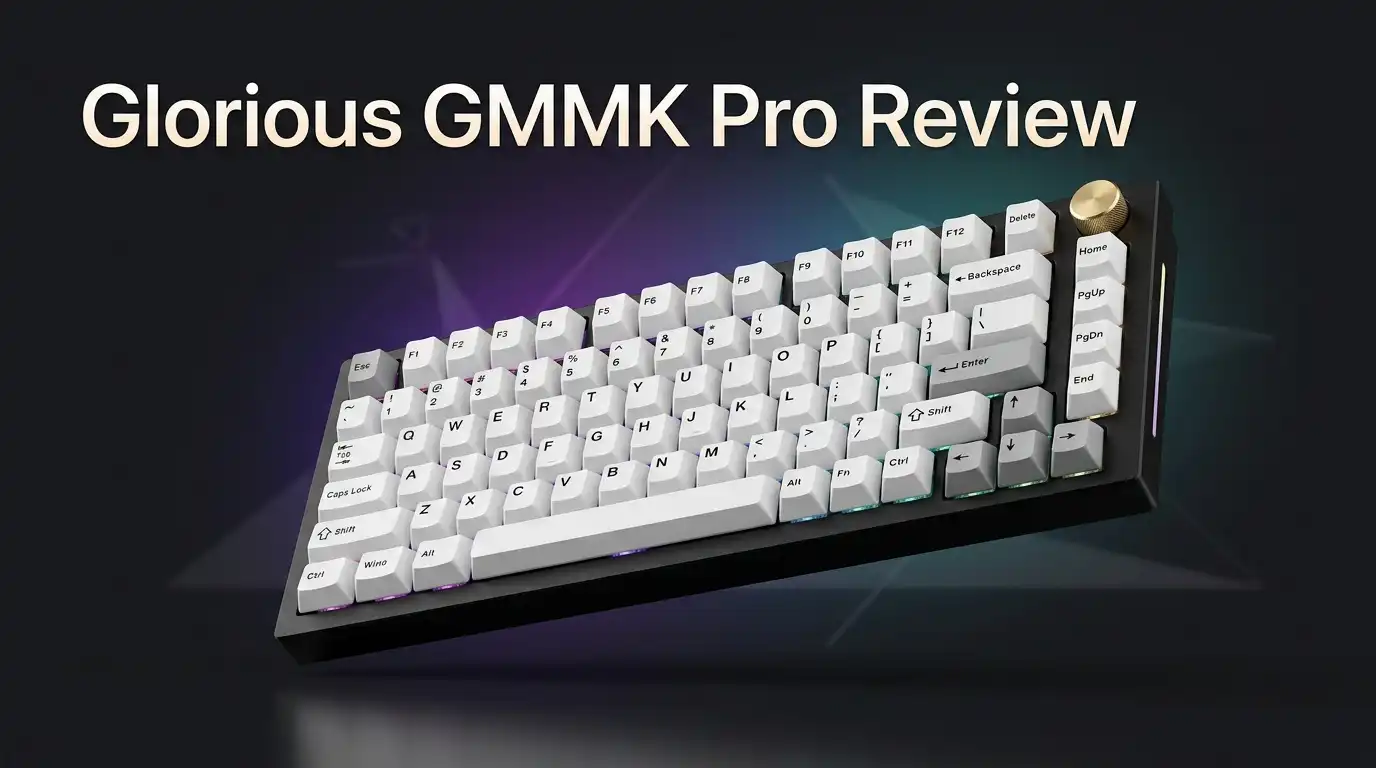
The GMMK Pro is a 75 percent custom mechanical keyboard kit. Glorious sells it as a barebone board, which means you supply your own switches and keycaps. The case is CNC machined aluminum with an anodized finish. It uses a gasket mount structure, a hotswap PCB with south facing LEDs, and a rotary knob in the top right corner.
The layout packs 82 keys into a compact exploded design. You get a function row, arrow keys, and a right side column, but no number pad. Glorious ships it in Black Slate and White Ice finishes. A two year warranty backs the product, which is rare in the custom keyboard space.
Think of it as a starter kit with premium materials. It gives you the metal, the knob, and the hotswap sockets without forcing you into a six month group buy.
Unboxing the GMMK Pro
The box feels like gaming gear, not boutique hardware. Inside, a thick foam sheet cradles the keyboard. Lift it out and you find a small accessory tray underneath.
You get a braided USB C cable, a keycap puller, a switch puller, spare gasket strips, and a Glorious sticker. The cable is genuinely good. It is thin, flexible, and feels like a quality mouse cable rather than cheap rubber.
The pullers are another story. Both tools feel flimsy and I replaced them within a day. The wire keycap puller scratches, and the switch puller grips poorly on tight sockets.
If you order the polycarbonate plate, it arrives in a separate branded box with a padded envelope inside. That packaging choice feels odd, though the plate does arrive safe. First impressions overall: solid, heavy, and clearly built to a budget in the small details.
Build Quality and Case Design
Pick up the GMMK Pro and the weight sells it immediately. The anodizing is even across the case with only minor machining marks on the rear edge. The rubber feet grip well and the six degree typing angle feels natural.
Then you open it. Eight Phillips screws hold the top case, and those screws feel thin enough to strip if you look at them wrong. Hex or Torx heads would suit a board aimed at tinkerers far better.
The polycarbonate plate option is the real problem. Once you install switches, the assembly bows upward in a shallow U shape. It flattens when the case closes, but it never sat correctly in my build.
The top case walls measure around 1.25mm near the light strips. That thinness is noticeable when you lift the board by its edges. Build quality is good, not great.
Top 3 Alternative for Glorious GMMK Pro

- The Keychron Q1, a fully assembled Knob customizable 75% layout mechanical keyboard features QMK/VIA support, full aluminum CNC machined body, double-gasket design, and OSA profile double-shot PBT keycaps, every component of the Q1 is designed to be easily assembled, you can customize and adjust each component you want.
- With the open-source QMK/VIA support, you can intuitively remap your favorite keys and create macros with any key on any operating system (macOS, Windows, or Linux) for a fluid workflow. Please connect the Keychron Q1 to your device with a cable and download the appropriate keymap JSON file below, open VIA, turn on "Show Design tab" on "Settings" tab, and drag the JSON file into the “Design” tab on VIA to get the Q1 keymap working on VIA.(Check our user guide or user manual for more instructions.)
Some of the links on this website are affiliate links, which means that at no additional cost to you, I earn a commission if you click through and make a purchase. I only recommend products and services that I believe will add value to my readers. Thank you for your support!
Keychron Q1

- Wireless and Full Metal: Meet the Keychron Q1 Pro, a groundbreaking full metal QMK/VIA wireless custom mechanical keyboard. Along with our many premium designs, including double-gasket design, PBT keycaps, screw-in stabs, etc., it will deliver you an unprecedented typing experience! The entire metal body is crafted with 6063 aluminum that is processed through CNC machined, polished, anodized, sandblasted, and undergoes 24 more manufacturing stages.
- Multitasking Wirelessly and Wired Connections: You can connect the Q1 Pro with up to 3 devices wirelessly via its stable Broadcom Bluetooth 5.1 for seamless multitasking across your laptop, phone, and tablet. Switch among them swiftly, and it’s fully compatible with both Mac and Windows. The Q1 Pro can last up to 100 hours (at lowest brightness) with a 4000 mAh big battery, which is one of the biggest in mechanical keyboards. It also has wired mode with USB Type-C connection.
Some of the links on this website are affiliate links, which means that at no additional cost to you, I earn a commission if you click through and make a purchase. I only recommend products and services that I believe will add value to my readers. Thank you for your support!
Keychron Q1 Pro

- ROYAL KLUDGE R75 Wired Mechanical Keyboard - Adopts a 75% layout and a volume roller, making it a practical choice for gaming. It retains essential arrow and function keys while freeing up desk space. Experience easy control with the built-in mechanical volume knob maded from high-grade CNC aluminum, improving typing efficiency and enjoyment. This keyboard is an excellent Christmas gift and a stylish desk update.
- Gasket Mount Mechanical Keyboard - This custom keyboard features built-in triple absorption layers, including a sound absorbing poron cotton, an IXPE foam pad and the sponge case foam. In addition, silencer foam installed under the space bar and stabilizers are Pre-lubed, which increase the rebound speed of the keys while reducing vibration, resulting in improved key sound for a unique typing feel.
Some of the links on this website are affiliate links, which means that at no additional cost to you, I earn a commission if you click through and make a purchase. I only recommend products and services that I believe will add value to my readers. Thank you for your support!
RK ROYAL KLUDGE R75
Typing Feel and the Gasket Mount
Glorious markets gasket mount heavily. The reality is less exciting. The foam gasket strips sit around the perimeter of the plate, but they compress almost completely once the case closes.
The result is a firm, almost rigid typing experience. You get very little flex and no bounce. Bottoming out feels solid and direct, which some typists genuinely enjoy. Others find it tiring after long sessions.
Swapping to the polycarbonate plate softens the bottom out slightly. It changes the feel more than it changes the flex. The hotswap sockets sit close to the bottom case, so there is simply no room for the PCB to move.
If you type for eight hours a day, test a softer board first. The GMMK Pro rewards deliberate, heavy typists. Light touch typists often prefer something with real give.
Sound Profile and Foam Experiments
The GMMK Pro sounds acceptable. That is the honest summary. It leans deep and muted, yet somehow still carries a faint hollow ring on certain keys.
The board ships with plate foam and case foam. I tested every combination. With both pieces installed, the sound is fullest and slightly deeper. Remove the plate foam and the board gets louder with more character. Remove the case foam and it turns thin and tinny.
The foam Glorious uses feels porous rather than dense. It mutes volume but does little to tighten each keystroke. A $10 roll of dense poron foam improves the sound more than any plate swap.
Linear switches with thick keycaps give the best results. Tactile switches expose the hollowness more clearly. Plenty of cheaper plastic boards sound better straight out of the box.
The Rotary Knob in Daily Use
The knob is the signature feature. It controls volume by default and mutes when pressed. The knurled aluminum finish looks sharp and the press action feels satisfying.
Daily use is less charming. Your thumb bumps the backspace key every time you reach for it. The detents feel soft, so you often overshoot past the volume level you wanted.
The knob works, but it never replaced my media keys. Pressing two keys is faster for most adjustments. Reprogramming the knob for scrolling or zoom improves its usefulness considerably.
Wobble is minimal, which is a genuine win. The inner barrel is plastic and attaches by friction, so it pulls off easily for cleaning. Treat the knob as a pleasant extra, not as a reason to choose this keyboard over another.
Layout and Keycap Compatibility
The exploded 75 percent layout is the board’s quiet strength. Gaps separate the alpha cluster, function row, arrow keys, and right side column. Those gaps help you find keys by feel without looking down.
The layout keeps arrows and function keys while saving desk space. Laptop users adapt within an hour. Full size users miss the number pad for about a week, then stop noticing.
One compatibility detail matters a lot. The GMMK Pro uses a 1.75U right shift key. Many budget keycap sets only include a 2.25U shift, which will not fit.
Check your keycap set before buying. Sets that advertise 75 percent or TKL coverage usually include the right pieces. Cherry profile and OEM profile both work well with the case bezels, though a thin gap stays visible around the edges.
Switches, Sockets, and the Build Process
The PCB supports five pin and three pin MX style switches. Sockets are south facing, which means Cherry profile keycaps never interfere with the switch housing.
You need 82 switches to fill the board. Installation is simple, but socket damage is the most common beginner mistake. Remove the PCB and support the back of each socket with your finger as you press switches in.
The sockets themselves are reliable. I swapped switches four times across my testing with zero failures. The microcontroller is an STM32 chip on earlier units, which matters if you plan to flash custom firmware.
Budget roughly 45 minutes for your first full build. Keycaps go on last. Take your time aligning switch pins, because bent pins cause dead keys and frustrating troubleshooting later.
Stabilizers: The Real Weak Point
Let me be blunt. Do not use the stock stabilizers. They will ruin your first impression of this keyboard.
Glorious applies factory lube with no restraint. The wires, housings, and stems arrive coated in a thick layer. The spacebar rattles loudly even after careful cleaning and relubing with quality grease.
I tried to save the stock stabs. It wasted two hours. Replacing them with aftermarket screw in stabilizers transformed the board instantly. The spacebar went from clattery to deep and controlled.
One more warning. The punched metal plate has stabilizer cutouts that run tight. Several popular aftermarket brands do not fit without filing. Check compatibility lists before ordering replacements.
This single issue explains most negative reviews online. Fix it and the board improves dramatically. Ignore it and you will hate every spacebar press.
Software, QMK, and VIA Support
Glorious Core is the official software. It handles key remapping, macros, and RGB effects. It is also the least enjoyable part of owning this keyboard.
Remapping requires scrolling through long lists. The visual layout does not update as you change keys. You must save after nearly every edit. Layers exist but the implementation confuses most new users.
VIA support arrived late and QMK support has been inconsistent across hardware revisions. Some later units shipped with different chips due to component shortages, which complicated custom firmware.
Mac users face extra friction since the configurator targets Windows. Competing boards now ship with full QMK and VIA support on day one, configured through a browser.
Programmability should be a selling point for a custom board. Here it feels like homework. Check your specific revision before assuming firmware freedom.
RGB Lighting and Side Glow
Per key RGB sits under every switch, and eight extra LEDs light translucent strips along both sides of the case. The side glow is the visual signature of this board.
Brightness is moderate. With the aluminum plate, backlighting stays subdued and shines mostly through shine through keycaps. The polycarbonate plate spreads light much better because it lets illumination pass through the plate itself.
There is a catch. With the polycarbonate plate installed, the side lighting bleeds into the key area. You cannot run side glow cleanly without backlighting.
Effects come from Glorious Core and cover the usual patterns. Reactive typing, waves, breathing, and static colors all work. Turning lighting off leaves two blank translucent strips on the sides, which looks a bit unfinished. Lighting is good, not class leading.
Gaming Performance
For gaming, the GMMK Pro performs well. Polling is responsive and I noticed no missed inputs during fast sequences in shooters or fighting games.
The weight matters most here. A 3.5 pound keyboard does not shift during frantic movement. Lighter plastic boards slide across a desk mat; this one stays planted.
Switch choice drives gaming feel far more than the case does. Light linears suit fast games. The firm gasket mount means bottoming out feels crisp and predictable, which many competitive players prefer.
The 75 percent layout frees up mouse space without removing arrow keys. That balance works nicely for mixed use setups.
What is missing is the modern gaming feature set. There are no magnetic switches, no rapid trigger, and no adjustable actuation. Competitive players chasing those features will look at newer analog boards instead.
What the GMMK Pro Does Not Do Well
Honest reviews list failures, so here they are clearly.
It has no wireless option. In 2026 that is a genuine limitation when rivals offer Bluetooth and 2.4GHz at similar prices.
The stabilizers are poor and require replacement. The screws feel fragile and strip easily. The polycarbonate plate warps once switches are installed.
The gasket mount delivers almost no flex, so the marketing oversells the typing feel. Sound is average and needs foam work to improve.
Software remains clumsy compared to browser based configurators. Assembly requires removing twelve screws just to reach the stabilizers, which discourages tinkering.
The oversized logo on the underside looks cheap. Finally, the total cost climbs fast once you add switches, keycaps, and better stabilizers. A $150 kit easily becomes a $250 keyboard.
Pros and Cons
Pros
- Heavy CNC aluminum case that feels premium and stays planted on any desk surface.
- Hotswap sockets accept three pin and five pin switches with no soldering required.
- Exploded 75 percent layout keeps arrows and function keys while saving desk space.
- Rotary knob adds a useful and satisfying volume control.
- Two year warranty from an established company, which is rare for custom keyboards.
- Swappable plates let you change the sound and bottom out feel.
- Per key RGB plus side glow lighting looks bright and clean.
Cons
- Stock stabilizers rattle badly and need replacement almost immediately.
- No wireless connectivity at all in a market full of wireless rivals.
- Gasket mount feels rigid rather than cushioned.
- Glorious Core software is slow and unintuitive.
- Thin Phillips screws strip easily during disassembly.
- Polycarbonate plate bows once switches are installed.
- Total build cost climbs well past the sticker price.
Price and Value in 2026
Pricing has softened considerably since launch. The barebone kit regularly appears between $130 and $160, and prebuilt versions sometimes land near $130 during sales.
That sounds good until you add the extras. Switches cost $25 to $50. Keycaps cost $30 to $80. Replacement stabilizers add $20. A realistic finished build sits around $220 to $280.
Compare that to current rivals. Several newer 75 percent boards ship fully assembled with wireless, better foam, and properly lubed stabilizers for under $150.
The GMMK Pro still wins on raw metal quality and parts availability. Glorious sells plates, knobs, gaskets, and cases separately, which few brands match.
Buy it on sale and it represents fair value. Buy it at full retail and you are paying a brand premium for older technology.
Who Should Buy the Glorious GMMK Pro?
- Premium Design & Materials: The GMMK PRO's body is CNC machined from solid aluminum, giving it substantial weight and unrivaled durability compared to plastic alternatives. Anodization gives the body's surface high scratch resistance and a satin-like feel that's satisfying to the touch. Beneath the board's keys is an aluminum plate that creates a solid and consistent typing feel while also safeguarding internal components from damage or debris.
- Hotswap Linear Switches: This Prebuilt Edition comes with exclusive Glorious Fox linear switches pre-installed. Foxes' lighweight press make them perfect for fast-paced gameplay, while pre-lubricated parts make each keystroke satisfyingly smooth with a clean, rich sound. Thanks to the GMMK PRO's 5-pin hotswap PCB design, mechanical switches can be easily removed and replaced with other MX-style alternatives from Glorious, Cherry, Gateron, Kailh, and more without the need for soldering.
Some of the links on this website are affiliate links, which means that at no additional cost to you, I earn a commission if you click through and make a purchase. I only recommend products and services that I believe will add value to my readers. Thank you for your support!
This keyboard suits a specific person. You should buy it if you want your first real custom build and you enjoy the process of choosing switches and keycaps yourself.
It fits people who want a heavy aluminum board without waiting months for a group buy. It fits anyone who values parts availability and a real warranty.
Skip it if you need wireless. Skip it if you want a board that sounds excellent straight out of the box. Skip it if you have already owned two or three custom keyboards, because you will likely find the typing feel flat.
Office typists who want quiet, cushioned keys should look elsewhere. Gamers chasing rapid trigger should look at magnetic switch boards instead.
For curious beginners with a modest budget, it remains a reasonable entry point in 2026.
Frequently Asked Questions
Does the GMMK Pro come with switches and keycaps?
The barebone kit includes neither. You buy 82 switches and a compatible keycap set separately. Glorious also sells prebuilt versions with switches and keycaps already installed, which cost more but save setup time.
Is the GMMK Pro good for beginners?
Yes, for beginners who want to learn. Assembly is simple and requires no soldering. The main learning curve involves installing switches carefully and replacing the stabilizers, which most newcomers manage within an hour.
Why does my spacebar rattle?
The stock stabilizers cause this. Factory lube is applied poorly and the wires sit loose. Replacing them with quality aftermarket screw in stabilizers solves the problem completely. Check plate compatibility first, since cutouts run tight.
Does the GMMK Pro support VIA?
Support arrived later than promised and varies by hardware revision. Some units flash VIA firmware without issue, while others rely on Glorious Core. Check your board revision before planning custom firmware.
Is the GMMK Pro wireless?
No. The GMMK Pro is a wired keyboard that connects through a centered USB C port on a daughterboard. If wireless matters to you, consider a newer board with Bluetooth and 2.4GHz support.
What keycap size does the right shift use?
It uses a 1.75U right shift. Many budget keycap sets only include a 2.25U shift key. Confirm your set covers 75 percent layouts before ordering, or that key will sit empty.

Welcome to The File Fix. I’m Millie, and I review tech so you don’t have to suffer buyer’s remorse.
Navigating the endless sea of Amazon devices and gadget releases can feel like a full-time job. That’s why I do the heavy lifting. I dig past the unreliable 5-star reviews and shiny spec sheets to test how these devices actually hold up in the real world. Whether you’re looking for the best budget earbuds, a reliable power bank, or the latest smart home gear, you’ll find honest, no-nonsense breakdowns here.