Royal Kludge RK84 Review 2026: Still Worth It?
The Royal Kludge RK84 has been floating around desk setup photos for years now, and it keeps showing up in 2026 shopping lists. That staying power says something.
Budget keyboards usually fade fast, yet this little 84 key board keeps selling because it packs three connection modes, swappable switches, and a battery that refuses to die. I spent weeks typing, gaming, and travelling with one.
This review covers the good parts, the annoying parts, and the stuff Royal Kludge quietly hopes you ignore. If you want a compact mechanical keyboard without spending custom build money, keep reading.
In a Nutshell:
- The RK84 is a 75% layout keyboard with 84 keys. You keep the arrow keys, the function row, and the delete key while losing the number pad. Your mouse hand stays closer to your body, which helps shoulder comfort during long sessions.
- Three connection modes cover almost every device. Bluetooth 5.0 pairs with three gadgets at once, the 2.4GHz dongle handles gaming, and USB C wired mode gives you zero latency plus charging.
- The 3750mAh battery is the headline feature. Royal Kludge claims 200 hours with lighting off. In real use with dim backlighting, I went over a week between charges.
- The hot swap sockets change everything for beginners. You can pull a switch with the included tool and drop in a new one in seconds. No soldering iron, no fear.
- Build quality punches above the price. The plastic case has real weight at roughly 1.77 pounds, and two layers of foam kill most of the hollow sound.
- Reliability is the weak spot. Scattered owner reports mention keys that stop responding or repeat after a year of use, so warranty coverage matters here.
What Is the Royal Kludge RK84?

- That is THREE MODES: Believe it or not, this is the first generation of RGB three-mode wireless keyboards. Wireless mode with stable BT5.0, hassle-free 2.4Ghz dongle plus USB-C wired mode set no limits about your keyboard connection.
- 84 Keys, Redefine TKL - The innovative 75% unique layout differs from traditional TKL keyboards, which cuts more clumsy space off while supporting the same functionality as practical arrow, multimedia and control keys.
Some of the links on this website are affiliate links, which means that at no additional cost to you, I earn a commission if you click through and make a purchase. I only recommend products and services that I believe will add value to my readers. Thank you for your support!
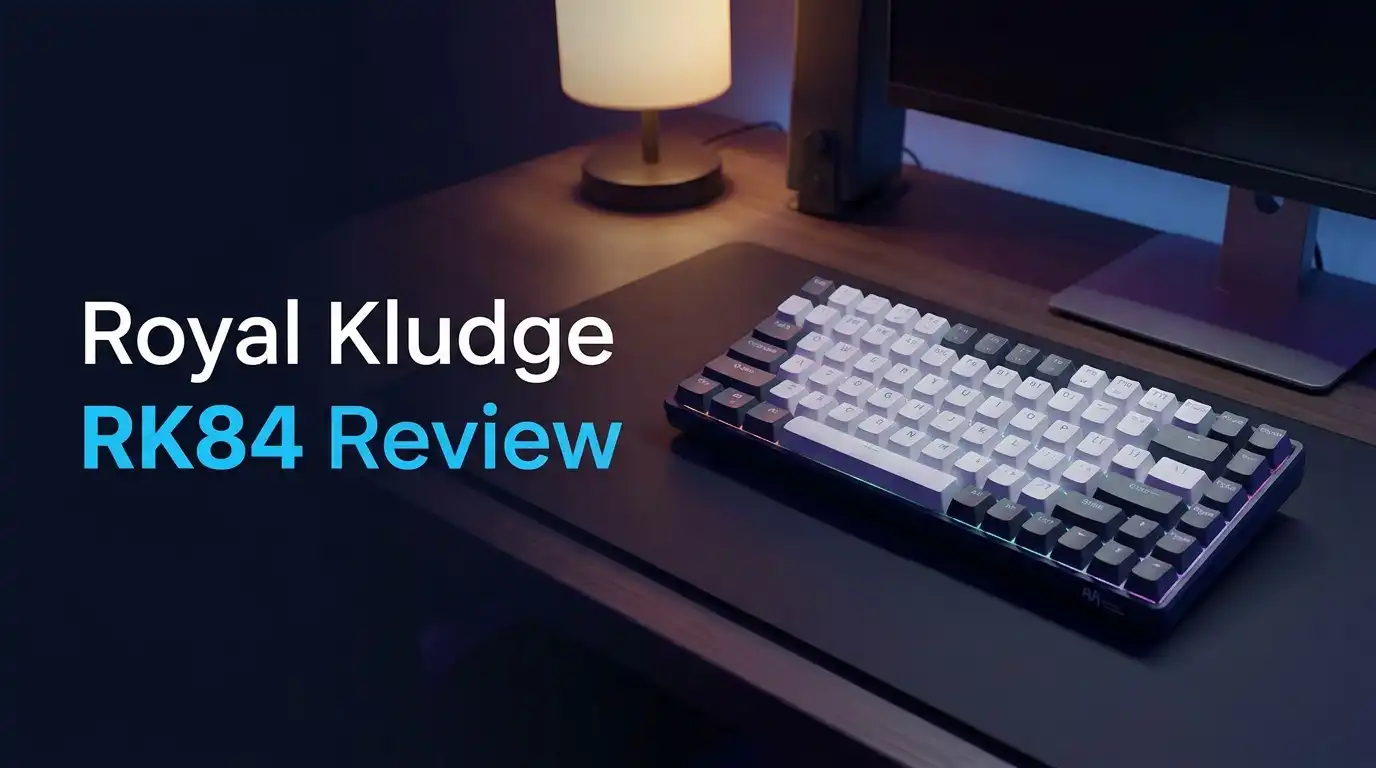
The RK84 is a compact mechanical keyboard built around a 75% layout. Royal Kludge squeezes 84 keys into a frame measuring about 12.5 inches wide and 5 inches deep. The keys sit tight against each other with almost no wasted space. The right control key got cut in half so the function key could fit. That sounds cramped, and honestly it takes a few days to adjust.
The selling point is value. You get hot swap sockets, RGB lighting, triple mode wireless, a huge battery, and two USB passthrough ports for well under a hundred dollars. Most brands pick two of those features and charge the same. Royal Kludge throws in all of them.
The board targets two groups. Gamers want the small footprint and the dongle. Typists want the arrow keys and the battery. Both groups usually walk away happy.
Unboxing the RK84: First Impressions
The box is simple cardboard with a product photo on the front. Nothing fancy, no magnetic flap, no ceremony. Inside, the keyboard sits in a foam cutout wrapped in a thin plastic sleeve. Lifting it out, the weight surprises you. This does not feel like a cheap board.
Underneath the keyboard tray you find the extras. There is a two in one keycap and switch puller, four spare RK switches, the 2.4GHz receiver, a braided USB cable, two magnetic feet, and a folded manual. The spare switches are a nice touch because they let you test the hot swap feature on day one without ordering anything.
The manual is the weak link. The translation reads rough and the Fn key chart is tiny. Most people will search for a shortcut list online within the first hour.
Design and Build Quality
The RK84 uses a plastic case, and Royal Kludge does not pretend otherwise. What saves it is density. At 1.77 pounds with a 1.75 inch height, the board stays planted during fast typing. Four rubber feet grip the desk well.
Here is a design choice I like. The rear feet do not flip out. Instead, two magnetic feet snap onto the existing feet and raise the back by about 0.4 inches. Magnets never snap off like plastic hinges do. That said, you only get one angle, so people who want three height options will feel limited.
You can also remove the plastic frame around the keys. Pop it off and the board switches from an embedded look to a floating key look. This single change makes the keyboard look twice as expensive in photos.
Top 3 Alternative for Royal Kludge RK84

- A 75% layout (84-key) RGB backlight compact Bluetooth mechanical keyboard. The ultimate keyboard that retains shortcut and arrow keys. Inclined bottom frame makes the K2 more comfortable to type even without a palm rest.
- Connects with up to 3 devices via Bluetooth and switch among them easily. With the latest Broadcom Bluetooth 5.1 chipset, the K2 is best to fit home, office and light gaming use while connecting with your smartphone, laptop and iPad. It also has wired mode with USB Type-C connection.
Some of the links on this website are affiliate links, which means that at no additional cost to you, I earn a commission if you click through and make a purchase. I only recommend products and services that I believe will add value to my readers. Thank you for your support!
Keychron K2 Wireless Mechanical Keyboard

- 60% Compact, More Room to Aim - Ditching the numpad and nav cluster frees up desk space for wide mouse swipes, so your sensitivity stays low and your flicks stay accurate.
- Swap Switches Without Soldering, Smooth and Quiet - The upgraded socket accepts almost any 3-pin or 5-pin switch, and stock Red linear switches keep clicks discreet for shared spaces.

Some of the links on this website are affiliate links, which means that at no additional cost to you, I earn a commission if you click through and make a purchase. I only recommend products and services that I believe will add value to my readers. Thank you for your support!
Redragon K617 Fizz 60% Mechanical Keyboard

- 【3 Modes Connectivity】 With 2.4Ghz wireless, Bluetooth, and USB wired 3 modes connection, this is a wireless gaming keyboard that no longer limits how you can connect. What’s more, in Bluetooth mode, you can connect up to 3 devices. Compatible with Windows/ MacOS/ Android.
- 【61 Keys Compact Design】No additional number keys, can meet you demands in Office or Home. The Mini 60% Mechanical Keyboard is Space-saving and Portable. Equipped with extra 4.7Ft-Grey coiled keyboard cable. USB C custom double-sleeved cable for mechanical gaming keyboard. Compact 61 keys with metal aviator connector braided cables, dedicated for FPS Gamers and efficient working.
Some of the links on this website are affiliate links, which means that at no additional cost to you, I earn a commission if you click through and make a purchase. I only recommend products and services that I believe will add value to my readers. Thank you for your support!
RK ROYAL KLUDGE RK61 Wireless 60% Mechanical Keyboard
Typing Feel and Switch Options
Royal Kludge ships the RK84 with its own RK switches in red, brown, blue, and yellow. The yellow linear switch is the one worth talking about. It actuates at 50 grams, which sits 10 grams above a standard red. The extra weight stops accidental presses without tiring your fingers.
The factory lubrication matters more than the weight. Lubed switches glide instead of scratching. On the yellow switches, the keystroke feels smooth from top to bottom, with an actuation point around 1.2mm for fast repeat presses.
Sound is where the board earns real praise. Two layers of EVA foam sit inside the case. They absorb the hollow echo that plagues cheap boards. You get a soft thock rather than a plastic rattle. Space bar rattle still exists on some units, though a quick lube fixes it.
Hot Swap Sockets and Easy Customization
This is the feature that turns the RK84 into a gateway keyboard. The sockets accept both three pin and five pin switches. Pull a switch straight up with the metal puller, line up the new one, press down, done. No heat, no solder, no risk of ruining the board.
Why does this matter? Beginners rarely know which switch they prefer. Clicky blues sound fun in videos and annoying in offices. Linear reds feel smooth but offer no feedback. Browns split the difference. With hot swap, you buy a ten pack of switches for a few dollars and test them yourself.
The keycaps use standard spacing for most keys, so aftermarket sets fit. Check the bottom row before buying because the split right control and the compact layout can cause fitment issues with cheaper keycap kits.
Triple Mode Connectivity Tested
Wired mode uses the USB C port and needs no software. Windows and macOS both detect the board instantly. This mode delivers the lowest latency and keeps the battery topped up.
The 2.4GHz dongle lives in a slot on the underside. Pairing is automatic. Plug the receiver in, flip the switch, and type. I saw no dropped keystrokes within normal desk range. This is the mode gamers should use.
Bluetooth 5.0 handles three devices. Press Fn plus Q, W, or E to pair and the same combo to switch. The board connected to a phone, a tablet, and a laptop without complaint. Switching between them takes about two seconds.
One warning. The board sometimes needs a key press to wake from deep sleep, so your first letter can disappear.
Battery Life You Can Actually Trust
The 3750mAh cell is the biggest in this price class. Royal Kludge rates it at 200 hours in 2.4GHz mode with the backlight switched off. That number assumes perfect conditions, as all battery claims do.
Real use tells a kinder story than usual. Running Bluetooth with low brightness lighting, the keyboard lasted over a week of daily work without hitting zero. Turn the RGB off completely and you can forget about charging for most of a month.
Turn the lighting to full brightness and the math changes fast. Bright RGB drains the cell in roughly eight to ten hours of active use. That is the trade every backlit wireless keyboard makes.
Charging takes five to seven hours from empty, which is slow. Plug it in overnight or just work in wired mode while it fills.
USB Passthrough Hub Explained
Two USB 2.0 ports sit on the back edge next to the USB C port. This is rare at any price. You can plug a mouse, a flash drive, a headset dongle, or a webcam straight into the keyboard.
The benefit is cable management. One cable runs to your computer and everything else connects at the keyboard. Laptop users gain the most here because laptops never have enough ports.
There are limits worth knowing. The ports run at USB 2.0 speed, so large file transfers crawl. More importantly, the hub only works in wired mode. Switch to Bluetooth or the dongle and those ports go dead. That makes sense electrically, but it still catches people by surprise.
Power hungry devices like external drives may also fail without their own power source.
RGB Lighting and Fn Shortcuts
The RK84 offers 19 backlight modes. You cycle through them with Fn plus Home. Some look great, like the ripple effect that follows your keystrokes. Others look like a slot machine. Brightness adjusts with Fn plus the up and down arrows, and animation speed uses the left and right arrows.
The lighting shines through the keycap legends well on the black model. Side glow is strong, which looks good in a dark room.
The function layer does real work beyond lighting. The F row doubles as media keys, calculator, and mail shortcuts. Fn plus S swaps the layout to macOS mode, which rearranges the modifier keys properly.
Learning these combos takes a weekend. After that, you stop reaching for the mouse to change volume or skip tracks.
Software and Programming
Royal Kludge ships a configuration tool for Windows. It lets you remap every key, build macros, and create custom lighting layers. Settings save to the board, so your profile travels with the keyboard.
The software works, but it is not polished. The interface looks dated, the download page can confuse newcomers, and the layout naming does not always match the keys on screen. Expect a short learning curve and a few saved profiles that mysteriously reset.
Here is the good news. You never need the software for normal use. Every important function lives on the Fn layer. Media control, lighting, device switching, and macOS mode all work out of the box.
Serious tinkerers should know the standard RK84 does not support QMK or VIA. Newer Royal Kludge models do, so check the listing carefully if open firmware matters to you.
Gaming Performance
For gaming, the RK84 performs better than its price suggests. The 2.4GHz dongle keeps latency low enough that I never blamed the keyboard for a death. N key rollover over the wired connection means every simultaneous press registers.
The compact layout helps aim more than people expect. Removing the number pad gives your mouse arm extra room, which lets you use a lower sensitivity and make smoother wide turns.
Linear switches suit shooters best. The yellow switches with their 1.2mm actuation reset quickly for counter strafing and rapid tapping.
This is not an esports board. There is no rapid trigger, no adjustable actuation, and no 8000Hz polling. Competitive players chasing every millisecond should look at magnetic Hall effect keyboards instead. Everyone else will be perfectly happy here.
Royal Kludge RK84 Wired Edition

- Compact 75% TKL Layout — Maximizes your desk space by 25% compared to full-size keyboards. This 84-key tenkeyless keyboard is ideal for immersive gaming and dynamic office setups, freeing up table space for mouse movement while maintaining full functionality.
- Lagfree Wired Connection & Dual USB Hub — Experience zero latency with a plug-and-play wired connection and pro-grade 1000Hz polling rate for instant response. Features 2 built-in USB-A pass-through ports to seamlessly connect your mouse, headset, or flash drive, or charge devices directly without reaching for your PC tower.
Some of the links on this website are affiliate links, which means that at no additional cost to you, I earn a commission if you click through and make a purchase. I only recommend products and services that I believe will add value to my readers. Thank you for your support!
Royal Kludge also sells a wired only version of the RK84. It drops the battery and the wireless radios while keeping the 75% layout, the hot swap sockets, the sound absorbing foam, and the RGB lighting. Newer wired units ship with PBT keycaps, which resist shine far better than the ABS caps on older models.
The wired model costs less and weighs less. Without the 3750mAh battery inside, it feels lighter on the desk, though it still stays stable.
Choose this one if your keyboard never leaves your desk. You save money, you skip charging, and you keep the USB passthrough working permanently.
Choose the wireless model if you type on a tablet, travel, or hate cables. The battery is the whole reason to pay extra, so be honest about whether you will use it.
What the RK84 Does Not Do Well
Honest reviews list the failures, so here they are. Long term reliability is the biggest concern. Multiple owners report keys going unresponsive or repeating endlessly after roughly a year. Some needed a PCB replacement under warranty, and a few saw the problem return afterward. Not everyone hits this, but it happens often enough to mention.
The stock keycaps on older units use thin ABS plastic. They develop a greasy shine within months. Budget twenty dollars for a PBT set.
Stabilizers arrive dry and rattly. The space bar and shift keys sound worse than the rest of the board until you lube them.
The USB hub dies in wireless mode. There is only one typing angle. The software feels dated. And the half sized right control key frustrates anyone with muscle memory from a full keyboard.
Pros and Cons
Pros
- Three connection modes cover wired, 2.4GHz, and Bluetooth with three paired devices.
- The 3750mAh battery lasts over a week with low brightness lighting.
- Hot swap sockets accept three pin and five pin switches with no soldering.
- Two USB 2.0 passthrough ports reduce desk cable clutter.
- Two layers of EVA foam produce a soft sound with little hollow echo.
- The removable top frame lets you switch between embedded and floating key looks.
- Magnetic feet never snap like plastic flip feet.
- Excellent price for the feature list.
Cons
- Reliability reports show key chatter and dead keys after about a year on some units.
- The USB hub stops working in wireless mode.
- Stock ABS keycaps shine quickly on older models.
- Stabilizers rattle until you lube them.
- Only one typing angle is available.
- Charging from empty takes five to seven hours.
- The standard model lacks QMK and VIA support.
- The half sized right control key takes real time to learn.
Who Should Buy the RK84 in 2026?
Buy it if you are new to mechanical keyboards. The hot swap sockets let you experiment with switch types cheaply, and the price keeps the risk low. You learn what you like without committing to a custom build.
Buy it if you switch between devices. The Bluetooth pairing works smoothly across phones, tablets, laptops, and desktops, and the battery removes charging anxiety.
Buy it if your desk is small. The 75% layout saves roughly 25% of the width of a full keyboard while keeping arrow keys.
Skip it if you need competitive gaming features like rapid trigger or adjustable actuation. Skip it if you want QMK firmware. Skip it if you refuse to tinker, because a few minutes with lube transforms the sound.
Final Verdict
The Royal Kludge RK84 still earns a recommendation in 2026, with eyes open. Nothing else at this price combines a 3750mAh battery, triple mode wireless, hot swap sockets, foam dampening, and a USB hub. Competitors pick two or three of those features and charge more.
The typing experience genuinely satisfies. Lubed yellow switches sound soft, the case feels dense, and the 75% layout hits the sweet spot between compact and usable.
The reliability question keeps it from a perfect score. Buy from a seller with a real return window and register your warranty. Most units run for years, but the failures that do occur tend to be frustrating ones.
Rated honestly, this is a strong 8 out of 10 keyboard. For a first mechanical board, it remains one of the smartest purchases available.
Frequently Asked Questions
Is the Royal Kludge RK84 hot swappable?
Yes. The RK84 uses hot swap sockets that accept both three pin and five pin mechanical switches. You pull old switches out with the included metal puller and press new ones in. No soldering is required. Line up the pins carefully before pressing down so you do not bend them.
How long does the RK84 battery last?
Royal Kludge rates the 3750mAh battery at 200 hours in 2.4GHz mode with the backlight off. In normal use with low brightness lighting over Bluetooth, expect roughly a week of daily typing. Full brightness RGB cuts that to around eight to ten hours. Recharging from empty takes five to seven hours.
Does the RK84 work with Mac?
Yes. Press Fn plus S to switch the keyboard into macOS layout mode. This rearranges the modifier keys so command and option sit in the right positions. You can connect over Bluetooth, the 2.4GHz dongle, or USB C. Some users also adjust modifier settings inside macOS system preferences for a perfect match.
Do the USB ports work in wireless mode?
No. The two USB 2.0 passthrough ports only function when the keyboard is connected by the USB C cable. In Bluetooth or 2.4GHz mode, those ports stay inactive. The ports also run at USB 2.0 speeds, so they suit mice, flash drives, and dongles rather than fast external drives.
Is the RK84 good for gaming?
Yes, for casual and mid level competitive play. The 2.4GHz dongle delivers low latency, the wired mode supports N key rollover, and the compact layout gives your mouse more room. However, the RK84 lacks rapid trigger, adjustable actuation, and ultra high polling rates found on magnetic switch gaming keyboards.
Does the RK84 support VIA or QMK?
The standard RK84 does not support QMK or VIA. You program it using the Royal Kludge configuration software for Windows, which handles key remapping, macros, and lighting. Some newer Royal Kludge models in other lines do offer VIA support, so check the specific product listing if open firmware is important to you.

Welcome to The File Fix. I’m Millie, and I review tech so you don’t have to suffer buyer’s remorse.
Navigating the endless sea of Amazon devices and gadget releases can feel like a full-time job. That’s why I do the heavy lifting. I dig past the unreliable 5-star reviews and shiny spec sheets to test how these devices actually hold up in the real world. Whether you’re looking for the best budget earbuds, a reliable power bank, or the latest smart home gear, you’ll find honest, no-nonsense breakdowns here.