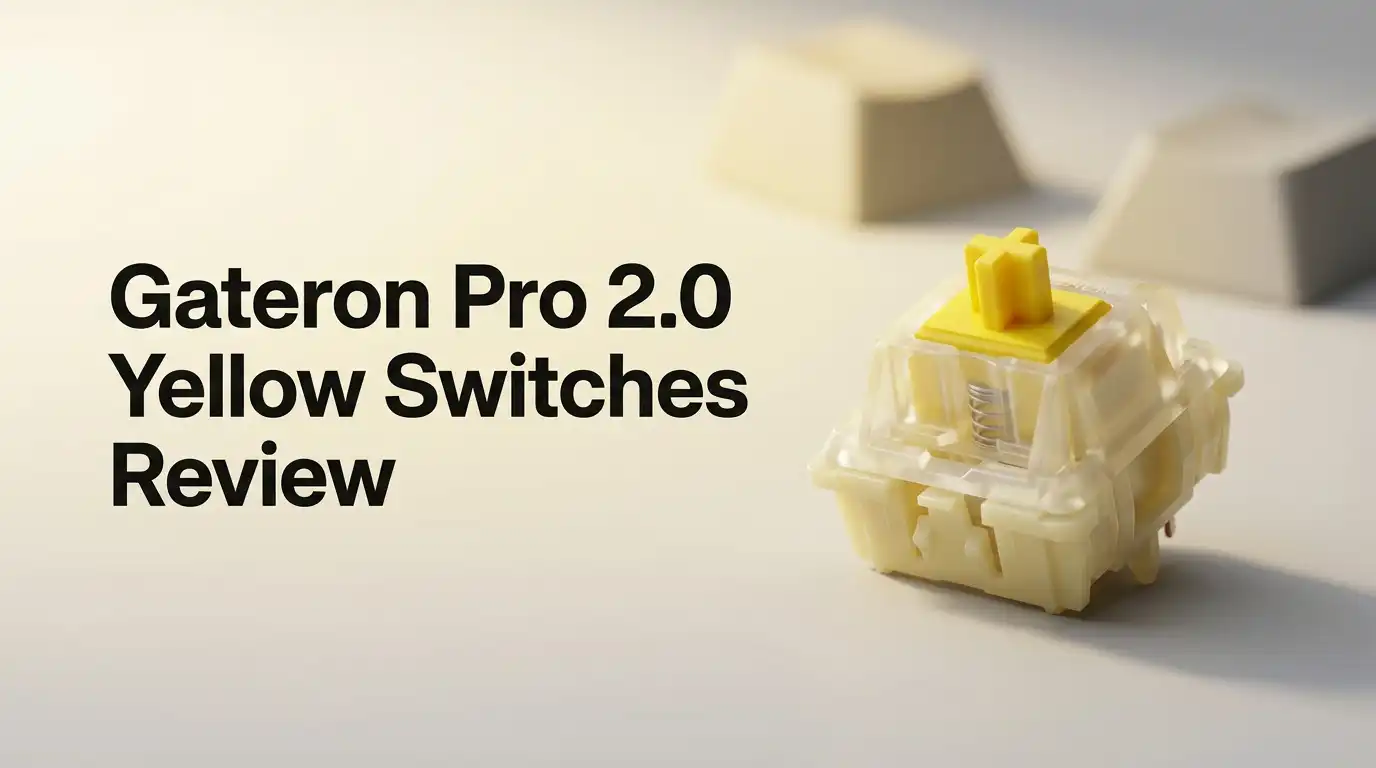
Gateron Pro 2.0 Yellow Switches Review 2026: Still Worth It?
Linear switches got crowded fast. Every month a new brand promises buttery travel and deep sound for pocket change.
Yet one budget switch keeps showing up in build after build: the Gateron Pro 2.0 Yellow. It sits in starter boards, in $300 custom keyboards, and in the drawers of people who own forty other switch types. That staying power says something.
This review covers the real experience of typing on these switches in 2026. You will read about the unboxing, the sound, the gaming feel, the backlight, and the parts that fall short. No marketing fluff.
Key Takeaways
- The Pro 2.0 Yellow is a factory lubed linear switch with roughly 50gf operating force, 2.0mm pretravel, and 4.0mm total travel. It feels light without feeling flimsy.
- The big change over the original G Pro is the mold and the light pipe. Gateron redesigned the upper housing with a light concentrating spot and a guiding column, so RGB looks brighter and cleaner on SMD boards.
- It uses a 3 pin design. That matters. You get wide compatibility with hotswap sockets, but you lose the extra plastic legs that help stabilize switches on plate free builds.
- Sound sits in the poppy and slightly clacky range, not deep thock. A nylon PA66 base keeps it from sounding hollow, though keycaps and case foam change the result more than the switch does.
- Smoothness is genuinely good for the price, but the factory lube job varies from switch to switch. Expect a few scratchy units in a 100 piece bag.
- Value remains the headline. For most people this switch delivers 85 percent of a premium linear experience at roughly 25 percent of the cost.
What Are Gateron Pro 2.0 Yellow Switches?

- Gateron G Pro 2.0 the second version of their impressive Gateron Pro switches already lubed from factory.
- The Pro 2.0 switches alloy contact point process upgrade, The improve the resistance to oxidation and vulcanization, Thus improving the service life of the switches.
Some of the links on this website are affiliate links, which means that at no additional cost to you, I earn a commission if you click through and make a purchase. I only recommend products and services that I believe will add value to my readers. Thank you for your support!
The Pro 2.0 Yellow is Gateron’s second generation refresh of its famous yellow linear. Gateron built its reputation on these yellows years ago, and the Pro line is the polished version of that formula.
The switch uses a POM stem, a transparent polycarbonate upper housing, and a white nylon PA66 base. Gateron lubes it at the factory before it ships.
Linear means no bump and no click. The keypress goes straight down and comes straight back up. Typists who hate the stutter of tactile switches usually land here.
The yellow sits between a red and a black in weight, which is why so many people call it the safe middle choice for both typing and gaming.
The Unboxing Experience
The packaging stays simple. Most sets arrive in a clear plastic clamshell tray or a resealable bag inside a slim cardboard sleeve, depending on the seller and the count.
There is no foam cradle, no sticker sheet, no switch puller thrown in. You open it and the switches are just there, loose, smelling faintly of fresh plastic and lube.
That first handful tells you a lot. The switches feel dense between your fingers. The housings snap together tightly with no rattle when you shake them.
Press one between your thumb and finger and you feel that even glide immediately. It is a quietly satisfying moment, even if the box itself is forgettable. Budget pricing shows up in the presentation, not in the product.
Full Specifications at a Glance
Here is the short version of the spec sheet, rewritten in plain language. Operating force sits around 50gf with a tolerance of about 15gf. Bottom out force lands near 60gf. Pretravel measures 2.0mm and total travel measures 4.0mm. Rated lifespan reaches roughly 50 million keystrokes.
The stem is POM, chosen for low friction. The top housing is clear polycarbonate for light transmission. The bottom housing is nylon PA66, which softens the bottom out sound.
The spring is steel. Contacts use an anti oxidation alloy for a longer service life. SMD LED support is built in. Note that the Pro 2.0 ships as a 3 pin switch, so plate mounted builds are the natural home for these.
Typing Feel and Smoothness
This is where the switch earns its reputation. The downstroke feels even from top to bottom with no catch near the end. The spring returns quickly without that springy ping you hear on cheap unlubed linears. Long typing sessions stay comfortable because 50gf sits light enough to prevent finger fatigue.
Stem wobble exists but stays modest. You notice a little north to south play on larger keycaps like the spacebar and shift. It is not distracting during normal typing.
Compared to an unlubed Gateron Yellow, the Pro 2.0 feels noticeably more refined. Compared to a premium switch costing three times as much, it feels about 15 percent rougher. For daily writing work, the difference barely registers after an hour.
Top 3 Alternative for Gateron Pro 2.0 Yellow Switches

- Gateron G Ks-3 milky yellow Pro V2 switch is Pre-lubed will feel better than regular milky yellow.
- Alloy contacts process upgrade, The improve the resistance to oxidation and vulcanization, Thus improving the service life of the switches.
Some of the links on this website are affiliate links, which means that at no additional cost to you, I earn a commission if you click through and make a purchase. I only recommend products and services that I believe will add value to my readers. Thank you for your support!
GATERON Milky Yellow Pro V2

- [High Quality]:Gateron G Pro 3.0 series meachanical keyboard switches,with smooth and comfortable typing exprience,Good gaming performance;Super long mechanical life with 100million cycles.The switches are factory lubricated and ready to use,there are 36pcs,72pcs,108pcs three sizes to choose from.
- [Feature]:Compared to G Pro 2.0,Gateron Pro 3.0 series switches with three-layer enhanced pin design,not easy to bend,Improve the stability and life of the switch,Stiffened but not thickened;Upgraded fine grain surface light guide column,uniform light effect,more transparent and more concentrated light.
Some of the links on this website are affiliate links, which means that at no additional cost to you, I earn a commission if you click through and make a purchase. I only recommend products and services that I believe will add value to my readers. Thank you for your support!
Gateron G Pro 3.0 Yellow

- Akko v3 Generation Pro Switches – Our creamy switches now feature alloy copper and palladium gold contact, which provide better conductivity, stability, and durability. With dustproof stem and 5-Pin, Akko v3 generation pro cream switches are designed to bring a better stability typing experience
- Smooth& Creamy – Akko v3 pro 50gf linear creamy yellow switches provide a unique and satisfying typing experience with their 18mm extension spring and POM/PC/PA materials. The creamy and smooth feel of our switches is further enhanced by the use of lubed rail
Some of the links on this website are affiliate links, which means that at no additional cost to you, I earn a commission if you click through and make a purchase. I only recommend products and services that I believe will add value to my readers. Thank you for your support!
Akko V3 Creamy Yellow Pro
Sound Profile and Acoustics
The Pro 2.0 Yellow sounds clean and medium pitched. The nylon base deepens the bottom out, while the polycarbonate top adds a touch of brightness to the upstroke. The result is a poppy clack rather than a muted thock. Spring noise is low thanks to the factory lube, which was one of Gateron’s stated goals with this revision.
Your keyboard changes the result more than the switch does. A gasket mounted board with plate foam will pull the pitch down and tighten everything up. A hollow aluminum case with no foam will add ring. Keycap material matters too.
Thick PBT caps give a fuller sound, while thin ABS caps make these switches sound sharper and cheaper than they really are.
Gaming Performance
Gamers like yellows for a reason. The 50gf weight stays light enough for fast repeated presses but heavy enough to prevent accidental taps during tense moments. Pretravel of 2.0mm matches a standard red, so actuation happens quickly without feeling twitchy.
Shooters feel good on these. Strafing with rapid A and D taps works well because the spring snaps back fast. Rhythm games and fighting games also pair nicely with the consistent linear travel. The one gap is speed focused play.
Speed silver switches actuate at around 1.1mm, which is measurably faster. Competitive players chasing every millisecond will prefer a silver or a magnetic switch, while everyone else will be perfectly served here.
RGB and Backlight Performance
Gateron made backlighting a priority with this generation. The upper housing includes a light concentrating spot and a light guiding column, which pushes more of the LED output upward through the switch instead of scattering it sideways. On a board with SMD RGB, the difference against the original G Pro is visible.
Colors look brighter and edges look crisper. Shine through keycaps genuinely glow instead of looking washed out. The clear top housing also lets side glow spill nicely across white or light colored plates.
If RGB matters to your build, this is the single strongest argument for picking the Pro 2.0 over older yellows. It is the feature Gateron clearly spent its engineering budget on.
Build Quality and Durability
Housing tolerances feel tight. The two halves of the shell click together firmly and resist opening by accident when you pull keycaps. Pin alignment is consistent across most of a bag, which means fewer bent legs during installation. That alone saves frustration on a 100 key build.
The anti oxidation alloy contacts support the 50 million keystroke rating. In practice, most people replace a keyboard long before they wear out a switch like this.
Reported failures usually come from bent pins during install rather than internal wear. Install slowly, check that both pins point straight down, and these switches will outlast your interest in them.
Pin Count and Keyboard Compatibility
The Pro 2.0 ships with 3 pins, meaning two metal contacts and one central plastic post. It drops into any MX style hotswap socket and into any PCB mount board, including 5 pin boards. The two empty plastic holes on a 5 pin PCB simply stay unused.
The catch appears on PCB mount builds without a plate. Five pin switches use those extra legs to stay perpendicular to the board. Without them, switches can tilt slightly during soldering. If your build uses a plate, which covers the vast majority of keyboards, this is a non issue. Check your PCB before ordering if you run an unusual plateless design.
Pro 2.0 vs G Pro vs Pro 3.0
Gateron now sells three generations of this switch, which confuses buyers constantly. The original G Pro was the budget smoothness champion. The Pro 2.0 refined the mold, cut spring noise, reduced stem wobble, and improved light transmission. Gateron itself says the typing feel between the two is close, with the 2.0 offering a quieter rebound.
The Pro 3.0 continues that path with a slightly heavier and more consistent factory lube application. The feel gap between 2.0 and 3.0 is small enough that most typists cannot blind test it reliably. Buy whichever generation is cheaper and in stock, unless you specifically want the latest lube job.
What These Switches Do Not Do Well
Honest reviews list the misses. First, quality control wobbles. In a bag of 100 you will likely find three to eight switches that feel scratchier than the rest. Swap those into function row positions where you will never notice.
Second, these are not thock switches. If you want that deep hollow pop people chase in sound tests, you need a different housing material or heavy foam modding.
Third, stem wobble on the spacebar is real. Fourth, there is no silent version, so office users who need quiet will have to look elsewhere. Fifth, the 3 pin design limits plateless builds. None of these are dealbreakers at this price, but they are real.
Pros and Cons
Pros
- Excellent smoothness for the money, with a clean and even downstroke that rivals switches costing far more
- Bright and crisp RGB thanks to the redesigned light guiding upper housing
- Low spring noise straight from the factory, with no modding required
- Balanced 50gf weight that works equally well for typing and gaming
- Wide availability and frequent discounts, so restocking a full board stays affordable
- Rated for 50 million keystrokes with anti oxidation alloy contacts
Cons
- Factory lube application varies between units, producing occasional scratchy switches
- Noticeable stem wobble on larger keycaps like the spacebar
- Sound leans poppy and bright rather than deep and thocky
- Only 3 pins, which limits plateless PCB mount builds
- No silent variant for shared office spaces
- Packaging offers no accessories, not even a basic switch puller
Should You Lube or Mod Them?
You do not need to lube these. The factory job handles most of the work. Still, a few cheap mods raise the ceiling. Adding a thin layer of Krytox 205g0 to the rails of your scratchier units fixes them completely. Filming is possible but mostly unnecessary given the tight housing fit.
The highest value mod is not the switch at all. Add plate foam, swap to thicker PBT keycaps, and lube your stabilizers. Those three changes transform the sound far more than switch work does. Spend an hour on your stabilizers before you spend four hours lubing 100 switches.
Price and Value in 2026
Pricing holds steady around $18 to $25 for a set of 70 to 110 switches, depending on count and seller. That works out to roughly 20 cents per switch. Premium linears routinely cost 60 cents to a dollar each. The math speaks loudly.
Value is the core of this product. You get about 85 percent of a boutique linear experience for a quarter of the outlay. For first time builders, that margin matters enormously. It also means you can buy two different switch types and experiment without regret. If your budget is under $30 for switches, this remains one of the strongest picks available.
Who Should Buy These Switches
Buy these if you are building your first mechanical keyboard and want a reliable linear that will not disappoint you. Buy them if you game and type in roughly equal measure. Buy them if your board has SMD RGB and you want that lighting to actually show.
Skip them if you want silence in a shared office. Skip them if you are chasing a specific deep sound signature for a sound test video. Skip them if you already own a premium lubed linear, because the upgrade path runs the other direction. For everyone in the middle, which is most people, this switch quietly does its job every single day.
Frequently Asked Questions
Are Gateron Pro 2.0 Yellow switches good for gaming?
Yes. The 50gf weight and 2.0mm actuation point suit fast paced games well. They are not the fastest option available, since speed silver switches actuate around 1.1mm, but they offer a better balance between speed and accidental press prevention for most players.
Do these switches come prelubed?
Yes. Gateron applies lubricant at the factory before shipping. The application is light and occasionally uneven, so a small number of switches in each batch feel scratchier than the rest. Hand lubing those few units fixes the problem in minutes.
Will 3 pin switches work in a 5 pin keyboard?
Yes. A 3 pin switch installs into any 5 pin PCB without modification. The two extra holes simply stay empty. The reverse requires clipping the plastic legs off a 5 pin switch, so 3 pin designs are actually the more flexible choice.
How do they compare to Gateron Milky Yellow Pro?
The Milky Yellow Pro uses a full nylon housing, which produces a deeper and more muted sound. The Pro 2.0 uses a clear polycarbonate top for better RGB and sounds brighter. Choose milky for sound and Pro 2.0 for lighting.
Do they need to be broken in?
Slightly. Most users report the switches feeling smoother after about a week of regular typing as the factory lube spreads evenly across the rails. The change is modest, not dramatic. They feel good straight from the bag.
Are they loud enough to annoy coworkers?
They are quieter than clicky switches but still audible. Bottom out noise carries in a quiet room. For shared offices, a dedicated silent linear with internal dampening is a safer choice, since no silent variant of the Pro 2.0 exists.

Welcome to The File Fix. I’m Millie, and I review tech so you don’t have to suffer buyer’s remorse.
Navigating the endless sea of Amazon devices and gadget releases can feel like a full-time job. That’s why I do the heavy lifting. I dig past the unreliable 5-star reviews and shiny spec sheets to test how these devices actually hold up in the real world. Whether you’re looking for the best budget earbuds, a reliable power bank, or the latest smart home gear, you’ll find honest, no-nonsense breakdowns here.