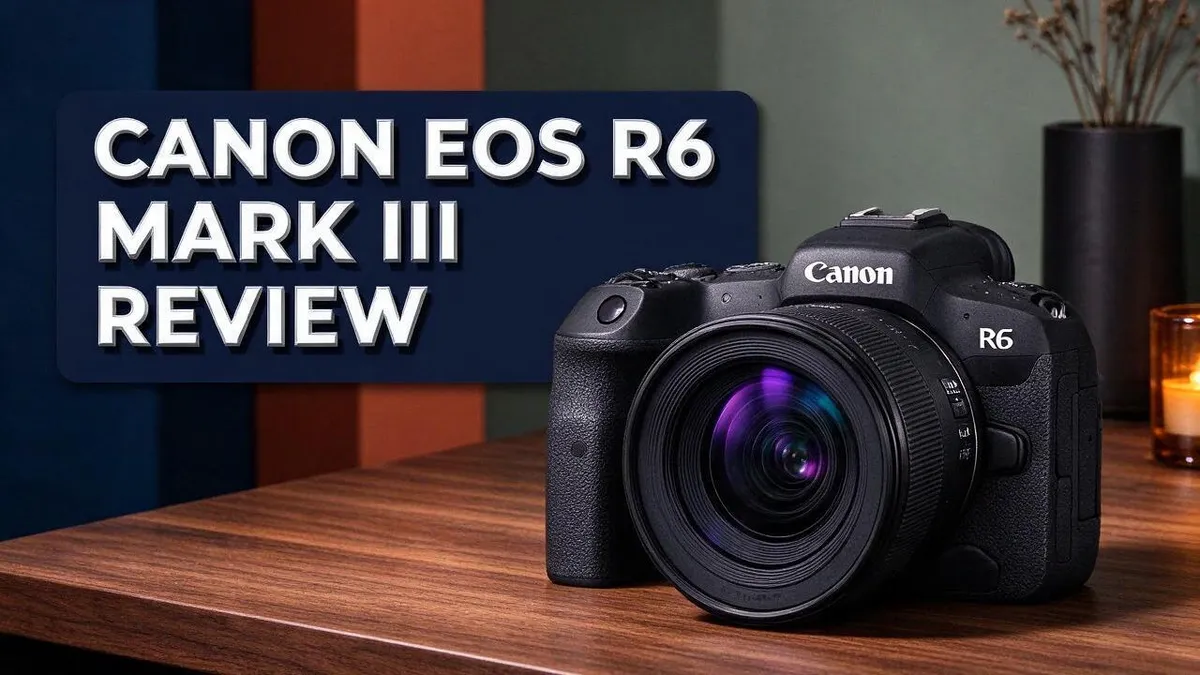
Canon EOS R6 Mark III Review: Specs, Autofocus, Video, and Verdict
Looking for a camera that does it all? The Canon EOS R6 Mark III could be the one. It brings a big jump in resolution. The sensor now delivers 32.5MP, up from 24.2MP on the Mark II.
Speed is another highlight. The camera shoots up to 40 fps, so fast action never slips away. Its DIGIC X processor keeps everything running smoothly.
Video fans will love it too. The camera records 7K Open Gate 30p and 4K 120p, and it supports C-Log 2 for flexible color grading. In-body stabilization reaches up to 8.5 stops.
In this review, we cover the key specs, real world performance, and who should consider this camera. Keep reading to see if it fits your style.
In a Nutshell
- Higher resolution: The R6 Mark III jumps to 32.5MP from 24.2MP on the Mark II. You get more detail for cropping and for large prints on the wall.
- Sharper autofocus: Canon updated its autofocus algorithms and added AI autofocus. Moving subjects stay sharp more often, which helps when you shoot people, pets, and wildlife.
- Strong image quality: Dynamic range and high ISO performance both impress. Shadows and bright skies keep their detail, so you spend less time fixing photos later.
- Powerful stabilization: The built in system reaches up to 8.5 stops across five axes. Handheld shots stay steady in dim rooms and at slow shutter speeds.
- Familiar layout: The body design matches the Mark II. Existing Canon users can switch without much relearning, so their favorite buttons stay in the same places.
- Competitive lineup: It goes up against the Canon EOS R5, Fujifilm X H2S, and Sony a7C. Each rival brings its own strengths to the table, so compare them side by side.
- Unknown drawback: One source hints at a major weakness but does not name it. Read hands on tests before you decide.
Sensor and Image Quality

- 32.5MP full-frame CMOS Image Sensor and DIGIC X Image Processor.
- Up to 40-fps Photo Shooting with 20-frames of pre-continuous shooting.

Some of the links on this website are affiliate links, which means that at no additional cost to you, I earn a commission if you click through and make a purchase. I only recommend products and services that I believe will add value to my readers. Thank you for your support!
Crop freedom is a big win for many shooters. Wildlife and sports photographers can cut tight on a distant subject. The file still holds enough detail for a clean final image. Cropping also helps when you cannot move closer to the action.
Portrait fans should watch skin tones closely. Natural color helps faces look right straight out of the camera. Test this in your own light before you commit.
Bigger raw files change daily habits too. Each shot takes more space, so cards and hard drives fill faster. Fast CFexpress Type B cards help keep the buffer clear during long bursts, which keeps the workflow smooth.
Sharp images also expose weak glass. A detailed sensor shows softness in older or basic lenses. Pairing the body with modern RF lenses helps you get the most from every frame.
Print size is another angle. Large prints need sharp, detailed files to look good on a wall. Photographers who sell canvases or fine art prints may value this most.
Editing style also shapes results. Raw files give plenty of room for color grading and creative looks. Photographers who build their own presets can shape a unique style from the start.
Lighting conditions change everything about image quality. Harsh midday sun tests contrast in a different way than soft window light. Each setting reveals different strengths and weaknesses.
Sample galleries and lab tests give the clearest picture of image quality. Current research offers limited test shots, so view full size files from real shoots.
The unnamed weakness in reviews might also affect image results. Look for it in side by side comparisons. Check the details yourself before making a decision.
Autofocus and Subject Tracking
Fast moving subjects test any camera. Good focus decides whether you keep the shot or delete it. Let us look at how the Canon EOS R6 Mark III handles moving targets.
The camera relies on Dual Pixel CMOS AF II for focus. This system reads focus data across the sensor. It helps the lens lock onto fast subjects quickly.
The DIGIC X processor does the heavy lifting. It handles focus and tracking data at speed. That speed helps the camera follow subjects that change direction.
Burst shooting plays a big role in tracking. The camera shoots up to 40 frames per second. It also holds 20 frames captured before your press.
Start with the right tracking setup. Pick a mode that suits your target. Birds, athletes, and pets all move in different ways.
Test your settings before a big event. Practice with a friend or pet first. Watch how the camera holds focus as your subject crosses the frame.
Tracking works best in good light with clear views. Busy backgrounds can confuse any autofocus system. Keep your subject separated from similar colors when possible.
Action shooters gain the most from these features. Sports, wildlife, and kids events all demand fast focus. Each one rewards a steady hand and quick settings.
Storage speed also matters for tracking. The camera supports CFexpress Type B and SD UHS II cards. Faster cards help clear long bursts quickly.
Battery life deserves a thought too. Long tracking sessions can drain power fast. Carry a spare battery for big days outdoors.
Shoot in short bursts rather than holding the button down. Short bursts also keep your files easier to sort.
One review hints at a major drawback without naming it. Tracking tests should show whether that issue affects moving subjects. Check sample galleries and lab tests before you decide.
Video Capabilities
Video is a big reason many people look at this camera. It records 7K Open Gate 30p and 4K 120p footage. Each mode suits a different kind of job.
The 7K Open Gate mode uses the full sensor area. That gives you room to reframe shots later. Editors can crop to vertical or square formats without losing too much detail.
The 4K 120p mode works well for slow motion. Smooth slow motion looks dramatic in sports clips and nature scenes. Filmmakers often use it for emotional moments.
Log profiles give you more control in post production. Flat footage holds more detail in bright skies and dark corners. Colorists can then shape the look to match a project.
The camera also supports advanced codecs for cinema work. These files hold more color data than basic formats. They need fast cards and strong computers to handle them smoothly.
Storage matters a lot for video. CFexpress Type B cards handle high data rates with ease. Many users keep a second card as a backup.
Heat can affect long recordings on many mirrorless cameras. Check the recording limits in the manual before a long shoot. Plan breaks during longer events so the camera can cool.
Audio deserves a close look too. Many creators add an external microphone for clearer sound. Wind noise can ruin outdoor clips, so a furry windscreen helps.
Practice your frame rate choices before a shoot. Pick 30p for normal motion and 120p for slow motion. Test a short clip first to check exposure and focus.
Some modes may narrow the view, so check each setting before you roll. Compare framing on a monitor or viewfinder. Small changes can shift the whole composition.
Overall, the video features suit creators who shoot often. Hobbyists can enjoy the tools too. Test the modes first and pick what fits your style.
Top 3 Alternatives
Sony a7 IV

- 33MP full-frame Exmor R back-illuminated CMOS sensor.Operating temperature : 0 to 40 °C (32 to 104 °F), Rated input : 100 - 240 V , 50/60 Hz, 0.2 A.
- 8x more powerful, next generation BIONZ XR image processing engine
Some of the links on this website are affiliate links, which means that at no additional cost to you, I earn a commission if you click through and make a purchase. I only recommend products and services that I believe will add value to my readers. Thank you for your support!
The Sony a7 IV offers a 33MP full frame sensor for sharp, detailed photos. It shoots 4K video at up to 60p, so creators who film often can rely on it. Its autofocus tracks people and animals well, even when they move fast. Many shooters also like its flexible menus and deep grip. It makes a strong pick for hybrid work that mixes stills and video.
Nikon Z6 III

- Bundle Includes: Nikon Z6 III Mirrorless Camera with 24-70mm f/4 S Lens + Camera Bag + 128GB Memory Card
- 24.5MP PARTIALLY STACKED FULL FRAME SENSOR: The Nikon Z6 III features a newly developed 24.5MP FX-format partially stacked CMOS sensor paired with the powerful EXPEED 7 image processor for faster readout speeds, improved rolling shutter performance, and enhanced responsiveness. Designed for photographers and content creators, this advanced sensor system supports exceptional image quality, strong low-light performance, and fast operation across a wide range of photography applications.
Some of the links on this website are affiliate links, which means that at no additional cost to you, I earn a commission if you click through and make a purchase. I only recommend products and services that I believe will add value to my readers. Thank you for your support!
The Nikon Z6 III uses a partially stacked sensor for fast readout. This helps reduce rolling shutter when you pan quickly across a scene. It records 6K video, which gives you extra room for cropping in post. Photographers also enjoy its bright electronic viewfinder and solid handling. It suits people who want speed and clean files for action and events.
Panasonic Lumix S5 II

- Fast, Accurate Phase Hybrid Autofocus: Advanced subject detection and metering technologies capture the target subject in focus even in adverse lighting conditions; once locked on the subject, it keeps tracking even with multiple moving objects
- Powerful Image Stabilization: With the S5II and S5IIX LUMIX developed Active I.S., which supports walking shots, to further enhance image stabilization in video recording
Some of the links on this website are affiliate links, which means that at no additional cost to you, I earn a commission if you click through and make a purchase. I only recommend products and services that I believe will add value to my readers. Thank you for your support!
The Panasonic Lumix S5 II adds phase detection autofocus for quicker subject locking. Its dual image stabilization keeps handheld shots steady, even in low light. Video fans get useful tools like log profiles for color grading. The body feels compact and light, so it works well for travel and everyday shooting. It suits anyone who values stable footage and flexible video options.
Stabilization and Ergonomics
Steady hands make a big difference in low light. The body uses five axis stabilization, which reduces shake from several directions at once. Many shooters can use slower shutter speeds without blur.
Handheld night shots are a great test. Try a few frames at a slow speed in a dim street or cafe. Brace your elbows against your ribs and hold your breath before you press the shutter.
Lens choice also shapes stability. Some lenses carry their own optical stabilization, and the body can work with them. Check the menu settings so both systems work together as expected.
The body layout stays the same as the Mark II. Owners can switch between models without relearning the buttons. New users will find the controls clear after a short practice session.
Grip comfort matters on long days. A comfortable grip lowers fatigue during a full day of shooting. Larger hands may need a grip extension for a secure hold. Hold the camera in a store for a few minutes before you decide.
Button reach helps you work fast. Keep your thumb near the rear dial and your index finger on the shutter. Assign custom buttons to focus modes or exposure lock so changes happen without looking away.
Weight and balance affect how long you can hold the camera. A heavy zoom can tire your wrist quickly, even with a stable body. Try a lighter prime lens for a relaxed walk around town.
Use a strap or a quick release plate for easy carrying. These accessories spread the load across your shoulder or hand. They also keep the camera ready for the next frame.
Stabilization and comfortable controls make this camera easy to handle. Your hands stay steady, and your fingers find the right dials with less effort. Good handling lets you focus on the scene.
Storage and Workflow
The R6 Mark III supports two card types. These are CFexpress Type B and SD UHS II. Each one suits a different style of shooting.
Choose cards based on your shoot. Larger files from the 32.5MP sensor fill cards faster than before. Pick a card size that fits your daily plans.
Expect bigger folders than the Mark II. Higher resolution means each raw file takes more space. Plan your storage with that in mind.
Carry spare cards at all times. Running out of room mid-event can cause you to miss key moments. Keep at least two extra cards in your bag.
Use a second card as a backup. Two copies of your files keep you safe if one card fails. Swap cards when one fills up.
Format cards inside the camera. This step prepares the card for the R6 Mark III and helps avoid file errors. Do it before every new shoot.
Use a fast card reader. A slow reader creates a bottleneck, even when your card is quick. Match the reader to your card type.
Sort files right after each shoot. Create folders by date and event name. Clear folders make editing much easier later.
Make a simple backup routine. Copy files to an external drive each night. Keep one copy in a separate location, like cloud storage.
Label every card clearly. Write a number on each card with a marker or sticker. You will always know where each file came from.
Check storage before a trip. Look at free space on your drives and cards. Delete old test shots to make room.
Storage choices shape your daily workflow. The right cards and drives keep you focused on shooting. Good habits turn storage from a worry into a simple routine.
Test your full workflow once. Shoot a few frames, import them, and edit a sample. You will spot slow steps before a real event.
Pros and Cons
Pros
- Higher resolution gives you 32.5MP, up from 24.2MP on the Mark II.
- The autofocus system now uses improved algorithms for sharper tracking.
- Dynamic range stays strong, so bright skies and dark shadows keep more detail.
- Image quality holds up well at high ISO settings in low light.
- The AI autofocus helps you lock onto subjects with less effort.
Cons
- Reviews do not name a clear weakness in the camera’s design or performance.
- One reviewer hints at a big drawback but does not say what it is.
- Some buyers may want more proof before trusting the camera for demanding work.
Who Should Buy It
Hybrid creators will get the most from this camera. If you shoot photos one day and video the next, the R6 Mark III covers both jobs well. You do not need a second body.
Wildlife and sports shooters should pay attention. Bursts up to 40 fps help you catch peak moments. The 20 pre-continuous frames also capture the split second before you press the button.
Video creators should take a close look. The 7K Open Gate 30p and 4K 120p modes give you wide frames and smooth slow motion. C-Log 2 and the XF-AVC S codec give editors more room to grade footage.
Filmmakers on short projects will appreciate the flexibility. You can move from client interviews to cutaway shots without changing cameras. This saves time on busy shoot days.
Canon R5 owners need a clear reason to switch. The R5 family already offers strong video and high resolution. Look closely at the autofocus gains and the new AI tools before you decide.
Sony and Fujifilm shooters can compare side by side. The Sony a7C and the Fujifilm X H2S are direct rivals. Test how each system feels in your hands before you commit.
Panasonic G95 users will notice a big change. The full frame sensor gathers more light and offers more control over depth of field. Low light work often looks noticeably cleaner.
Travelers who want one camera for every trip will benefit. The range of options covers landscapes, portraits, and video. You can handle many situations without carrying extra gear.
Beginners can grow into this camera. It offers room to learn as your skills improve. Start with auto modes, then move to manual settings once you feel confident.
Careful shoppers should wait for more hands on tests. One reviewer hints at a big drawback but does not name it. Read several reviews and watch sample footage before you buy.
Final Verdict
The Canon EOS R6 Mark III earns a solid final verdict. It blends stills and video into one camera that feels easy to use.
The body layout stays the same as the Mark II. That means your muscle memory still works. Few surprises await you on day one.
This camera suits people who want growth without a steep learning curve. Switching from an older model feels natural. You can focus on shooting instead of hunting for buttons.
Who should buy it? Creators who shoot both photos and video will get the most from it. Event and travel photographers also gain a flexible partner.
Other shooters may want to wait. Anyone who rarely records video might not need the extra features. A simpler camera could serve them just as well.
Careful buyers should read long term reviews before deciding. Real world testing often reveals issues that spec sheets hide. Look for shooters with similar goals and needs.
Sports shooters should still compare the EOS R3. It remains a serious rival for demanding action work. Test both bodies with your favorite lenses before you choose.
Existing Canon owners have an easy path forward. RF lenses fit directly onto this body. That saves time and keeps your kit consistent.
Here is the bottom line. The R6 Mark III packs a lot of capability into a familiar body. It rewards creators who plan their workflow before the first shoot.
Rental trials offer another smart option. Renting the camera for a weekend lets you test the grip, menus, and battery life. Many shops offer this service, so ask before you commit.
Start with a clear list of your needs. Then check the camera against that list. A good match leads to better images and happier days behind the lens.
Frequently Asked Questions
What is the biggest upgrade over the Mark II?
The sensor jumps from 24.2MP to 32.5MP. You get more room to crop your photos. Large prints also look sharp. The autofocus algorithms improved too, so focus locks on faster in busy scenes.
How strong is the in body stabilization?
The camera offers up to 8.5 stops of stabilization across five axes. This helps you shoot sharp handheld photos in dim rooms. It also keeps your footage smooth when you walk or move the camera by hand. You can often use slower shutter speeds without a tripod.
Which memory cards should you buy?
The camera uses CFexpress Type B and SD UHS II cards. Fast cards matter most for long bursts and high quality video. Check the write speed on the card label before you buy. A faster card clears the buffer quicker, so you can keep shooting without long pauses.
Can the camera handle professional cinema work?
Yes, it includes cinema features like a log profile and the XF AVC S codec. These tools give you more control over color when you grade footage later. Filmmakers can capture flat, detailed files and shape the final look in post production. Pair the camera with a good monitor so you judge color accurately on set.

Welcome to The File Fix. I’m Millie, and I review tech so you don’t have to suffer buyer’s remorse.
Navigating the endless sea of Amazon devices and gadget releases can feel like a full-time job. That’s why I do the heavy lifting. I dig past the unreliable 5-star reviews and shiny spec sheets to test how these devices actually hold up in the real world. Whether you’re looking for the best budget earbuds, a reliable power bank, or the latest smart home gear, you’ll find honest, no-nonsense breakdowns here.