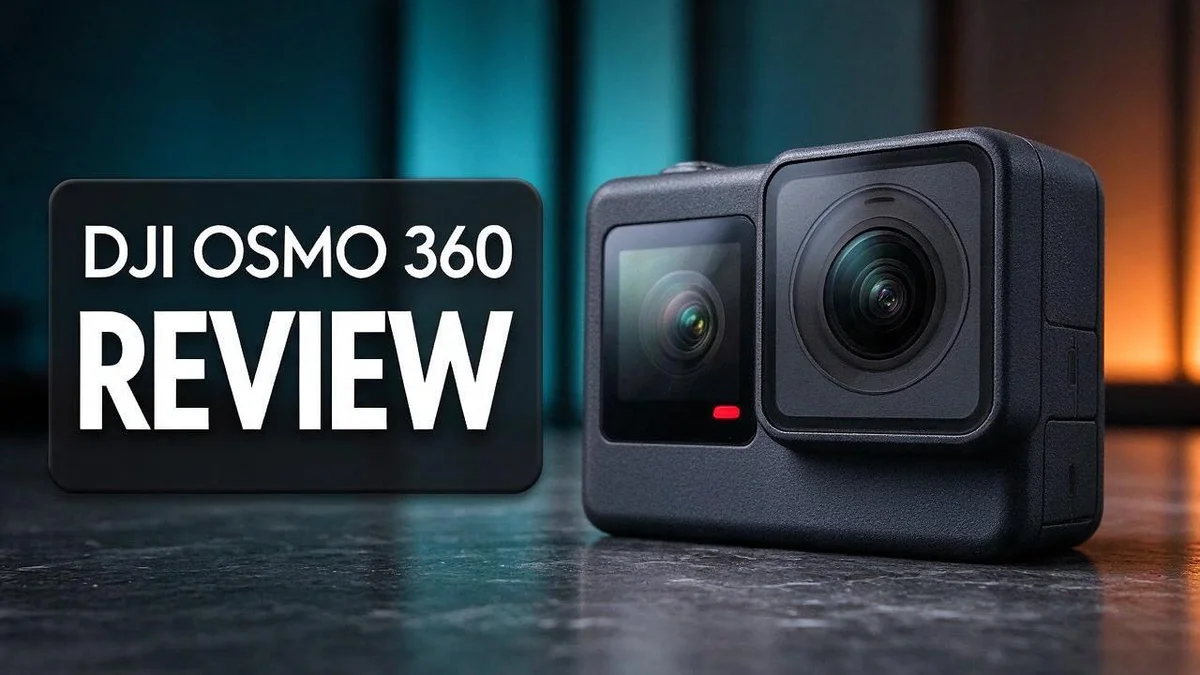
DJI Osmo 360 Review: 8K 360° Video, Features, Pros, Cons and Verdict
Have you ever wished you could capture everything around you in one shot? The DJI Osmo 360 makes that dream real. It records native 8K 360° video at up to 50fps, so you never miss a moment.
Its 1 inch sensor helps deliver sharp, detailed footage. You can also snap 120MP panoramic photos for stunning landscapes. Want a classic action camera feel instead? Single lens mode gives you vlog and POV shots with ease.
This compact camera is small, stylish, and easy to carry. Creators who love travel, sports, or family adventures will find plenty to enjoy. Night shots look strong, and smart tracking keeps your subject in focus.
Still, no gadget is perfect. Some users report software bugs, and the camera is not officially sold in the US.
This review explores what works and how it compares with rivals like the Insta360 X5 and GoPro Max 2.
In a Nutshell
-
Native 8K 360 video: The camera records footage at up to 50 frames per second. You get wide scenes with plenty of fine detail, even when you zoom in during editing.
-
120MP panoramic photos: Still shots capture huge panoramas in a single frame. Photographers can crop into them and keep strong clarity.
-
Dual lens stitching: Two lenses work together and blend the image instantly. You spend less time on manual stitching and more time creating.
-
Single lens and night performance: Switch to one lens for classic action cam shots, perfect for vlogs and first person POV clips. The camera also handles dim scenes with ease.
-
Editing across platforms: Footage works with many editing apps. Creators can move from phone to desktop with little hassle, which saves time on every project.
-
Real concerns to weigh: The camera is not officially sold in the US. Some users also report software bugs, so check for updates first.
Video and Photo Quality

- Big Views, Brilliant Quality - Groundbreaking 1-inch 360° imaging [1] delivers excellent low-light for sharper shots on every adventure. Now with 8K/30fps 360° video, perfect for outdoor sports and travel.
- Stunning, Day or Night - Capture every detail with 8K 360° videos. Whether you're exploring city nights or chasing sunrise, your 360 camera delivers crisp, vibrant panoramas, even in low light.

Some of the links on this website are affiliate links, which means that at no additional cost to you, I earn a commission if you click through and make a purchase. I only recommend products and services that I believe will add value to my readers. Thank you for your support!
The biggest win for video is flexibility. Because the camera captures the full sphere, you choose the angle after the shoot. You can reframe one clip into several different scenes.
Reframing does create a catch. Your final video usually uses a smaller window than the full 8K frame, so the sharpness depends on the crop size you pick.
Light matters a lot here. The camera handles indoor rooms and dim streets well, and the night mode helps keep shadows from turning into mush.
Night footage still shows some noise when light gets very low. Shoot in the best light you can find for the cleanest results.
If you enjoy color grading, shoot with the most flexible settings the menu offers. Your edits will have more room to adjust tones later.
Stabilization is another strength. Smart tracking keeps subjects in view while you move, so handheld clips feel steadier.
Photo quality stands out too. The 120MP panoramas hold plenty of detail, so you can zoom into a distant corner of the scene later.
Big files need space. Eight K footage fills storage quickly, so bring fast memory cards and an external drive for longer trips.
Lens care matters as well. Dust or fingerprints on either lens can soften the stitched seam, so wipe both lenses before every shoot.
Speed affects sharpness. Fast pans can blur fine details, so move slowly when you want crisp frames.
Test your settings before a big trip. A short clip in the same place tells you how the light and motion will look.
Bright light near windows can cause strong contrast. Position yourself so the sky does not wash out the scene.
Mind the frame rate. Higher frame rates give smoother motion, but they use more storage and power.
Shoot a few extra takes. Extra clips give you backup options if one shot turns out soft or shaky.
Overall, the photo and video output feels impressive for a small camera. Some rough edges remain, but careful shooting brings the best results.
Design and Portability
Design is where the DJI Osmo 360 starts to feel different. You notice the solid build the moment you pick it up. It slips into a jacket pocket without much fuss.
Your hand can rest on it all day. Simple controls sit where your thumb expects them. Using it on a busy street feels natural.
Mounting gives you plenty of options. A tripod, a selfie stick, or a handlebar clip can all hold the camera. Many creators like how the stick can blend into the footage.
Pack light for long days out. Keep a spare battery in a separate pouch so you never miss a moment.
Quick tip: Add a wrist strap before you move fast. It keeps the camera close during hikes, bike rides, or tight crowds.
Balance matters when you hold the camera at arm length. A steady grip helps you keep the frame level during long walks.
Travel days bring new challenges. Security checks, crowded trains, and cramped seats all test gear. A compact design makes it easier to stay organized.
Think about your daily bag first. Slide the camera into a side pocket. Keep your phone and cables nearby. You can grab the camera without digging through a full backpack.
Group trips benefit from quick handoffs. A light body makes it simple for friends to take a turn.
Storage and charging are small details. Store the camera in a dry place between outings. Let it cool down before you pack it.
Overall, the build suits people who love to move. Careful handling keeps the camera ready for every trip.
Some shooters also like the lightweight feel for vlogging on foot. You can film while you walk without feeling weighed down.
Still, the body needs a little care in rough weather. Keep it in a sealed bag when rain starts. Wipe off moisture before you open the case.
Good design helps you capture more moments. Your gear should feel easy every time.
Shooting Modes and Smart Features
Shooting modes give you plenty of room to play. You can switch between full 360 capture and a single lens view with ease. Each option suits a different style of shooting, so choose the mode that fits your scene.
Smart tracking is one of the standout features. The camera can lock onto a moving subject and keep it in the scene. This helps when you bike, surf, or hike and want to stay focused on the action.
Tracking works well for solo creators too. You can set up the camera on a stand, step into the frame, and let it follow you. Many creators like this option for talking head videos and travel clips.
Kids and pets move fast and change direction without warning. Tracking helps keep them in view while you focus on the moment instead of aiming the lens.
The mindset changes when you shoot in 360. You can capture the scene first and sort out the angle later. This lowers stress when a moment happens fast.
Quick mode changes help during busy shoots. A friend may need a single lens clip right after a wide scene. Switching modes keeps the shoot moving without extra gear. Each switch takes only a moment.
The companion app puts key controls in one place. You can preview shots and adjust settings from your phone. Wireless connections keep the camera linked to your device.
Practice tracking on a short walk before a big outing. Watch how the camera responds to quick turns and sudden stops. You learn its habits fast this way.
Overall, the shooting modes and smart features make the camera feel flexible. Tracking and mode switching help you capture action without fuss. The result is more time for fun and less time fiddling with settings.
Top 3 Alternatives
If you want a different 360 camera, these three options are worth a look. Each one offers a slightly different mix of features. Every model captures your full surroundings, so you never miss a moment.
Insta360 X4

- IMMERSIVE 360 VIDEO - The 8K era is here. Insta360 X4 delivers 360° video in stunning 8K or 5.7K60fps! Use Active HDR to keep shots color accurate too, even in action scenarios.
- SIMPLE, EASY REFRAMING - With Insta360 X4, get out there and shoot, not having to worry about lining up a shot. Shoot first, then reframe easily after, all in the AI-powered Insta360 app.
Some of the links on this website are affiliate links, which means that at no additional cost to you, I earn a commission if you click through and make a purchase. I only recommend products and services that I believe will add value to my readers. Thank you for your support!
The Insta360 X4 shoots 8K 360 video and clear photos.
It handles bright sun and dim rooms with ease. Its tough body resists rain and dust, so it fits hikes and trips. It also works well for vlogs and travel footage.
The Insta360 app lets you reframe shots after you record.
Insta360 X5

- WHAT’S INCLUDED – Unleash Stunning 8K 360° Capture with the Insta360 X5 Camera featuring Dual 1/1.28" Sensors, Breathtaking 8K30fps 360° Video, Triple AI Chip Processing & PureVideo Low-Light Performance | 2400mAh Battery | USB-C Charging Cable | Protective Pouch | Lexar 32GB SD Card | Lens Cloth | Limited 1-Year Manufacturer Warranty — Capture epic adventures, everyday moments, and immersive perspectives with incredible detail, vibrant color, and enhanced dynamic range.
- SUPERIOR STABILIZATION - Integrated 6-Axis Gyroscope ensures incredibly smooth, shake-free footage, even in the most dynamic action sequences. Capture professional-grade video with advanced image stabilization.
Some of the links on this website are affiliate links, which means that at no additional cost to you, I earn a commission if you click through and make a purchase. I only recommend products and services that I believe will add value to my readers. Thank you for your support!
The Insta360 X5 builds on that foundation with sharper image quality.
It keeps the flexible editing style that fans love. Smoother stabilization helps when you film fast movement like biking or skiing. Low light shots also look cleaner than before.
Creators who want the newest tools often pick this model.
GoPro Max 2

- COMPLETE 360 ADVENTURE BUNDLE – Everything you need to capture incredible adventures in one value-packed kit! Includes GoPro MAX2 8K 360 Action Camera | 3 Total 1960mAh Enduro Batteries | GoPro 48" Extension Pole | 64GB SanDisk microSD Card | 47-Piece Accessory Kit | Lens Caps | Mounting Accessories | USB-C Cable | Microfiber Cloth | Stickers | GoPro 1-Year Limited Warranty
- CAPTURE EVERYTHING IN STUNNING 8K 360 VIDEO – Never miss a moment or the perfect angle! Record everything around you in breathtaking 8K 360 video, capturing the action and your reactions simultaneously. Reframe your footage into sharp 4K videos, choosing any angle after recording to create incredible content for YouTube, TikTok, travel, sports and unforgettable adventures
Some of the links on this website are affiliate links, which means that at no additional cost to you, I earn a commission if you click through and make a purchase. I only recommend products and services that I believe will add value to my readers. Thank you for your support!
The GoPro Max 2 brings 360 capture to a name many people already trust.
It pairs well with the GoPro app, so sharing clips feels quick. Its simple controls make it a good first 360 camera. Beginners often find it fun and easy to use.
It also records regular flat video when you want a standard angle.
Choose the model that fits your style. Think about how you plan to shoot, edit, and share. The right pick makes capturing everyday moments more fun.
Software and Editing Workflow
The software side of the DJI Osmo 360 shapes your whole workflow. Good planning here saves time later. Most creators spend more hours editing than shooting, so this part deserves attention.
Start with the companion app. The app links to the camera through a wireless connection. You can preview clips and move files to your phone. This gives you a fast first look at every shoot, even while you travel.
Stitching joins the two lenses into one sphere. The camera does this work live, so your files arrive ready to edit. You rarely need to stitch by hand.
Desktop editing takes a bit more care. Your computer needs to handle large 360 files. Import the raw clips, then choose a spherical editor or a flat preview. Check that your software reads the spherical metadata first.
The camera works with several editing platforms. This gives you options. You can use a phone editor for quick social posts or a desktop program for long projects. Many people mix both tools in one project.
Software bugs can slow you down. Some users report crashes or odd behavior after updates. Reviewers say the software is not perfect yet. Keep firmware and apps updated, and back up your files before a big edit.
Build a simple routine. Import clips right after each shoot. Label folders by date and location. Create a template for titles and music so future projects go faster.
Audio deserves attention too. Built in mics can pick up wind and handling noise. Add a clean music track or voiceover in your editor to fix that.
Export in the highest quality your project allows. Large files take time, so render overnight when possible.
Good habits make editing feel less like a chore. A clear routine keeps your library tidy. Over time, you will spend less time searching and more time creating stories your viewers enjoy.
Think of software as part of the camera. The Osmo 360 rewards creators who learn its tools. Spend an evening exploring the menus before your next trip. You will edit faster and feel more confident.
Pros and Cons
Pros
- Native 8K footage gives sharp detail for large screens.
- Night shots look clean and bright in low light.
- A 120MP panoramic photo mode captures wide scenes in one frame.
- Single-lens mode feels familiar for POV and vlog shooting.
- The compact body fits easily into a bag or jacket pocket.
Cons
- It is not officially sold in the US, so buyers may face limits.
- Reviewers say the camera “isn’t perfect” in every situation.
- Rivals like the Insta360 X5 and GoPro Max 2 offer strong alternatives.
- The recording time claims need real-world testing to confirm.
Who Should Buy It
This camera suits people who hate missing a moment. Travelers often shoot fast in busy markets or on crowded trains. A 360 view lets them film first and frame later.
Storytellers who like to reframe footage will feel right at home. You can pick a new viewing angle after the shoot. One clip can become several videos with different looks.
Beginners who want to learn 360 filmmaking also benefit. The learning curve feels gentle when you start with simple modes. Simple controls make the first shoots less stressful. You can grow into advanced edits over time.
Hikers and cyclists may enjoy it most. Their hands stay free while the camera records the full ride. Later, they can revisit the route and share the best moments.
Families who love group outings will appreciate the wide view. Everyone can join the fun without taking turns behind the lens. Parents can also relax and enjoy the day.
Event filmers and vloggers who cover fast scenes gain the most. A single recording can capture a whole room or street. That saves time at weddings, concerts, and street festivals.
Buyers who need an exact runtime should test it first. Actual results will show how long the battery truly lasts. Until then, treat the official claims as a starting point.
Anyone chasing perfect lighting in tight spaces may need extra gear. Small accessories like a tripod or mount can help. Test your setup before a major trip.
Casual users who only post quick clips may find the extra steps tiring. Editing takes time, so the process suits patient creators. A phone camera might serve quick sharing better.
Check local availability before you decide. Stock can vary by region, so confirm where you can buy and get support. A short search now saves frustration later.
Ultimately, the right buyer enjoys experimenting with new angles. They accept a learning curve and want footage they can shape later. This camera rewards that curiosity.
Final Verdict
The DJI Osmo 360 is a strong camera with a few clear trade offs. It offers fresh creative options for people who want more from every clip. Still, it may not be the right pick for everyone.
Your final choice depends on how you plan to shoot. Think about your favorite locations, your editing habits, and your patience with new software.
Location plays a bigger role than many shoppers expect. Because the camera is not officially sold in the US, buyers there should check support options first.
Software deserves careful thought too. User reports describe bugs and crashes after some updates. Waiting a few weeks after a launch can help you avoid early problems.
Rival cameras deserve a fair look before you decide. The Insta360 X5 and GoPro Max 2 each have their own strengths. Compare how each one feels in your hand and fits your editing routine.
Think of this camera as a creative tool, not a magic fix. It rewards people who plan their shots and learn the controls. Casual users may need more time to feel comfortable.
Expect some practice before your footage feels natural. Early clips may look awkward, but that is normal for 360 filming.
Overall, the camera delivers exciting results for active creators. Its small size and strong image quality make it easy to carry everywhere.
Our advice is simple. Test the camera in your own setting, check your local options, and confirm the software works well on your computer.
Before you buy, list the top three shots you want to capture. This simple step shows whether the camera matches your needs.
Patience pays off with this type of gear. Every new camera needs time for settings, habits, and workflow changes. Give yourself a few weeks to learn the basics before judging it.
Friends who already edit 360 footage can offer useful tips too. Their advice may save you hours of trial and error.
In short, the DJI Osmo 360 suits eager creators who enjoy learning new tools. It may not solve every filming challenge, yet it opens doors to fresh storytelling.
Frequently Asked Questions
What makes a 360 camera different from a regular action cam?
A regular action cam records one fixed view. The DJI Osmo 360 captures the full sphere around you, so you choose the angle later. This helps you focus on the moment instead of worrying about framing every shot while the action unfolds.
Who should skip this camera?
If you only need flat, fixed-angle footage, a standard action cam may suit you better. People who dislike editing may also feel slowed down. This camera works best for people who enjoy shaping their footage after the shoot.
Should I add the Insta360 X6 to my shortlist?
Yes, you should. It appears among the top competitors in the research, so it deserves a fair look. Compare it side by side with other options. Check how each one handles the places and lighting you shoot in most often.
How can I plan my first shoot?
Pick one familiar place for your first session. Record short clips in both 360 and single-lens mode. Then review them on your device. This simple test shows you which mode fits your style before you travel or film an important event.
What should I do if the software causes problems?
Back up your original files before you start editing. Keep your app updated and save your work often. Small habits like these protect your footage if the software crashes or behaves unexpectedly.
Welcome to The File Fix. I’m Millie, and I review tech so you don’t have to suffer buyer’s remorse.
Navigating the endless sea of Amazon devices and gadget releases can feel like a full-time job. That’s why I do the heavy lifting. I dig past the unreliable 5-star reviews and shiny spec sheets to test how these devices actually hold up in the real world. Whether you’re looking for the best budget earbuds, a reliable power bank, or the latest smart home gear, you’ll find honest, no-nonsense breakdowns here.